- Altersfreigabe4+
- KategorieGesundheit und Fitness
- EntwicklerChristopher Riches
- SprachenEnglisch
- Größe12,5 MB
Verlinkt auf die offizielle App Store-Seite
Download.org hostet keine Datei von Swimming Lap Tracker. Die Schaltfläche öffnet die App-Seite bei App Store, wo Christopher Riches die App veröffentlicht. Eintrag zuletzt geprüft am 24.11.2026.
Screenshots

Info
Der Entwickler hat diesen Text nicht in Ihrer Sprache bereitgestellt.
Swimming Lap Tracker gives you precise manual control over laps, intervals and structured swim training on Apple Watch, with detailed workout analysis on iPhone.
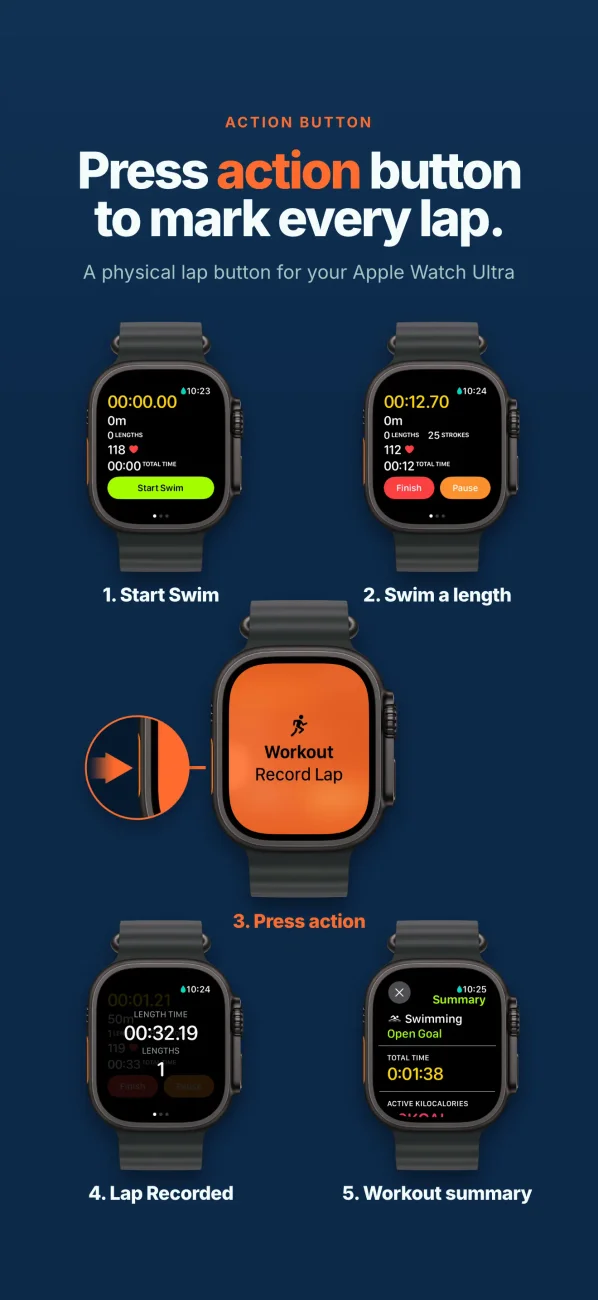
Mark laps with the Digital Crown or the Action Button on Apple Watch Ultra. You decide exactly when each lap or interval is recorded instead of relying on automatic lap detection. Live swim metrics stay visible on your wrist, and completed workouts are saved to Apple Health.
BUILD CUSTOM SWIM SETS
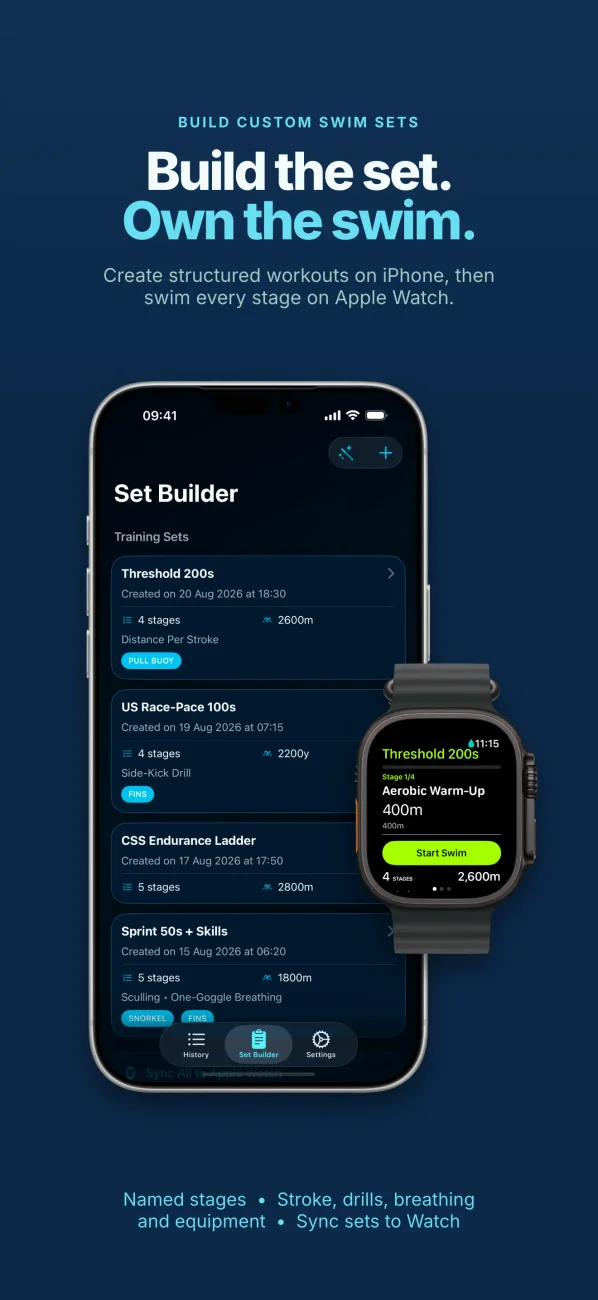
Create structured training sessions in the Set Builder and sync them to Apple Watch.
• Build workouts with multiple named stages
• Set distance or repeats with a separate interval distance
• Choose stroke, drills, equipment, rest and notes
• Add breathing targets and bilateral breathing
• Set target pace and cadence in seconds per stroke or strokes per minute
• Reorder stages and save multiple training sets
• Follow stage-by-stage prompts and progress on Apple Watch
• Sync new, edited and deleted sets between iPhone and Watch
DOWNLOADABLE AUDIO GUIDES
Create a downloadable audio guide for a custom workout before you swim. Voice prompts and timing cues support pace and tempo training.
• Choose Standard timing or a flowing Waltz 1–2–3 pattern
• Use clear timing cues, including the Piano tone
• Preview the timing pattern and tone before generating the file
• Keep your preferred audio settings between sessions
• Generate audio in the background with smoother progress estimates
Download or transfer the finished audio file to compatible swimming headphones with onboard storage. Audio guides do not play through swimming headphones over Bluetooth while you are in the water.
EQUIPMENT FOR EVERY SESSION
Select equipment in supported Apple Watch workout modes, including fins, paddles, pull buoy, kickboard and snorkel. Your choices persist between workouts, the live screen shows a bag icon with the selected item count, and completed workouts show equipment as capsules in iPhone history.
PRECISE LAP AND INTERVAL TRACKING
• Fast manual lap marking with the Digital Crown
• Action Button support on Apple Watch Ultra
• Manual Lap Mode for separate swim and rest timing
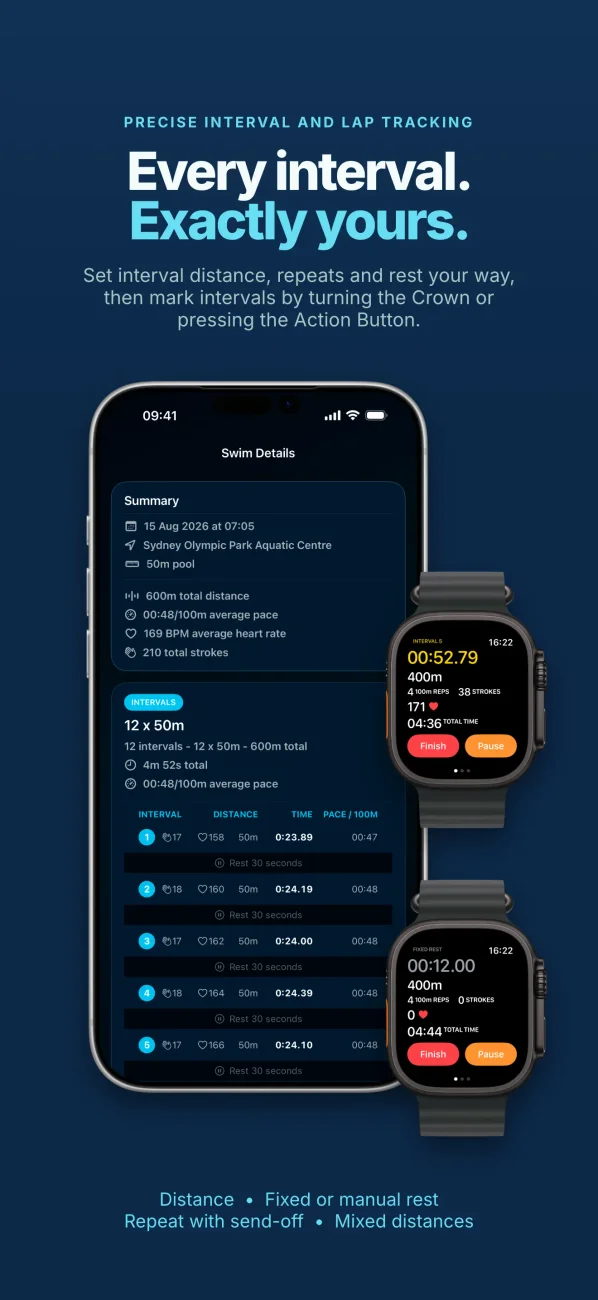
• Interval modes with distance, fixed rest or manual rest
• Repeat intervals with optional send-off times
• Mixed-distance interval sessions
• Metres and yards
• Pool presets or custom lengths from 1m to 250m or 1y to 250y
• Open Water Mode with GPS distance
LIVE METRICS ON APPLE WATCH
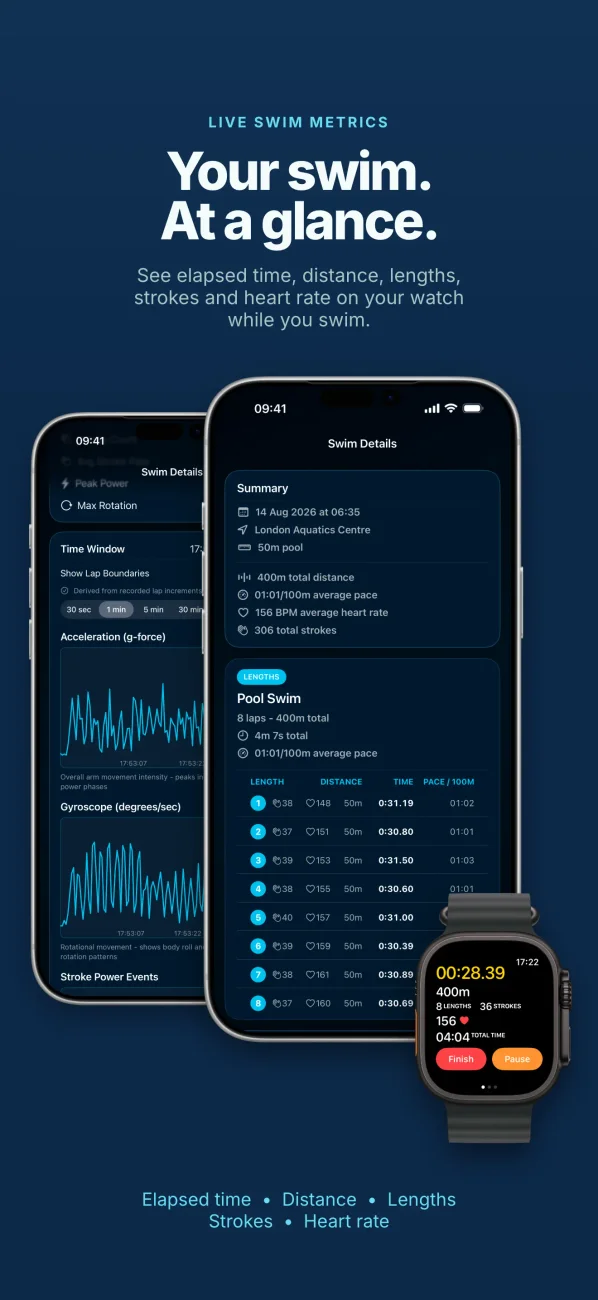
See lap time, total time, distance, completed lengths, strokes and heart rate while you swim. Custom workouts also show the current stage, interval progress, stroke, drill, equipment, breathing target and rest.
DETAILED SWIM ANALYSIS ON IPHONE
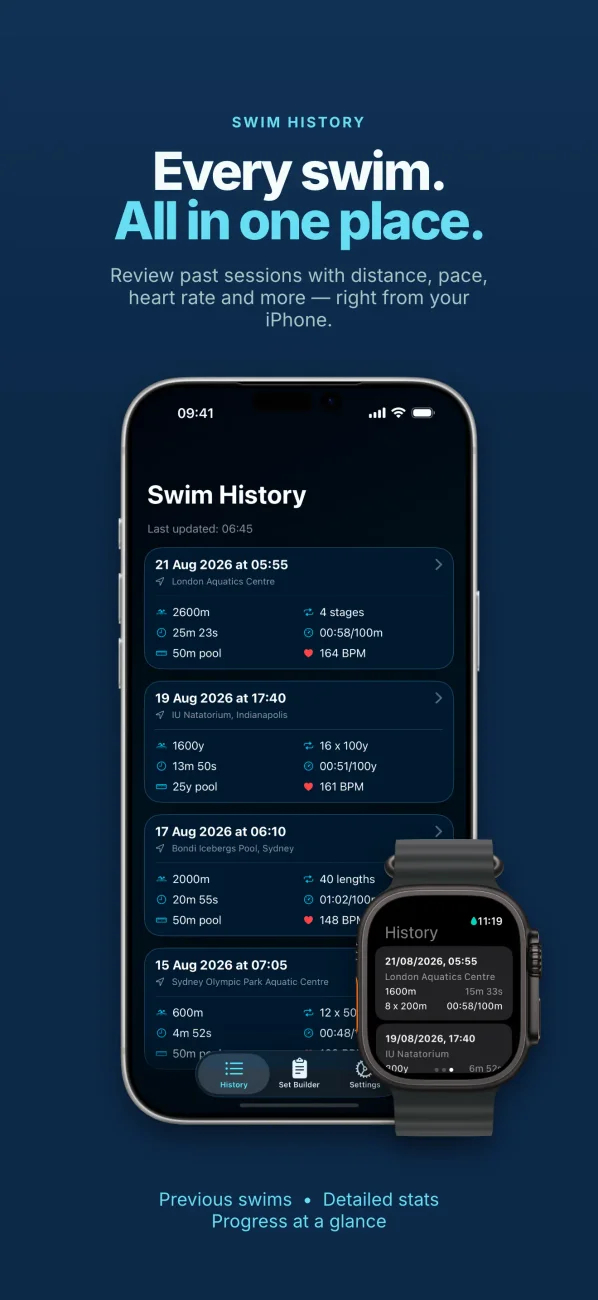
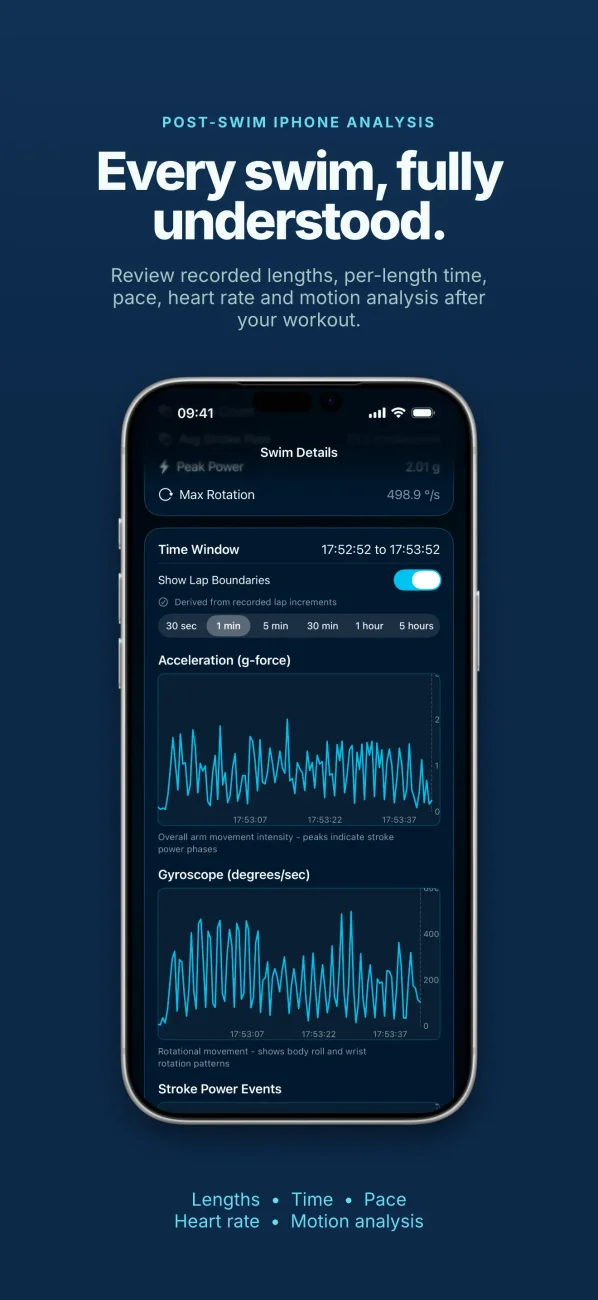
Review total distance, duration, average pace, individual lap and interval times, custom workout stages, heart rate, strokes, active calories, motion charts, equipment used and recorded swim locations. Export motion data as CSV.
HOW IT WORKS
Choose your pool length or Open Water Mode, select a workout mode and tap Start Swim. Mark each lap or interval from your wrist while Swimming Lap Tracker records your workout for later review.
PERMISSIONS
Health access is required to record workouts and heart rate. Motion access enables stroke and movement analysis. Location access enables swim locations and open-water GPS distance.
APPLE WATCH ULTRA ACTION BUTTON
After installation, open Settings on Apple Watch and choose Action Button. Select Swimming Lap Tracker as the app, set First Press to Start a Workout, and choose Swim Laps as the workout. Open Swimming Lap Tracker with the Action Button before using it to mark laps.
Requires iOS 18.2 or later and watchOS 11.2 or later.
Neue Funktionen
Version 1.39 · 21.11.2026
• See start and finish times, active swimming time, and total elapsed time for newly recorded pool swims. A new chart shows how much of the session you spent swimming versus resting or paused for newly recorded pool swims.
• Add and edit notes after a swim to remember how it felt or what to work on next. Notes are saved on your iPhone.
• Track distance per stroke with a new chart and a session average. Swim Details now distinguishes recorded stroke counts from motion-based estimates.
• Jump between lengths or intervals in motion charts, with new 2-minute and 10-minute views and windows up to 5 hours for longer recordings.
• Fixed pool workout timing in Apple Fitness. Heart-rate readings are also better aligned with active swimming.
• Pool names / locations appear more consistently across Swim History and Swim Details.
App-Datenschutz
Was Christopher Riches im App Store zum Umgang dieser App mit Daten angibt.
-
Keine Daten erfasst
Der Entwickler erfasst keine Daten von dieser App.
Die Datenschutzpraktiken können variieren, zum Beispiel je nach den von Ihnen verwendeten Funktionen oder Ihrem Alter.
Informationen
- Anbieter
- Christopher Riches
- Kategorie
- Gesundheit und Fitness
- Version
- 1.39
- Aktualisiert
- 21.11.2026
- Veröffentlicht
- 04.01.2026
- Größe
- 12,5 MB
- Erfordert
- iOS 18.2 oder neuer
- Altersfreigabe
- 4+
- Preis
- 1,99 €
- Sprachen
- Englisch
- Copyright
- © 2026 Mobile Appz UK
Das könnte Ihnen auch gefallen
-
 LapViewGesundheit und Fitness
-
 Fitness ExporterGesundheit und Fitness
-
 OpenSwimGesundheit und Fitness
-
 Just'a Tabata: Workout-TimerHIIT, Zirkel & Intervalle
-
 Calorie Balance: GewichtstrendDefizit, Aufnahme & Verbrauch
-
 SwimSet: Swim Workout TrackerGesundheit und Fitness
-
 LapTrack: Schwimmen & BahnSchwimm-Log & Bahnzähler
-
 SwimAI: Schwimm-Coach & PlanKraul Technik Video & Training
-
 FitmustMedizin
-
 Swimio: Swim Coach & TrackerGesundheit und Fitness