
VoidLink - Extreme
A Creative Fork of Moonlight
Entwickelt für iPhone, iPad, iPod touch
1,99 € · In-App-Käufe
- Altersfreigabe12+
- KategorieSpiele
- Entwickler伟敏 张
- SprachenEnglisch+ 2 weitere
- Größe14,5 MB
Verlinkt auf die offizielle App Store-Seite
Download.org hostet keine Datei von VoidLink - Extreme. Die Schaltfläche öffnet die App-Seite bei App Store, wo 伟敏 张 die App veröffentlicht. Eintrag zuletzt geprüft am 24.11.2026.
Screenshots

Info
Der Entwickler hat diesen Text nicht in Ihrer Sprache bereitgestellt.
VoidLink is a project developed & maintained by Sunshine - Moonlight game streaming community players. After long term development and iterations, it has been refined into a powerful and feature rich game streaming tool.
More details about VoidLink including our community support is available on the app support web page.
Key Features of VoidLink
1. Better performance
- VoidLink's standard video rendering pipeline delivers unparalleled streaming performance and reference-grade HDR accuracy. Check our app support web page for details.
- Supports YUV 4:4:4 streaming (requires device hardware decoding).
- Picture‑in‑picture mode supported (iOS15+) —stream in the background without interruption.
2. High-performance frame-interpolated streaming with HDR support:
- Supports stable 60 → 120 FPS frame-interpolated streaming on at least A15 and newer devices
3. Drawing Toolkit:
Toolkit built for drawing: better stroke transmission, pro-level pressure curve mapping, double-tap and squeeze shortcuts, exclusive on-screen buttons.
(Basic stylus support remains available without purchasing the Drawing Toolkit)
4. External controller support
- Radial menu and global controller navigation, covering 95% of app settings and operations for gamepad streamers. Enjoy a handheld-like experience without touching the screen!
- Super fun! VoidLink brings the first-ever [Gamepad Visual Feedback Overlay] to the game streaming community.
- Specify controller mapping as Xbox360 or DualShock 4.
- User-defined controller mouse mode.
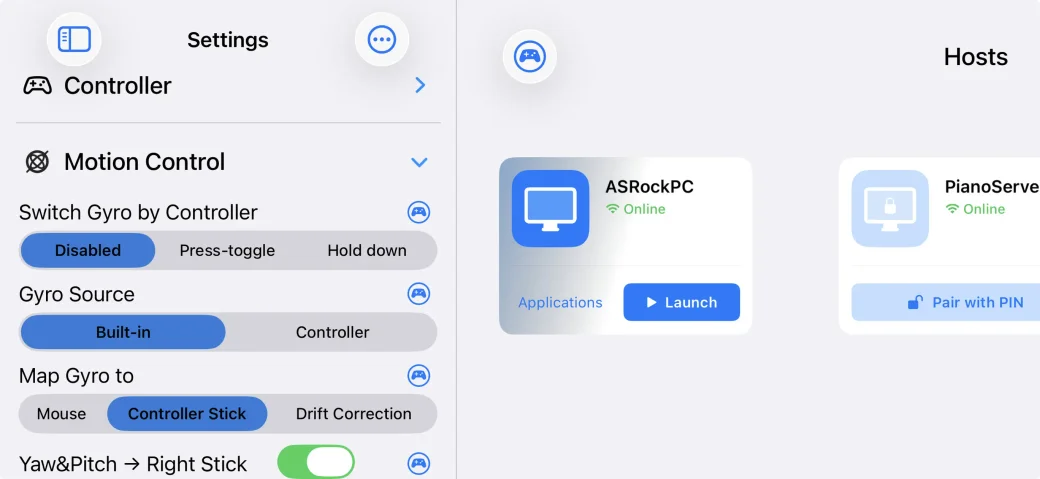
- User-defined gyro toggle & hold button.
- Controllers can be connected anytime during streaming.
- DS4 Gyroscope mapping.
5. Advanced touch support
- Smooth, reliable multi‑touch passthrough.
- The app introduces a multi‑Touch game fine‑tuning feature for games with native mobile UI on PC.
- Simulated mouse click, double click, right‑click, drag, etc., with adjustable pointer sensitivity.
6. Powerful on-screen widgets
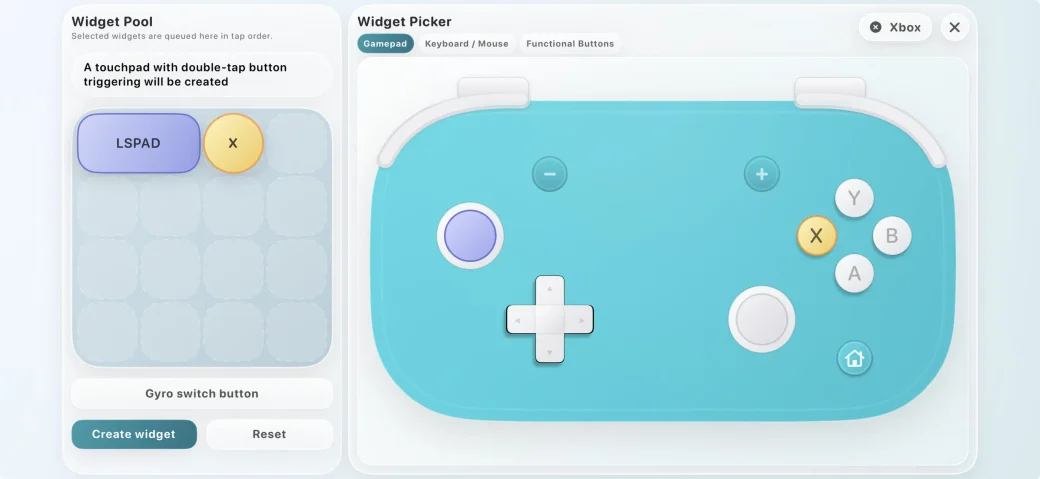
- Button widget includes: controller, keyboard, mouse, gyro control, functional (settings menu, soft keyboard, etc.)
- Supports grouping, layering, collapsing, and expanding on-screen widgets.
- Widget group is able to import complete layouts for quick reuse.
- Supports combo buttons, button macros, button+touchpad hybrid widgets
- Touchpad widget that enables mobile style gaming.
- Auto tap timer for each button widgets
- Visual and haptic feedback supported (requires device with vibration motor).
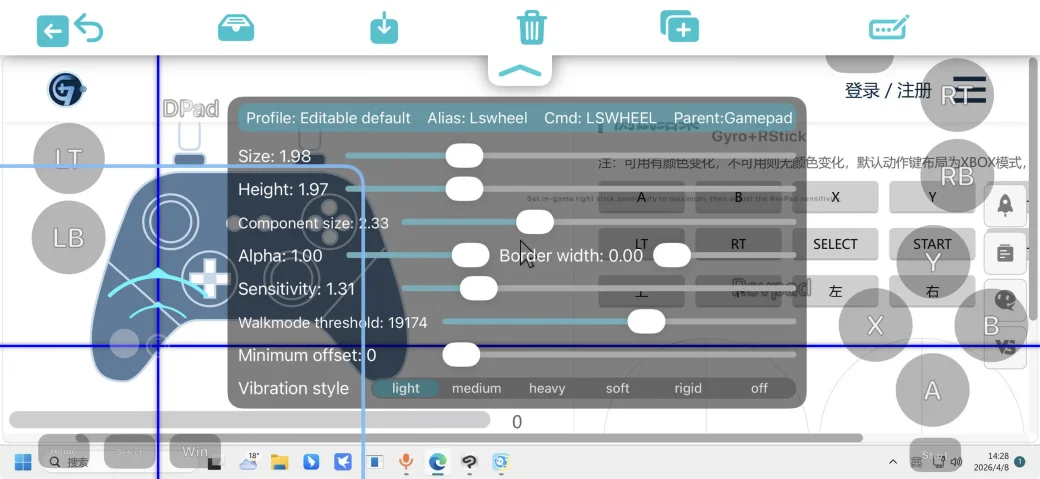
- Customize on-screen widget & layout—adjust size, shape, border, transparency, sensitivity, labels, and more.
- Import/export on-screen widget layouts for sharing configurations across devices.
7. Powerful motion control
- Directly maps built-in gyro or external gamepad gyro to mouse or controller stick, no need for third party PC software for motion control mapping
- Works with on-screen gyro control button “GYRO” & “GYROPAUSE” or user-defined physical controller buttons.
8. Haptic engine selection (iOS 13+)
- Auto: rumbles iPhone when controller does not support rumbling. Able to rumble iPhone when using on-screen widget control while no physical controller is connected.
- swap rumbling left & right handle motor on controller
Note: external controller rumbling supported on iOS 14+.
9. Microphone redirection
- Support for microphone redirection with Sunshine-Foundation.
10. Changing bitrate upper limit without disconnecting
- Bitrate upper limit can be adjusted without disconnecting when working with Sunshine-Foundation.
Note: check out our technical support page for more details about Sunshine-Foundation
11. Full portrait‑mode support
- Streaming content and on‑screen widgets adapt to portrait orientation: automatic resolution and widget layout adjustment
12. External display support: duplicate or external display only
Neue Funktionen
Version 3.5.19 · 21.11.2026
- USB wired streaming are now available for both PC(Windows) & Mac hosts:
https://github.com/TrueZhuangJia/foundation-sunshine (Windows Sunshine)
https://github.com/The-Fried-Fish/CanvasHost (macOS Sunshine)
App-Datenschutz
Was 伟敏 张 im App Store zum Umgang dieser App mit Daten angibt.
-
Keine Daten erfasst
Der Entwickler erfasst keine Daten von dieser App.
Die Datenschutzpraktiken können variieren, zum Beispiel je nach den von Ihnen verwendeten Funktionen oder Ihrem Alter.
Informationen
- Anbieter
- 伟敏 张
- Kategorie
- Spiele
- Version
- 3.5.19
- Aktualisiert
- 21.11.2026
- Veröffentlicht
- 20.11.2025
- Größe
- 14,5 MB
- Erfordert
- iOS 14.0 oder neuer
- Altersfreigabe
- 12+
- Preis
- 1,99 €
- In-App-Käufe
- Ja
- Sprachen
- Englisch, Vereinf. Chinesisch, Tradit. Chinesisch
- Copyright
- Copyright © 2025 TrueZhuanjia(True砖家) @ Bilibili
Das könnte Ihnen auch gefallen
-
 SUMEE!Simulation
-
 Moonlight Game StreamingSpiele
-
 CloudGear: PC Gaming BrowserStream in 5K, 120 FPS & HDR
-
 Control Ultimate EditionAction
-
 Asobi: Remote PlayNext Level Remote & Cloud Play
-
 Phosphor EmulatorSpiele
-
 Sea of StarsGefahren und Wunder
-
 Tomb Raider™Lara Croft wird zur Legende.
-
 Subnautica: Below ZeroTrotze der Kälte
-
 nyxigameSpiele