Yard Planner
DIY Landscape Design
Entwickelt für iPhone, iPad, iPod touch
3,99 €
- Altersfreigabe4+
- KategorieLifestyle
- EntwicklerHome Outside, Inc.
- SprachenEnglisch
- Größe761,7 MB
Verlinkt auf die offizielle App Store-Seite
Download.org hostet keine Datei von Yard Planner. Die Schaltfläche öffnet die App-Seite bei App Store, wo Home Outside, Inc. die App veröffentlicht. Eintrag zuletzt geprüft am 20.11.2026.
Screenshots


Info
Der Entwickler hat diesen Text nicht in Ihrer Sprache bereitgestellt.
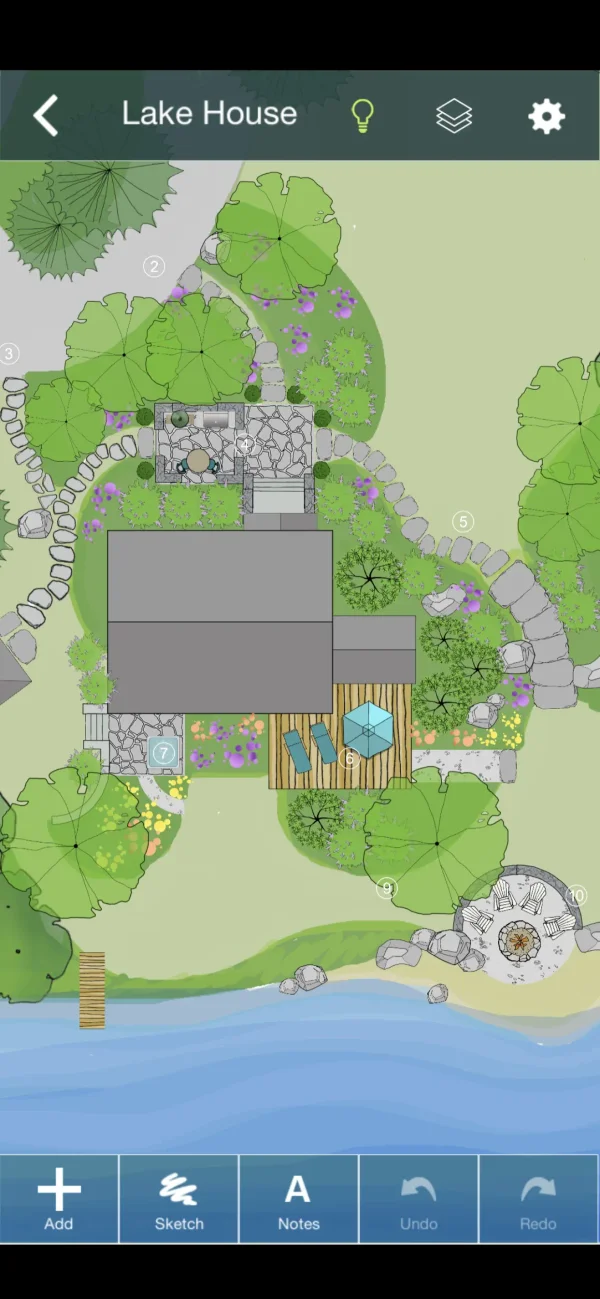
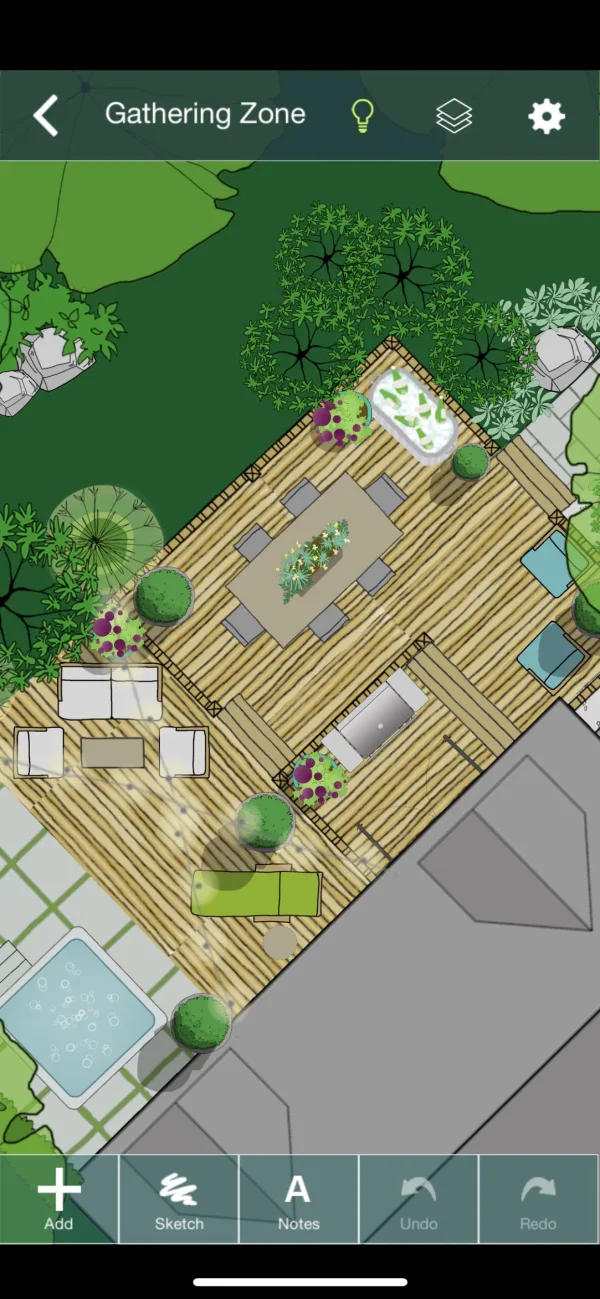
YARD PLANNER is a simple drag-and-drop 2D landscape design app with all the tools you need to mock up your property, create new designs, and share them with friends and family.
YARD PLANNER is ideal for homeowners who want to try out fresh ideas for their yard. Useful for landscape professionals to share designs with clients and contractors. Also perfect for children and adults alike to exercise their imagination and creativity!
Use YARD PLANNER to select and place over 800 beautiful hand-drawn elements including trees, gardens, pools, patios, hammocks, driveways, houses and sheds, solar panels, and just about anything you might want for your property–even parties and weddings!
Features include:
• Sample designs to inspire or get you started
• Simple drag-and-drop functionality
• 34 palettes (800+ hand-drawn elements) to create your landscape design layout
• Resize, Rotate, Undo/Redo, Duplicate, Flip, Group
• Rotate elements with “Snap to 90” or turn off to rotate more precisely
• Snap to grid (elements stick to a re-sizeable grid of guidelines, turn on/off in Settings)
• Rulers (visible at edges of design; zoom in to the single unit; user selects feet/meters; can be turned on/off)
• Choose from 15 different background colors
• Sketch Tool (allows users to draw garden beds and other free-form shapes with an eraser and brushes of different colors, widths and opacity)
• Map Tool (This highly accurate mapping tool based on Google Maps allows you to drop pins at the corners of your property and import the map image with measurements into the app as a background.)
• North arrow (appears with Map Tool)
• Site Analysis palettes to mark the locations of your site’s utilities and light and moisture conditions
• Notes (allows users to tag elements in their designs with typed comments or descriptions)
• Light/Dark mode (changes Note tags and North arrow from white to black for visibility against light backgrounds.)
• Animated Figures (a palette of animated elements—a person, dog, cat, bird, and car—that move through your design on a looped or repeating path, adjustable speed, play and stop animation)
• Import a Photo as a background (useful for importing a digital image of your property plan)
• Create different Layers of elements in your design. Add, delete, rename layers, make each layer visible/invisible, lock/unlock for editing, and reorder layer position.
• In-app step-by-step guide to creating your Property Plan.
• Designs automatically save to the app’s Saved Designs gallery
• Share designs on social media
• Email an editable design so friends can edit one another’s designs and email them back and forth
***As featured in The New York Times, Fox News, USA Today, Gardenista, and more.
“Home Outside allows you to create intricate and varied landscapes…And when you’re finished designing your yard or indulging in a little dreamscaping, you can email results to friend.” –Kate Murphy, The New York Times
“The app gives you drag and drop tools to create a garden design idiosyncratic to your garden [and] allows you to choose hardscape materials, design paths and patios, and arrange furniture in your outdoor space.” –Dalilah Arja, Gardenista
“I can’t imagine a designer who wouldn’t want to have this on their phone or tablet. I’ve tried this app … it’s a great tool for a ‘quickie’ design that you can show clients … and then refine as you like.” –Jane Berger, Garden Design Online
Neue Funktionen
Version 3.6.2 · 08.09.2024
Bugs fixes and improves
App-Datenschutz
Was Home Outside, Inc. im App Store zum Umgang dieser App mit Daten angibt.
-
Keine Daten erfasst
Der Entwickler erfasst keine Daten von dieser App.
Die Datenschutzpraktiken können variieren, zum Beispiel je nach den von Ihnen verwendeten Funktionen oder Ihrem Alter.
Informationen
- Anbieter
- Home Outside, Inc.
- Kategorie
- Lifestyle
- Version
- 3.6.2
- Aktualisiert
- 08.09.2024
- Veröffentlicht
- 01.06.2011
- Größe
- 761,7 MB
- Erfordert
- iOS 14.0 oder neuer
- Altersfreigabe
- 4+
- Preis
- 3,99 €
- Sprachen
- Englisch
- Copyright
- © All Dreams Digital and Julie Moir Messervy Design Studio, Inc.
Das könnte Ihnen auch gefallen
-
 GardenPuzzle - Plan a GardenLifestyle
-
 Landscape Design: VeraLifestyle
-
 iScapeLandschaftsplanung ganz leicht
-
 Flourish GardenLifestyle
-
 Sow: Gartenplaner & GestaltungPflanzen erkennen & pflegen
-
 YardFlip: AI Landscape DesignLifestyle
-
 Deck PlannerLifestyle
-
 Landscape AI: Landscape DesignLifestyle
-
 Gartenplaner fürs GemüsebeetPlanungshilfe zum Selbstanbau
-
 GARDENIZE – dein Garten onlinePlanen, Dokumentieren, Ordnen