GRBL Nothing Bricks 2
Grubel- PEGI 3Clasificación por edad
- PersonalizaciónCategoría
- 7/10/2026Actualizado
- 1,79 €Precio
Enlaza a la ficha oficial de com.grubel.nbricks2 en Google Play. Última comprobación el 13/11/2026.
Acerca de esta aplicación
Traducción automática de Google. Idioma original: Inglés (Estados Unidos).
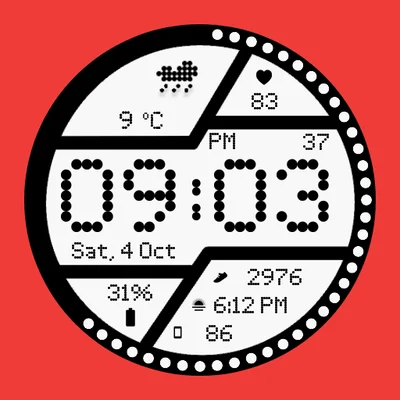
Esfera de reloj moderna con íconos meteorológicos personalizados. Diseñado para Wear OS.
📢 SI NO PUEDES VER LA COMPLICACIÓN DEL TIEMPO DESPUÉS DE INSTALAR LA ESFERA DEL RELOJ:
- ACTUALIZA EL TIEMPO MANUALMENTE EN EL RELOJ.
SI NO FUNCIONA:
- CAMBIA A OTRA ESFERA DEL RELOJ Y LUEGO VUELVE A ESTA.
- PARA QUIENES USAN FAHRENHEIT: LA COMPLICACIÓN DEL TIEMPO NECESITA TIEMPO PARA ACTUALIZARSE Y SINCRONIZARSE CON EL RELOJ. POR ESO PUEDES VER TEMPERATURAS DE 69 °C. DESPUÉS DE UN TIEMPO, CAMBIARÁ A F.
Diseñado para Wear OS
CARACTERÍSTICAS:
✅ Compatible con formato AM/PM y 12/24 h
✅ 5 complicaciones personalizadas
✅ 11 iconos meteorológicos personalizados basados en Nothing OS
✅ Fecha (el formato cambia según la configuración regional del usuario)
✅ Compatible con pilas AA (no incluidas) y legible, con colores a juego con el tema
✅ 18 temas
✅ Segundos con puntos: puedes activarlos o desactivarlos pulsando sobre ellos
Si tienes algún problema, escríbenos a grubel.watchfaces@gmail.com. Con gusto te proporcionaré capturas de pantalla e instrucciones paso a paso para ayudarte a instalar la esfera.
📢Las esferas no cambian automáticamente después de la instalación. Para configurarla, vuelve a la pantalla de inicio, mantén pulsado el icono, desliza el dedo hasta el final y pulsa "+" para añadir la esfera. Usa el bisel para encontrarla.
Los desarrolladores de Samsung ofrecen un vídeo útil que muestra varias maneras de instalar una esfera de reloj para Wear OS:
🎬 https://youtu.be/vMM4Q2-rqoM
📢LA APLICACIÓN COMPLEMENTARIA NO INSTALA LA ESFERA EN TU RELOJ. SOLO ABRE LA FICHA DE PLAY STORE EN TU RELOJ, DONDE PUEDES INSTALARLA TÚ MISMO.
LEE LAS INSTRUCCIONES A CONTINUACIÓN.
Hay dos maneras de instalar esta esfera en tu dispositivo Wear OS:
Desde la aplicación Play Store:
1. Usa el menú desplegable y selecciona el dispositivo de destino en la aplicación Play Store.
Después de unos minutos, la esfera se transferirá al reloj.
2- ACTIVAR LA ESFERA:
Una vez instalada, debes activar la esfera. Mantén presionada la pantalla, desliza el dedo hacia la izquierda y pulsa "AÑADIR ESFERA DEL RELOJ" para activarla.
Desde la tienda Play Store:
1 - Accede al enlace de la esfera del reloj a través de un navegador web en tu PC o Mac, como Chrome, Safari (etc.). Puedes buscar el nombre de la esfera en Play Store.
Haz clic en "Instalar en más dispositivos" y selecciona el dispositivo de destino.
Después de unos minutos, la esfera se transferirá al reloj.
2 - ACTIVAR LA ESFERA DEL RELOJ:
Una vez instalada, debes activar la esfera del reloj.
Mantén presionada la pantalla, desliza el dedo hacia la izquierda y pulsa "AÑADIR ESFERA DEL RELOJ" para activarla.
Para API 34+
📢 Recuerda que, si quieres que tu reloj muestre el estado de la batería del teléfono, debes instalar la aplicación Phone Battery Complication.
DESCARGO DE RESPONSABILIDAD
📢 Cada dispositivo ofrece diferentes complicaciones personalizadas, y la selección varía según las aplicaciones de terceros. Las complicaciones personalizadas que se muestran en las capturas de pantalla de la tienda provienen de una aplicación de terceros: complicación de la batería del teléfono
Mostrar el texto original
📢 WHEN YOU CAN'T SEE THE WEATHER COMPLICATION AFTER INSTALLING THE WATCH FACE:
- PLEASE UPDATE THE WEATHER MANUALLY ON THE WATCH
IF THAT DOESNT WORK:
- PLEASE SWITCH TO OTHER WATCH FACE THEN SWITCH BACK TO THIS ONE
- FOR THOSE USING FAHRENHEIT - WEATHER COMPLICATION NEEDS SOME TIME TO UPDATE AND SYNC WITH THE WATCH. THAT IS WHY YOU MAY SEE TEMPS LIKE 69°C AFTER SOME TIME IT WILL SWITCH TO F
Designed for Wear OS
FEATURES:
✅ Supports AM/PM and 12H/24H format
✅ 5 custom complications
✅ 11 custom weather icons based on Nothing OS
✅ Date (format change based on user's locale)
✅ AOD battery friendly and readable, with theme-matching colors
✅18 themes
✅ Dotted seconds - you can turn them on/off by tapping on them
If you face any problem, please reach out at grubel.watchfaces@gmail.com. I’ll gladly provide screenshots and step-by-step instructions to help you install the watch face.
📢Watch faces do not change automatically after installation. To set it up, return to the home display, tap and hold, swipe to the end, and tap ‘+’ to add the watch face. Use the bezel to find it.
Samsung Developers offer a helpful video showing multiple ways to install a Wear OS watch face:
🎬 https://youtu.be/vMM4Q2-rqoM
📢THE COMPANION APP DOES NOT INSTALL THE WATCH FACE ON YOUR WATCH. IT ONLY OPENS THE PLAY STORE LISTING ON YOUR WATCH, WHERE YOU CAN INSTALL IT YOURSELF.
PLEASE READ INSTRUCTIONS BELOW.
There are two ways to install this watchaface to your WearOS device:
From PLAY STORE APP:
1. Use the drop-down menu and select the target
device on the PLAY STORE APP:
after a few minutes the watch face will transferred on
watch.
2- ACTIVATE WATCH FACE:
Once installed, you need to activate the watch face.
Long press screen, swipe left and tap "ADD WATCH
FACE" to activate it.
From PLAY STORE WEBSITE:
1 - Go to the watch face link through a Web Browser on
PC / Mac such as Chrome, Safari (etc.). You can search
the watch face name on Play Store.
Click on "Install on more devices" and select the target
device:
after a few minutes the watch face will transferred on
watch.
2- ACTIVATE WATCH FACE:
Once installed, you need to activate the watch face.
Long press screen, swipe left and tap "ADD WATCH
FACE" to activate it.
for API 34+
📢 Remember , if you want your watch to show phone's battery status, you should install Phone Battery Complication app
DISCLAIMER
📢 Each device offers different custom complications, and selection varies by third-party apps. Custom complications shown in store screenshots come from third-party app - Phone Battery Complication
Seguridad de los datos
Lo que Grubel declara en Google Play sobre los datos que esta aplicación recopila y comparte.
- No se comparten datos con tercerosMás información sobre cómo los desarrolladores declaran lo que comparten
- No se recogen datosMás información sobre cómo los desarrolladores declaran lo que recogen
Contacto del desarrollador
- Sitio webGRUBELWATCHFACES.COM
- Correo electrónicogrubel.watchfaces@gmail.com
- Política de privacidadsites.google.com
- DirecciónJuliana Tuwima 20/8a 90-002 Łódź Poland
Información
- Ofrecida por
- Grubel
- Categoría
- Personalización
- Versión
- 1.0.1
- Actualizado
- 7/10/2026
- Publicado
- 5/10/2025
- Clasificación por edad
- PEGI 3
- Precio
- 1,79 €
- Nombre del paquete
- com.grubel.nbricks2