Oasis Steps Watch Face
BasilBase- PEGI 3Clasificación por edad
- PersonalizaciónCategoría
- 23/8/2026Actualizado
- 1,59 €Precio
Enlaza a la ficha oficial de com.basilbase.oasis en Google Play. Última comprobación el 19/11/2026.
Acerca de esta aplicación
Traducción automática de Google. Idioma original: Inglés (Estados Unidos).
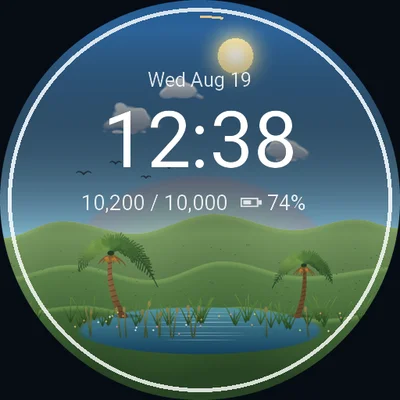
Camina y descubre un paisaje desértico y verde que se transforma en un oasis. En toda la escena, ni un solo árbol.
Oasis no es un árbol que crece en tres etapas. Es un desierto entero que se transforma en un oasis, en constante movimiento, todo el día, solo con tus pasos.
Cada medianoche, el reloj vuelve a la arena desnuda: tierra seca, grietas que la atraviesan, una neblina que lo cubre todo. Entonces caminas y el valle se llena.
LO QUE CONSTRUYEN TUS PASOS
· La tierra agrietada cicatriza y la arena se vuelve verde.
· Se abre un estanque en el centro y se ensancha a medida que avanza el día.
· La hierba aparece en cinco franjas, luego los juncos, y después las flores.
· Dos palmeras datileras brotan de la tierra.
· Los pájaros surcan el cielo.
· Las nubes se acumulan, porque un valle con agua tiene su propio clima.
Todo se deduce de tu conteo de pasos para alcanzar tu meta, y nada retrocede durante el día. Lo que ves en tu muñeca a las seis de la tarde es el día que realmente has tenido.
LAS PALMERAS CRECEN DE VERDAD
Aquí no hay un dibujo reemplazado por uno más grande. Las palmas están
escaladas a partir de la fracción del paso, ancladas en la raíz, de modo que el tronco
se alarga y la corona se abre al caminar. Medido en un Galaxy Watch6
con respecto a la altura prevista, el seguimiento fue inferior a un píxel.
No es una barra de progreso con imágenes.
LA LUZ ES UN SEGUNDO RELOJ INDEPENDIENTE
La hora del día se mantiene separada de tus pasos, por lo que la esfera nunca te indica dos
cosas a la vez.
· Un sol en una órbita real: sobre las dunas por la mañana, sobre los dígitos
al mediodía, en el lado opuesto al atardecer.
· Una luna en la misma órbita, medio día después, en lo alto a medianoche.
· Una franja dorada en el horizonte al amanecer y al atardecer.
· Estrellas, una vez que oscurece.
El amanecer y el atardecer se rigen por horas fijas en lugar de por tu ubicación:
un intercambio deliberado, y esto es lo que se obtiene.
NO HAY QUE PERMITIR NADA, NO HAY QUE CONFIGURAR
Oasis no lee la ubicación ni el clima. No hay pantalla de permisos, ni panel donde debería aparecer la temperatura, ni nada que esperar. Le pide al reloj la hora, la fecha, los pasos, el objetivo y el nivel de batería; todo lo que tu reloj ya sabe. Instálalo, selecciónalo y empieza a caminar.
NO SE DETIENE AL LLEGAR AL OBJETIVO
Al alcanzarlo, el anillo exterior se cierra y un segundo anillo comienza a llenarse detrás. El valle también tiene respuestas más allá de ese punto, más de una, y no se muestran aquí a propósito. Camina más de lo que tenías previsto.
EN LA ESFERA
· Horas y minutos, con un tamaño de lectura suficiente para leerlos a la distancia de un brazo.
· Día de la semana y fecha.
· Pasos por encima de tu objetivo, mostrados en números, no en porcentaje, para que puedas ver con qué
comparar tu progreso.
· Batería, con su propio icono para evitar confusiones con el progreso.
· Dos anillos alrededor del borde: el objetivo y el progreso superado.
TRES AJUSTES, DIECISÉIS OPCIONES, TODO EN EL RELOJ
· Objetivo de pasos. El modo automático toma el objetivo ya establecido en la app de salud del reloj,
por lo que la mayoría de la gente no lo modifica. Seis objetivos fijos de 5000 a 20 000 si
prefieres configurar la esfera en otro lugar.
· Color. Seis tonos para los dígitos y la pantalla: blanco, arena, menta, azul cielo,
rosa y ámbar. El paisaje conserva sus propios colores.
· Reloj. Sigue la hora del reloj, o fuerza el formato de 24 horas, o el de 12 horas con AM/PM.
Sin ranuras para complicaciones ni configuración previa.
PANTALLA SIEMPRE ACTIVA
La pantalla siempre activa solo muestra el contorno, un color tenue, sin cielo, y aun así
muestra lo que cultivaste hoy en silueta, debajo del reloj, la fecha, tus
pasos y ambos anillos.
COMPATIBILIDAD E INSTALACIÓN
Wear OS 5 o posterior (API 34+): Galaxy Watch4 y posteriores tras la actualización, Galaxy
Watch Ultra, Pixel Watch 3 y otros relojes Wear OS 5. Desarrollada y probada en
un Galaxy Watch6.
1. Cómprala aquí.
2. Abre la Play Store en tu reloj e instala Oasis desde tu biblioteca, o
toca "Instalar en más dispositivos" y selecciona tu reloj.
3. Mantén pulsada la esfera actual, desplázate hasta Oasis y tócala.
4. Mantén pulsada de nuevo y toca Personalizar para acceder a los tres ajustes.
La opción de teléfono solo sirve para facilitar la búsqueda de la esfera. Oasis funciona
completamente en el reloj.
Una sola compra. Sin suscripción, sin anuncios, sin seguimiento, sin cuenta, sin aplicación complementaria.
Si tiene alguna pregunta o algo no funciona correctamente, escríbanos a contact@basilbase.com.
Mostrar el texto original
Oasis is not a tree that grows in three stages. It is a whole desert
becoming an oasis, moving continuously, all day, on your steps alone.
Every midnight the dial resets to bare sand: dry ground, cracks running
through it, haze over everything. Then you walk, and the valley fills in.
WHAT YOUR STEPS BUILD
· The cracked ground heals shut and the sand goes green
· A pool opens at the centre and widens as the day goes on
· Grass arrives in five bands, then reeds, then flowers
· Two date palms rise out of the ground
· Birds cross the sky
· Clouds gather, because a valley with water in it has weather
All of it runs off your step count against your goal, and none of it ever
goes backwards during the day. What is on your wrist at six in the evening
is the day you actually had.
THE PALMS REALLY GROW
Nothing here is one drawing swapped for a bigger one. The palms are
scaled from the step fraction itself, anchored at the root, so the trunk
lengthens and the crown opens while you walk. Measured on a Galaxy
Watch6 against the height it was meant to be, it tracked to under a pixel.
Not a progress bar with pictures on it.
THE LIGHT IS A SECOND, SEPARATE CLOCK
Time of day is kept apart from your steps, so the dial never tells you two
things at once.
· A sun on a real orbit: up over the dunes in the morning, above the digits
at noon, down the far side at dusk
· A moon on the same orbit, half a day behind, overhead at midnight
· A band of gold along the horizon early and late
· Stars, once it is dark
Sunrise and sunset run on fixed hours rather than from your location - a
deliberate trade, and this is what it buys.
NOTHING TO ALLOW, NOTHING TO SET UP
Oasis reads no location and no weather. No permission screen, no dash where
a temperature should be, nothing to wait for. It asks the watch for the
time, the date, your steps, your goal and the battery level, all things your
watch already knows. Install it, choose it, walk.
IT DOES NOT STOP AT THE GOAL
Reach it and the outer ring closes and a second ring starts filling behind
it. The valley has answers past that point too, more than one, and they are
not listed here on purpose. Walk further than you meant to.
ON THE DIAL
· Hours and minutes, big enough to read at arm's length
· Weekday and date
· Steps over your goal as numbers, not a percentage, so you can see what
you are measured against
· Battery, with its own icon so it cannot be misread as progress
· Two rings around the rim: the goal, and everything past the goal
THREE SETTINGS, SIXTEEN OPTIONS, ALL ON THE WATCH
· Step goal. Auto takes the goal already set in your watch's own health app,
so most people never touch it. Six fixed goals from 5,000 to 20,000 if you
would rather aim the dial elsewhere.
· Colour. Six tones for the digits and the readout: white, sand, mint, sky,
rose and amber. The landscape keeps its own colours.
· Clock. Follow the watch, or force 24-hour, or 12-hour with AM/PM.
No complication slots, and nothing to configure before it works.
ALWAYS-ON
The always-on screen is outline only, one dim colour, no sky - and it still
shows what you grew today in silhouette, under the clock, the date, your
steps and both rings.
COMPATIBILITY, AND HOW TO INSTALL
Wear OS 5 or newer (API 34+): Galaxy Watch4 and later once updated, Galaxy
Watch Ultra, Pixel Watch 3 and other Wear OS 5 watches. Built and tested on
a Galaxy Watch6.
1. Buy it here.
2. Open the Play Store on your WATCH and install Oasis from your library, or
tap "Install on more devices" and pick your watch.
3. Long-press your current watch face, scroll to Oasis and tap it.
4. Long-press again and tap Customize for the three settings.
The phone entry exists only to make the face easy to find; Oasis runs
entirely on the watch.
One purchase. No subscription, no ads, no tracking, no account, no companion
app. If you have a question, or something is not working right, please write
to us at contact@basilbase.com.
Seguridad de los datos
Lo que BasilBase declara en Google Play sobre los datos que esta aplicación recopila y comparte.
- No se comparten datos con tercerosMás información sobre cómo los desarrolladores declaran lo que comparten
- No se recogen datosMás información sobre cómo los desarrolladores declaran lo que recogen
Contacto del desarrollador
- Correo electrónicocontact@basilbase.com
- Política de privacidadbasilbase.com
- DirecciónUMUTKENT MAH. ADA 4 SK. NO: 17 IC KAPI NO: 9 MERKEZ 14300 Bolu Türkiye
Información
- Ofrecida por
- BasilBase
- Categoría
- Personalización
- Versión
- 1.0
- Actualizado
- 23/8/2026
- Publicado
- 23/8/2026
- Clasificación por edad
- PEGI 3
- Precio
- 1,59 €
- Nombre del paquete
- com.basilbase.oasis