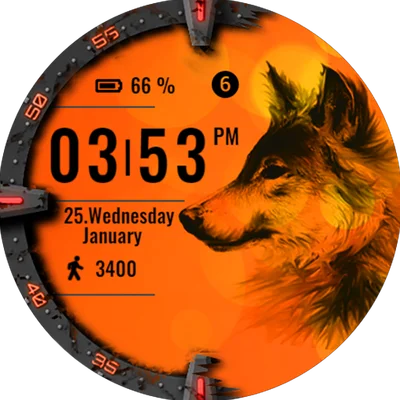
Orange Fox Watch Face
RADU GHEORGHE TURCU- PEGI 3Clasificación por edad
- PersonalizaciónCategoría
- 4/12/2023Actualizado
- 0,99 €Precio
Enlaza a la ficha oficial de com.turcuradu.orangefoxwatchface en Google Play. Última comprobación el 24/11/2026.
Acerca de esta aplicación
Traducción automática de Google. Idioma original: Inglés (Estados Unidos).
Esfera de reloj fresca e informal expandir para ver todos los detalles
Dispositivos compatibles: todos los relojes que tienen Wear OS
Samsung, Fossil, Google, Moto y otros
Puedes encontrarme en Telegram:
https://t.me/TRWatchfaces
Notas de instalación de la esfera del reloj en el reloj inteligente:
La aplicación de teléfono solo sirve como marcador de posición para que sea más fácil de instalar y encontrar la esfera del reloj en su reloj Wear OS. Debe seleccionar su dispositivo de reloj en el menú desplegable de instalación.
Si descarga el asistente directamente con el teléfono, debe abrir la aplicación y tocar la pantalla. -> comenzará a instalarse en el reloj.
Es necesario conectar un reloj Wear OS. Si este método no funciona, tiene métodos alternativos, abra su navegador web desde el enlace del complemento de la aplicación e instálelo desde el menú desplegable.
Siga las sugerencias de la aplicación. Si tiene problemas, por favor póngase en contacto conmigo.
Características :
Amigable con la batería
Diseño simple y fresco
contador de pasos
Indicador de bateria
Fecha
Contador de notificaciones
AoD
1 widget complicado, puedes verlo en las capturas de pantalla.
Para configurar el reloj, debe abrir la aplicación Wear OS en el teléfono y seleccionar la esfera del reloj.
Intenta ver otros diseños en mi canal:
https://www.instagram.com/turcuraduwatchfaces/
O en mi perfil de google.
Mostrar el texto original
Supported devices : All Watches which have Wear OS
Samsung , Fossil , Google , Moto and others
You can find me at telegram :
https://t.me/TRWatchfaces
Watch face installation notes on smart watch:
Phone app serves only as a placeholder to make it easier to install & find the watch face on your Wear OS watch. You have to select your watch device from the install dropdown menu.
If you download the helper directly with the phone , you need to open application and touch on the display. -> will start to install on the watch.
A wear os watch need to be connected. If this method not working you have alternative methods , open your web browser from the link from app companion and install from drop menu.
Follow the app hints. If you have problems , please contact me.
Features :
Battery friendly
Simple and cool design
Steps counter
Battery indicator
Date
Notification Counter
AoD
1 complicated widget , you can see in the screenshots.
To set on watch you need to open wear os app on the phone , and select the watch face.
Try to see others designs on my channel :
https://www.instagram.com/turcuraduwatchfaces/
Or in my google profile.
Seguridad de los datos
Lo que RADU GHEORGHE TURCU declara en Google Play sobre los datos que esta aplicación recopila y comparte.
- No se comparten datos con tercerosMás información sobre cómo los desarrolladores declaran lo que comparten
- No se recogen datosMás información sobre cómo los desarrolladores declaran lo que recogen
Novedades
4/12/2023
Second release.
Contacto del desarrollador
- Sitio webt.me
- Correo electrónicoraduturcu03@gmail.com
- Política de privacidade-droid.net
- DirecciónStr. Eduard Albert Bielz, Nr. 89d, Bl. b1, Sc. f, et.1, Ap. 60 550031 Sibiu Romania
Información
- Ofrecida por
- RADU GHEORGHE TURCU
- Categoría
- Personalización
- Actualizado
- 4/12/2023
- Publicado
- 11/1/2023
- Clasificación por edad
- PEGI 3
- Precio
- 0,99 €
- Nombre del paquete
- com.turcuradu.orangefoxwatchface