WIN Super Inf Mod V3
WinWatchfaces- PEGI 3Clasificación por edad
- PersonalizaciónCategoría
- 15/10/2026Actualizado
- 1,19 €Precio
Enlaza a la ficha oficial de com.watchfacestudio.superinfmodv3 en Google Play. Última comprobación el 14/11/2026.
Acerca de esta aplicación
Traducción automática de Google. Idioma original: Inglés (Estados Unidos).
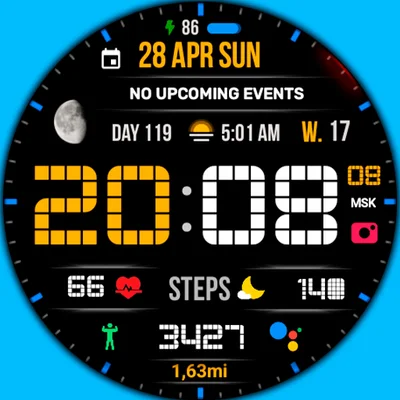
Elegante esfera de reloj digital con fases lunares y funciones deportivas.
Elegante esfera digital con fases lunares y funciones deportivas para Wear OS
Características principales:
- Hora digital en formato 12/24 horas (según la configuración del smartphone)
- Alta resolución
- Posibilidad de cambiar el color
- Complicaciones personalizadas
- Visualización del día del año
- Visualización del día de la semana
- Fases lunares
- Modo AOD (pantalla completa o mínima)
Compatible con dispositivos Wear OS con API nivel 30 o superior, incluyendo Samsung Galaxy Watch 4, 5, 6, 7, 8 y Pixel Watch.
**Instalación**
1. Instala la aplicación de la esfera en tu teléfono.
2. Asegúrate de que tu reloj Wear OS esté conectado a tu teléfono y utilice la misma cuenta de Google.
3. Selecciona tu reloj como dispositivo de instalación y completa la instalación.
4. Una vez instalada, selecciona la esfera de tu galería.
Si la instalación se retrasa, comprueba la conexión a internet en ambos dispositivos, espera un minuto o dos, o reinicia tu reloj e inténtalo de nuevo.
**Personalización**
• Mantén pulsada la esfera del reloj y pulsa **Personalizar** para acceder a los ajustes disponibles.
• Para una mejor experiencia, te recomendamos configurar la esfera directamente en tu reloj. Guía en vídeo:
https://youtu.be/YPcpvbxABiA
**Soporte**
Si tienes alguna pregunta o problema con la instalación, ponte en contacto con: srt48rus@gmail.com
**Más esferas de reloj de WIN**
Descubre otras esferas:
https://play.google.com/store/apps/dev?id=6789054753742990227
Mostrar el texto original
Stylish digital watch face with moon phases and sports functions for Wear OS
Basic moments:
- 12/24 hour digital time (depending on smartphone settings)
- A high resolution;
- Ability to change color
- Custom complications
- Display the number of the day of the year
- Display the week number of the year
- Moon phases
- AOD mode (full or minimum mode)
Compatible with Wear OS devices running API level 30 and above, including Samsung Galaxy Watch 4, 5, 6, 7, 8 and Pixel Watch.
**Installation**
1. Install the watch face app on your phone.
2. Make sure your Wear OS watch is connected to your phone and uses the same Google account.
3. Select your watch as the installation device and complete the installation.
4. After installation, select the watch face from your watch face gallery.
If installation is delayed, check the internet connection on both devices, wait a minute or two, or restart your watch and try again.
**Customization**
• Touch and hold the watch face, then tap **Customize** to access the available settings.
• For the best experience, we recommend configuring the watch face directly on your watch. Video guide:
https://youtu.be/YPcpvbxABiA
**Support**
If you have any questions or installation issues, please contact: srt48rus@gmail.com
**More watch faces by WIN**
Explore other watch faces:
https://play.google.com/store/apps/dev?id=6789054753742990227
Seguridad de los datos
Lo que WinWatchfaces declara en Google Play sobre los datos que esta aplicación recopila y comparte.
- No se comparten datos con tercerosMás información sobre cómo los desarrolladores declaran lo que comparten
- No se recogen datosMás información sobre cómo los desarrolladores declaran lo que recogen
Novedades
15/10/2026
Wear OS update - at your request, we've added the ability to change the background style
Contacto del desarrollador
- Correo electrónicosrt48rus@gmail.com
- Política de privacidadsites.google.com
- Direcciónул. Ескалиева, д. 148 кв. 21 090000 Уральск Kazakhstan
Información
- Ofrecida por
- WinWatchfaces
- Categoría
- Personalización
- Actualizado
- 15/10/2026
- Publicado
- 28/4/2024
- Clasificación por edad
- PEGI 3
- Precio
- 1,19 €
- Nombre del paquete
- com.watchfacestudio.superinfmodv3