AgStatus: Coding Agent Board
Live status and plan limits
Diseñada para iPhone, iPad
Gratis
- Clasificación por edad4+
- CategoríaPara desarrolladores
- DesarrolladorInal Kardanov
- IdiomasInglés
- Tamaño2,3 MB
Enlaza a la página oficial de App Store
Download.org no aloja ningún archivo de AgStatus: Coding Agent Board. El botón abre la página de la aplicación en App Store, donde la publica Inal Kardanov. Ficha comprobada por última vez el 25/11/2026.
Capturas de pantalla
Acerca de
El desarrollador no ha proporcionado este texto en tu idioma.
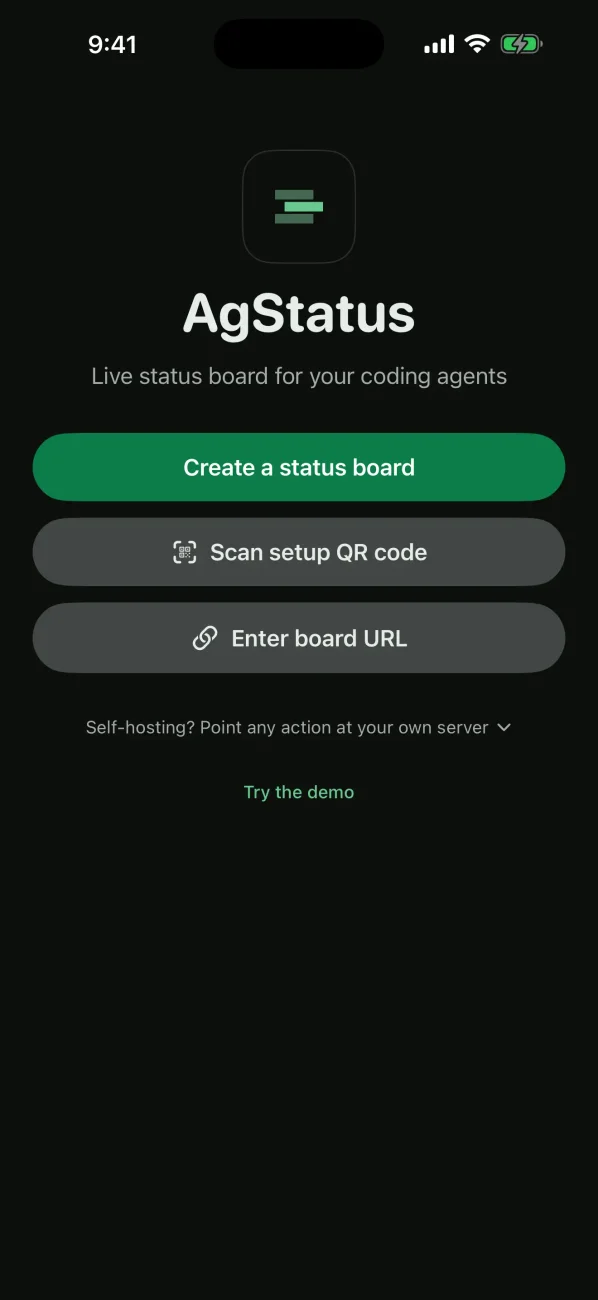
AgStatus turns your phone into a live status board for the AI coding agents running on your computer.
Long-running agents all behave the same way: they work for a few minutes, then quietly stop and wait for you. AgStatus puts every session on one screen — what each one is doing right now, how long it has been silent, and which ones are stuck — so you can step away from the keyboard without losing the thread.
HOW IT WORKS
A small open-source hook on your computer posts an update whenever an agent starts a session, edits a file, runs tests, or needs your input. Your board is a private URL with an unguessable token: no account, no sign-up, no email address. Connect your computer by scanning a QR code, typing a short pairing code, or pasting the board URL.
ON THE BOARD
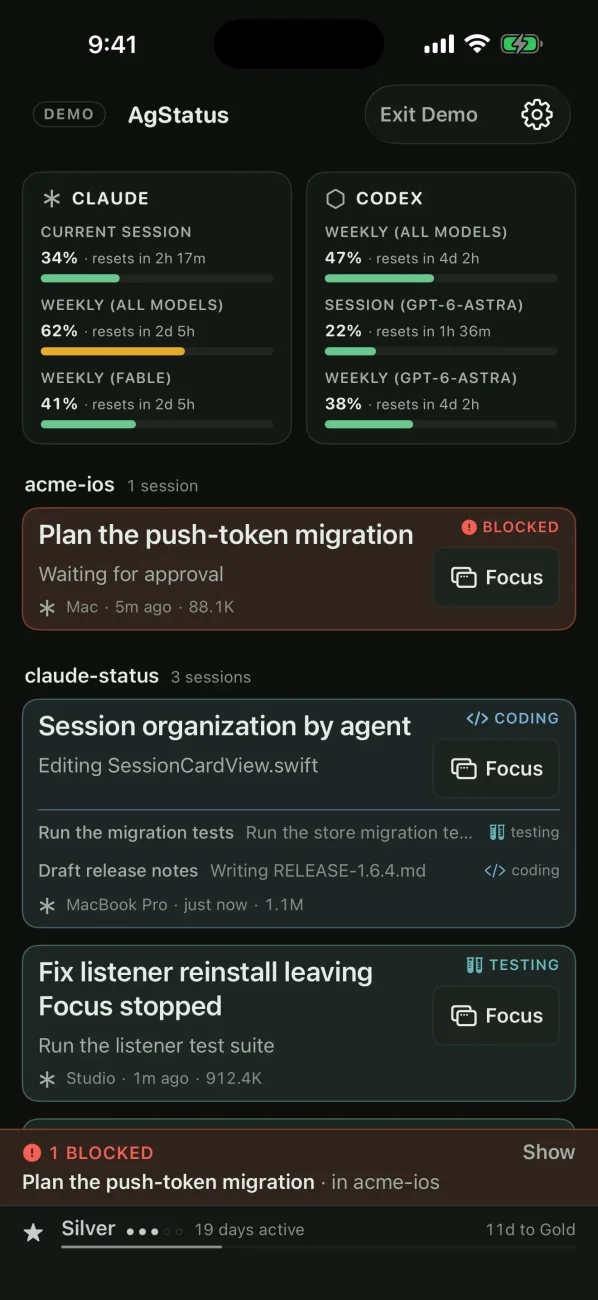
• Sessions grouped by project, each under its own label, with the cards two across where an iPad has room
• One card per session, color-coded through six states: idle, planning, coding, testing, blocked, done
• The last thing the agent reported — the file it is editing, the test command it ran, the approval it is waiting for
• A session's running subagents as rows on its card: what each was asked to do, what it is doing and its state; one waiting on your approval turns the card blocked
• Blocked and finished cards carry the color while busy ones recede, so the ones that need you stand out; a session that has gone quiet loses its color, shows a “?” and says how long it has been silent
• While a session is blocked, a bar along the bottom names it and its project; tap the bar to bring that card into view, and again for the next one
• Updates stream in as they happen — no polling, no refresh button
• Long-press a card to dismiss it or, with Focus set up on your Mac, bring its terminal to the front; on iPhone you can also swipe it away
• Keep-screen-awake option for when the board lives on a desk or a shelf
PLAN LIMITS AT A GLANCE
Each agent on the board has a head with its plan limits: the current session window, the weekly cap, and per-model weekly caps, each with a percentage and a “resets in 2h 15m” countdown that stays current. Bars run green, then amber, then red as a limit approaches, and only the agents actually running on your board take up space.
SESSION HISTORY
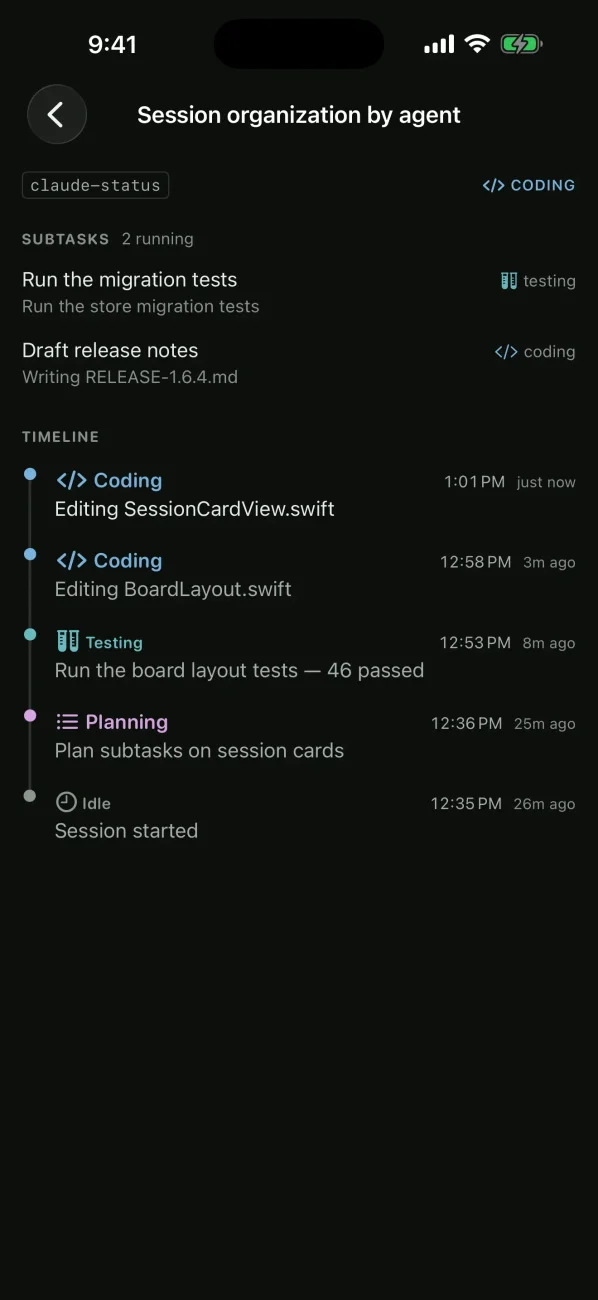
Tap any card to open its timeline: every status change and message that session reported, newest first, with timestamps.
BUILT FOR PRIVACY
• No accounts, no analytics, no advertising identifiers, no third-party SDKs
• The app talks only to the board server you point it at
• Your board URL and token are stored in the iOS Keychain on your device
• Delete a board and everything on it from Settings, whenever you want
• The hook has a minimal mode that reports tool names only and never command text, and plan-usage reporting can be switched off
NOTIFICATIONS
The app supports opt-in alerts for the moment an agent is blocked or finishes a run. The toggles become available when the server hosting your board is set up to send notifications, and the app says so plainly when it is not.
OPEN SOURCE AND SELF-HOSTABLE
The server, the command-line tool, the hook, and this app are open source under the MIT license. Point the app at the hosted service or at a server you run yourself — the whole backend is a single process, and every screen in the app works the same either way.
TRY IT BEFORE YOU SET ANYTHING UP
Tap “Try the demo” on the welcome screen for a fully populated board — sample sessions moving through their states, usage bars, and timelines. Demo mode runs entirely on your device and sends nothing anywhere.
Designed for iPhone and iPad, with a dark interface. Showing real sessions requires a computer running a compatible coding agent.
AgStatus is an independent open-source project that works with the hook systems of Claude Code and OpenAI Codex. It is not affiliated with, endorsed by, or sponsored by Anthropic or OpenAI. All product names and trademarks are the property of their respective owners.
Novedades
Versión 1.7.0 · 25/11/2026
Your board grouped by project, subagents on their session's card, and one bar for blocked sessions.
A SECTION PER PROJECT
Sessions are now grouped by the folder each one started in: a section per project, in name order, each under a label with its session count. A session that changes directory stays in its section. On iPhone the label stays in view while its cards scroll by. On iPad, where two columns fit, each section's cards stand two across, under a strip for each agent's limits.
Each agent's plan limits at the top now carry its mark and, where there is room, its session count.
ONE BAR FOR WHAT NEEDS YOU
While any session is blocked, a bar along the bottom says how many are blocked and names one of them with its project. Tap it and that card comes into view with a ring around it; tap again for the next one. If another session blocks while the bar is up, the bar comes in again with the new count. With Reduce Motion on, it never slides in or out.
SUBAGENTS ON THE CARD
When a session runs subagents, each one not yet done is a row on its card: what it was asked to do, what it is doing and its state. A card shows up to two rows on iPhone and three where cards stand two across, then a count of the others and of those done. Tap a row to open the session, where the full list stands above its timeline. A subagent waiting on your approval turns the card blocked, and the card names it. A session whose turn is over while its subagents still work reads WORKING, not done.
Subagents on the card need AgStatus 1.7.0 on the computer your agents run on: run its install command there again. Project sections and the bar need nothing new there. A server you run yourself needs 1.7.0 too. The demo shows subagents at work.
CARDS
A busy session that has sent no update for ten minutes used to fade, words and all. Now every word stays readable: the card loses its color, a "?" takes the place of its state's symbol, and "no update for 14m" stands where the time was.
A session's title can take two lines instead of one. Every card has a long-press menu with Dismiss, beside Bring to front where Focus is set up; on iPhone you can still swipe a card away.
ACCESSIBILITY
• At the largest text sizes cards no longer run off the screen, and a limit's reset time is shortened or left out, never cut mid-number.
• VoiceOver reads a card's agent and name, then its state, then its message, and with notifications off says when a session becomes blocked, with its project. Magic Tap presses the bar from anywhere on the board; Voice Control answers to the bar's word, Show or Next.
• With Increase Contrast on, the quieter text, the borders and the card edges are brighter.
• The main buttons are a darker green that their white labels can be read on.
• The connection light in the toolbar shows its state by its shape, no longer glows, and VoiceOver says when the connection drops.
• Session history passes contrast, marks each state with its symbol as well as its color, and shows every message in full.
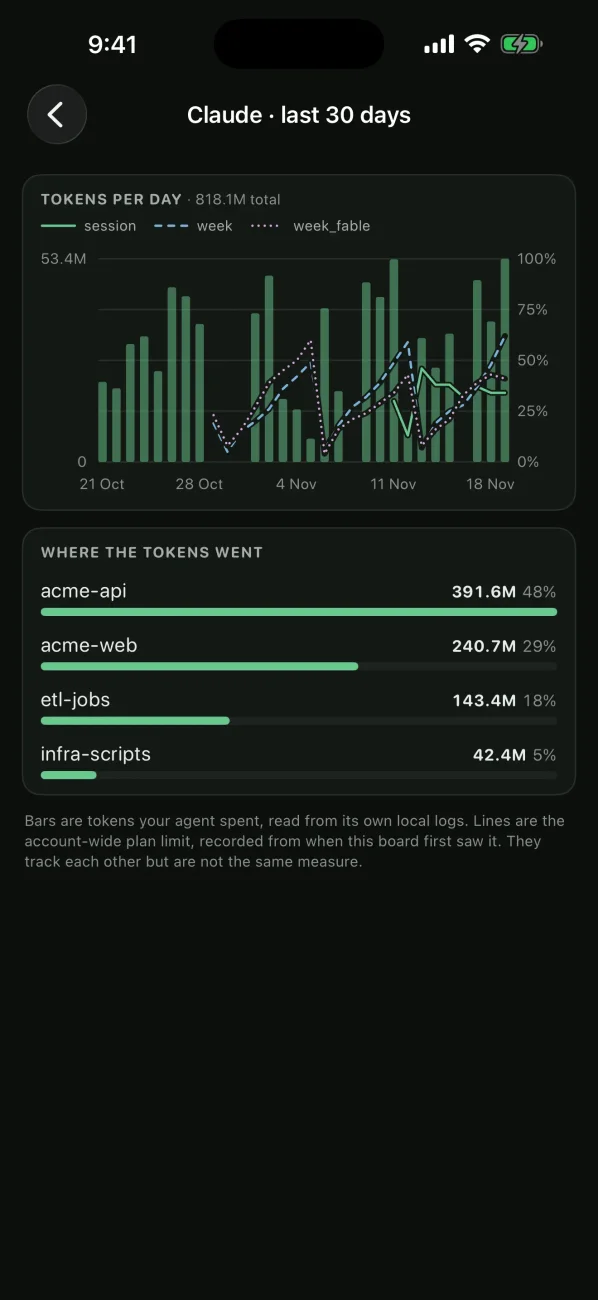
• The usage chart tells limit lines apart by pattern as well as color, marks a window's first-day reading with a shape of its own, and grows its text with yours. VoiceOver reads its figures, with an Audio Graph.
PAIRING IS SAFER
The app now accepts only a pairing code the board's server could have issued, adds a board only when its address is made of the characters a host name can contain, and puts both in quotes in the line it gives you to paste into a terminal. If a board answers with anything else, you get an error, never a command to paste. On agstatus.online only the quotes are new.
ALSO
• Sessions with no usable folder, such as one started in the root folder, wait in a "No project" section at the end until they report one.
• A board with plan limits but nothing running says "Nothing running" instead of offering to pair a computer.
• A new icon: three strips, one lit and pulled out of line, the way an air traffic controller flags the flight that needs action.
Privacidad de la aplicación
Lo que Inal Kardanov declara en App Store sobre cómo esta aplicación gestiona los datos.
-
Datos no vinculados a ti
Pueden recopilarse, pero no se vinculan a tu identidad.
- Identificadores
Las prácticas de privacidad pueden variar, por ejemplo, según las funciones que uses o tu edad.
Información
- Vendedor
- Inal Kardanov
- Categoría
- Para desarrolladores
- Versión
- 1.7.0
- Actualizado
- 25/11/2026
- Publicado
- 27/8/2026
- Tamaño
- 2,3 MB
- Requiere
- iOS 17.0 o posterior
- Clasificación por edad
- 4+
- Precio
- Gratis
- Idiomas
- Inglés
- Copyright
- © 2026, Inal Kardanov
Quizá también te guste
-
 cmd+cmdPara desarrolladores
-
 Motif - SSH & CodexPara desarrolladores
-
 CodexexPara desarrolladores
-
 VibeBuddy: Agent MonitorPara desarrolladores
-
 Codex Meter - Your Codex UsagePara desarrolladores
-
 Charge - AI Usage TrackerPara desarrolladores
-
 SpinCat AI MonitorPara desarrolladores
-
 Codex Live BarPara desarrolladores
-
 AI Usage Tracker: PulsePara desarrolladores
-
 Tokens - Usage TrackerPara desarrolladores