
- Clasificación por edad4+
- CategoríaProductividad
- DesarrolladorRyusuke Uchida
- IdiomasInglés+ 1 más
- Tamaño20,3 MB
Enlaza a la página oficial de App Store
Download.org no aloja ningún archivo de Albumy. El botón abre la página de la aplicación en App Store, donde la publica Ryusuke Uchida. Ficha comprobada por última vez el 28/11/2026.
Capturas de pantalla


Acerca de
El desarrollador no ha proporcionado este texto en tu idioma.
With this app, you can easily organize your Photo Library with just one hand!
Features
+++ Batch Selection +++
Select multiple photos at once and perform actions like:
* Add to album in bulk.
* Remove photos from album in bulk.
* Delete photos in bulk.
* Mark photos as favorites in bulk.
* Hide photos in bulk.
* Share photos in bulk.
All changes made in this app sync directly with the iPhone’s built-in Photos app.
+++ Quick Search +++
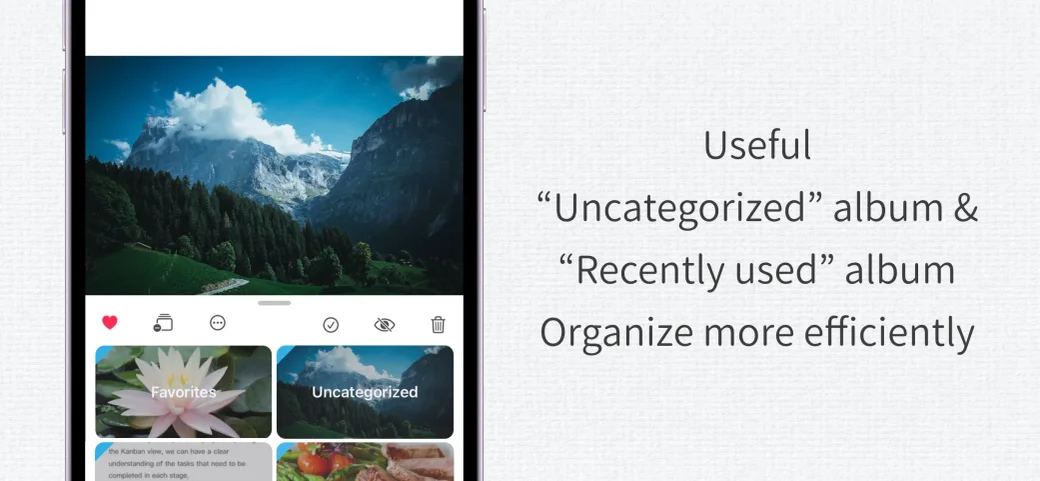
* Quickly find albums by typing the album name.
* Access recently used albums with ease.
You can get to the album you want to see right away.
+++ Uncategorized Photos +++
The “Uncategorized” album displays photos that haven’t been sorted into any albums.
This feature is perfect for users who want to organize every photo neatly.
+++ Display of Which Album a Photo Belongs To +++
Easily see which albums a photo belongs to at a glance.
This makes organizing your albums smoother and more intuitive.
+++ One-Handed Operation (iPhone) +++
The app is designed for easy one-handed use. Perform basic actions with just your thumb for a stress-free experience.
Whether you want to organize your photos better or manage them more efficiently, this app is for you.
It’s ideal for iPhone and iPad users who want to streamline photo management.
Please give it a try!
Novedades
Versión 3.5.0 · 27/11/2026
* Added support for iPhone Duo
* Added full support for the Liquid Glass Design
* Added the ability to view and edit photo Captions
* Changes such as deleting, hiding, and removing photos from albums are now reflected immediately
* Fixed a bug where edits were not immediately reflected
* Added an option to choose whether to show the toolbar first when viewing details
* Added the ability to adjust cell spacing and corner radius
* Added a Masonry-style layout (Beta)
* Other bug fixes
Thank you as always for using our app!
Privacidad de la aplicación
Lo que Ryusuke Uchida declara en App Store sobre cómo esta aplicación gestiona los datos.
-
Datos usados para rastrearte
Pueden usarse para rastrearte en aplicaciones y sitios web propiedad de otras empresas.
- Identificadores
- Datos de uso
- Diagnóstico
-
Datos no vinculados a ti
Pueden recopilarse, pero no se vinculan a tu identidad.
- Identificadores
- Datos de uso
- Diagnóstico
Las prácticas de privacidad pueden variar, por ejemplo, según las funciones que uses o tu edad.
Información
- Vendedor
- Ryusuke Uchida
- Categoría
- Productividad
- Versión
- 3.5.0
- Actualizado
- 27/11/2026
- Publicado
- 13/6/2022
- Tamaño
- 20,3 MB
- Requiere
- iOS 15.0 o posterior
- Clasificación por edad
- 4+
- Precio
- Gratis
- Idiomas
- Inglés, Japonés
- Copyright
- © 2026 One Tap Apps
Quizá también te guste
-
 DeeBee - Database-style notesProductividad
-
 Memogram(メモグラム) コピーが簡単なメモ帳アプリProductividad
-
 Manage bookmark with imagesProductividad
-
 memoChica - Notes for ideasProductividad
-
 ビジネスメール定型文GPTProductividad
-
 AIPromptNoteProductividad
-
 Copi Note - Note & PasswordProductividad
-
 L.O.F.I – Focus & ProductivityProductividad
-
 Photo Memo - Quick RecallProductividad
-
 Atoyomu: AI Summary, BookmarksProductividad