BaristaTimer: Brew Timer & Log
Better Coffee, Fully Offline
Diseñada para iPhone, iPad
Compras en la aplicación
- Clasificación por edad12+
- CategoríaComida y bebida
- Desarrolladortakashi nakatani
- IdiomasJaponés+ 1 más
- Tamaño115,4 MB
Es posible que BaristaTimer: Brew Timer & Log no esté disponible en App Store en este momento
No se pudo acceder a la ficha de la tienda en nuestra última comprobación. El enlace sigue llevando a la página oficial de App Store.
Capturas de pantalla

Acerca de
El desarrollador no ha proporcionado este texto en tu idioma.
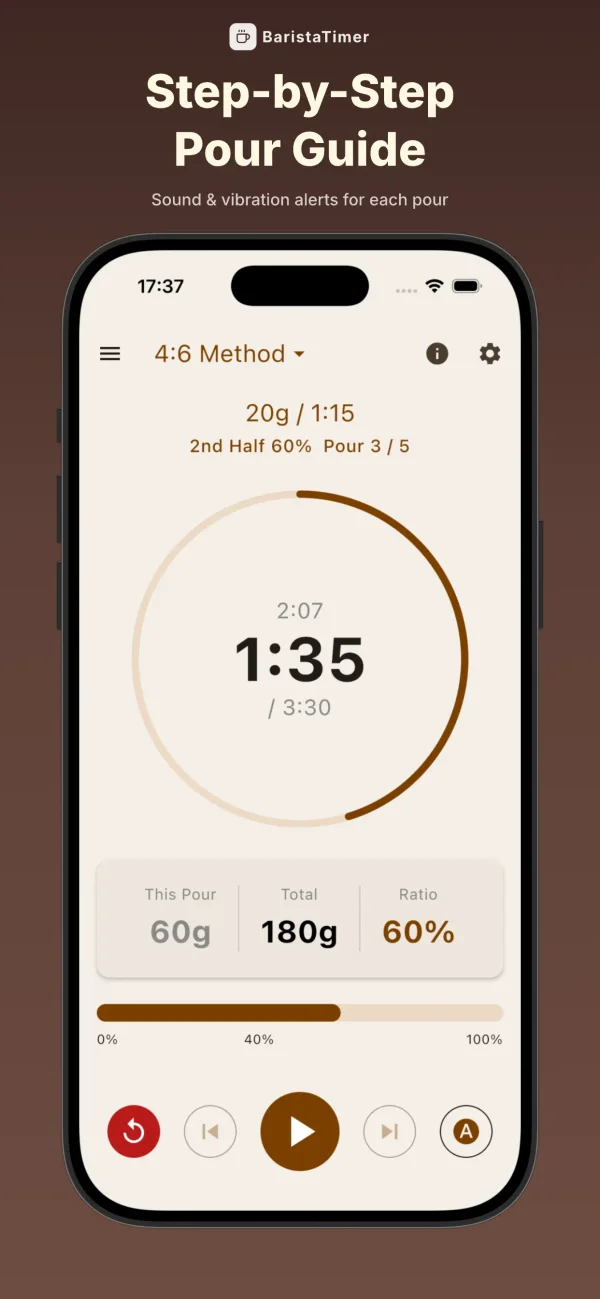
BaristaTimer is a timer and logging app for brewing better pour-over (hand drip) coffee, in English and Japanese.
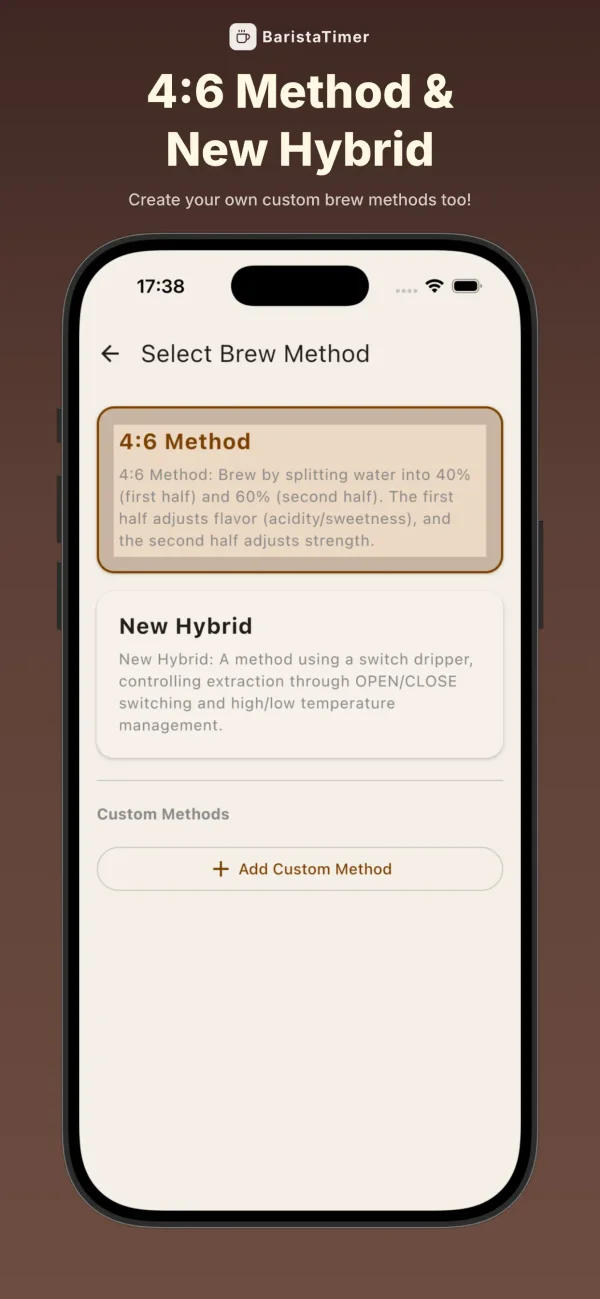
It supports popular methods like the 4:6 Method and the New Hybrid Method.
Custom recipes, brew history, and stats help you make a better cup.
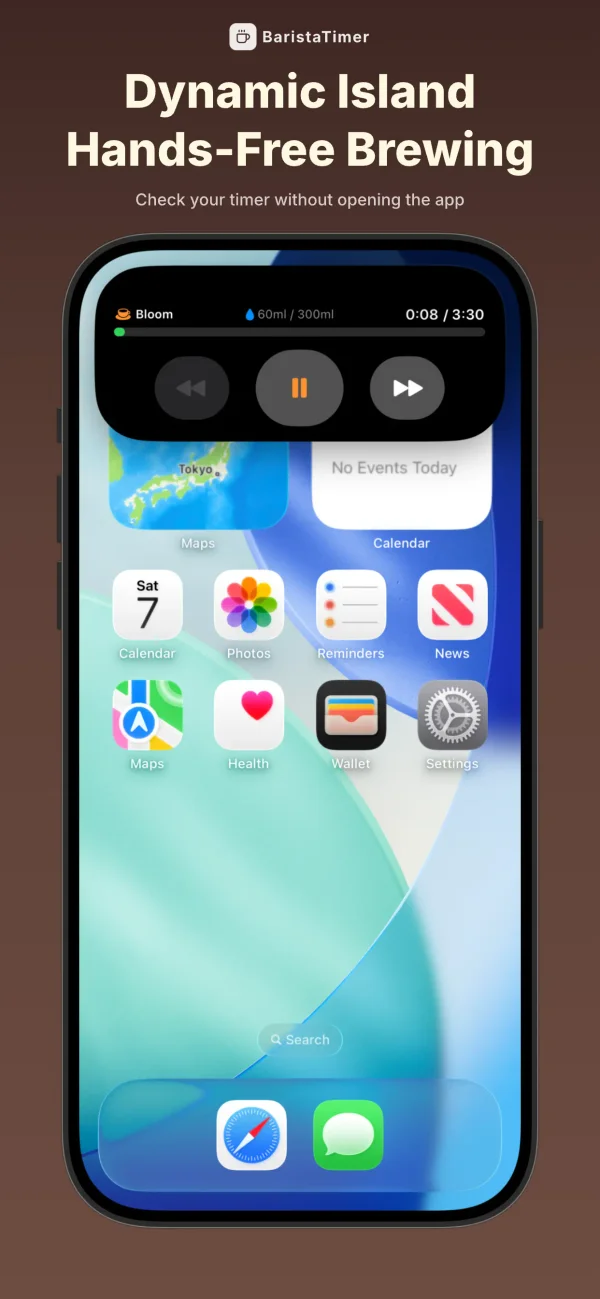
■ Dynamic Island & Live Activity
See the current step, time, and water on your Lock Screen — even while using another app.
■ Voice Commands — Hands-Free Control
Control the timer by voice — no need to touch your phone.
・"next" / "back" / "done" (Japanese & English)
・Voice button can be hidden in settings
■ Supported Methods
【4:6 Method】
Developed by the World Brewers Cup 2016 Champion.
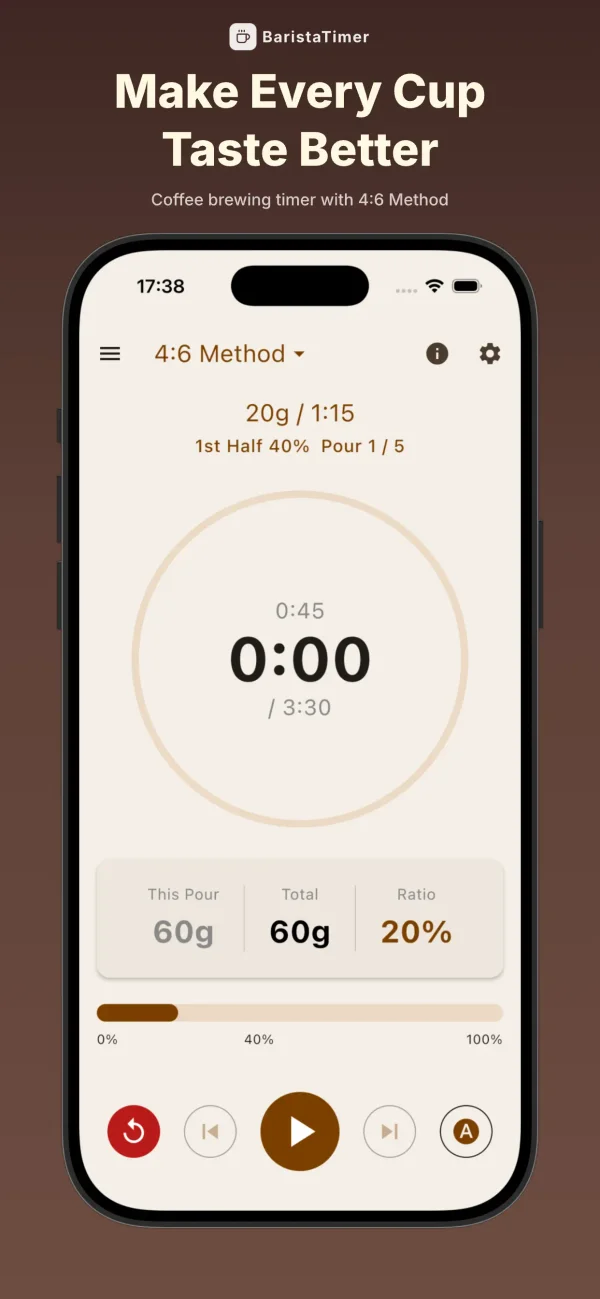
Split water into the first 40% (flavor) and the last 60% (strength) for intuitive taste control.
・Adjust flavor balance (sweet to bright) with a slider
・Control strength with the number of pours (1–3)
・Customize steaming (bloom) time
【New Hybrid Method】
Combines percolation and immersion using a switch dripper (e.g., HARIO Switch).
・Auto water temp by roast level (light, medium, dark)
・Dripper open/close shown per step
・Fine-tune temps manually
【JAC2015 Winning Recipe】
The inverted AeroPress recipe that won JAC2015.
・30g at 1:6, poured at 82°C, then 90°C
・Step water scales with your dose and ratio
【Custom Method】
Create your own recipes from scratch.
Set each step's time and water (grams or brew ratio); drag to reorder.
・Dripper type: Normal, Switch, or AeroPress (labeled on methods and brews)
・"Agitate" steps for stirring, swirling, or tapping
【Brew to Create】
Brew without targets, then save it as a custom method.
Swipe any method right to add it to Favorites at the top.
■ Timer Features
・Real-time target time and water volume per step
・Detailed view: all steps listed with an elapsed-time bar
・Show pours in grams or brew ratio (1:n)
・Auto step transitions for hands-busy brewing
・Start countdown & assist sounds for step transitions
・Runs in the background
■ Brew Log
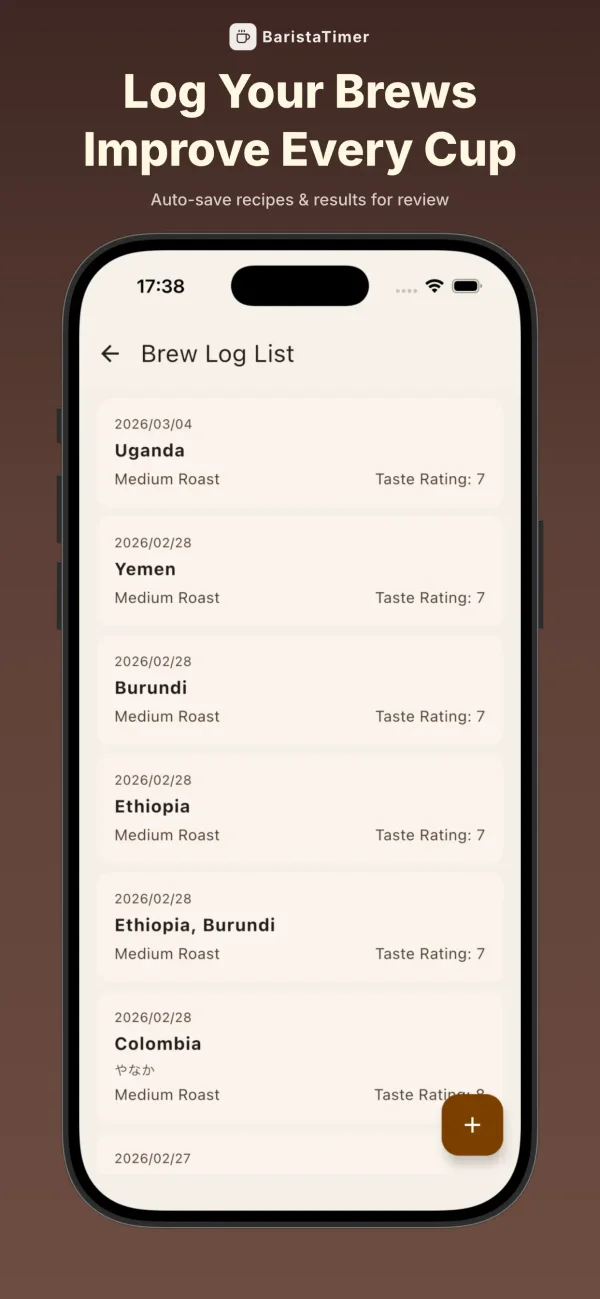
After each brew, log the details to improve your next cup.
・Bean origin, roast, grinder, grind size, dripper, filter
・Free-form notes & automatic step times
・Browse, view, and edit history
・Rate your satisfaction
■ Flavor Notes
Log the flavors you taste, in the shared language of tasting.
・As many flavors as you like from 110 attributes across three tiers
・Tap a category to expand it, then log just "Fruity" or go on to "Blackberry"
・A specific note adds its parent categories automatically
・Shown on brew details and in the share image
・Vocabulary from the Coffee Taster's Flavor Wheel by SCA and World Coffee Research
■ Share on Social Media
Share a brew (recipe, rating, times) or custom method as an image to X, Messages, and more.
A #BaristaTimer hashtag and App Store URL are attached — edit freely before posting.
■ Inventory — Never Run Out
Track how much coffee is left, in grams.
・Search to add a product; tap to adjust the amount
・Saving a new brew log subtracts the beans you just used
・Alerts when running low or out (adjustable threshold, or turn off)
・Swipe left to stop tracking (the product itself is kept)
■ Works Offline — No Internet Required
Every feature works offline — even at a remote campsite, brew your usual recipe.
■ Brew Summary & Top 10
・Stats by period (Last 30 days / Custom / All time)
・Total brews, average rating, and highest-rated cup
・Most-used method, dripper, filter, and water
・Top 10 highest-rated brews ranked
・AND filters across product, origin, dripper, and more
■ High-Rated Pattern Analysis
Histograms of ratio, brew time, temperature, and roast level show what your top-rated brews share.
・Tabs per method (4:6 / New Hybrid / Custom)
・Customizable high-rating threshold (default 8/10)
・Jump to the matching high-rated records
■ Terms of Use & Privacy Policy
Terms of Use: https://baristimer.github.io/privacy/terms
Privacy Policy: https://baristimer.github.io/privacy/
* This description is a machine translation based on the original Japanese.
Novedades
Versión 3.2.0 · 6/11/2026
[New] New Features: Detailed Timer View & Custom Method Sharing
■ Detailed Timer View
Brew while seeing every step in a list instead of the circular timer. Turn on "Detailed Timer View" in App Settings (the circular timer stays the default).
・Lists the steps from the current one to the last. Finished steps disappear, so the current step is always on top
・A bar shows the elapsed time with a mark at each step, and turns red with the overtime once you pass the total target time
・Shows coffee, ratio, and temperature, plus water as "current / final" (poured by this step / by the last step) to check against your scale
・The setting syncs across your devices ("Brew to Create" keeps the usual view)
■ Custom Method Sharing
Share a custom method as an image to X, Messages, Mail, and more.
・Tap the share button on the method's details
・One image covers coffee, ratio, total water, total time, temperature, each step's water, target time, and support text, and record defaults
・The #BaristaTimer hashtag and App Store URL are attached
■ Favorites
"Inventory" in the menu is now "Favorites", gathering your favorites in one place.
・"Favorite Origins & Varieties" and "Favorite Shops" moved here from App Settings
・Open Inventory from Favorites (inventory alerts and the product picker still open Inventory directly)
■ Improvements
・Inventory search now finds products to add by shop name as well as product name. Products not yet in your inventory show up even when you already track many products.
・In Select Shop and Select Product, tap ">" on the right to view shop or product details. Edit them with the pencil on the details screen.
・In "Edit Brew Data" for a custom method, the step list now appears only when "Edit steps" is checked. It opens automatically when you choose "Per Step" temperature or try to confirm while the steps' water doesn't add up to the total.
・In custom methods, steps with the same percentage now get matching water (within 1g), and the percentages in the timer step list and method details stay consistent with each step's grams.
・When setting step water by percent or ratio, the amount shown now matches the water you get after tapping OK, and the ratio slider no longer has two marks with the same ratio.
・Updated internal app processing.
Privacidad de la aplicación
Lo que takashi nakatani declara en App Store sobre cómo esta aplicación gestiona los datos.
-
Datos no vinculados a ti
Pueden recopilarse, pero no se vinculan a tu identidad.
- Información de contacto
- Identificadores
- Diagnóstico
Las prácticas de privacidad pueden variar, por ejemplo, según las funciones que uses o tu edad.
Información
- Vendedor
- takashi nakatani
- Categoría
- Comida y bebida
- Versión
- 3.2.0
- Actualizado
- 6/11/2026
- Publicado
- 11/4/2026
- Tamaño
- 115,4 MB
- Requiere
- iOS 18.4 o posterior
- Clasificación por edad
- 12+
- Compras en la aplicación
- Sí
- Idiomas
- Japonés, Inglés
- Copyright
- © takashi nakatani
Quizá también te guste
-
 4:6 Pour Over Timer - ShizukuComida y bebida
-
 46memoryComida y bebida
-
 DripRecipeComida y bebida
-
 46 BrewComida y bebida
-
 KOOHI | coffee noteTu diario de café y recetas
-
 ドリップタイマーComida y bebida
-
 Shizuku: Temporizador de CaféRecetas V60, 4:6 y pour over
-
 DripMasterComida y bebida
-
 CoffeaNote: Coffee Brew TimerComida y bebida
-
 MyBrewNote: Coffee JournalComida y bebida