
Binder - Journal & Notes
Notes, Plan, Organise & To-Do
Diseñada para iPhone, iPad, Mac
Gratis
- Clasificación por edad4+
- CategoríaProductividad
- DesarrolladorTomi Tiihonen
- IdiomasInglés
- Tamaño3,8 MB
Enlaza a la página oficial de App Store
Download.org no aloja ningún archivo de Binder - Journal & Notes. El botón abre la página de la aplicación en App Store, donde la publica Tomi Tiihonen. Ficha comprobada por última vez el 17/11/2026.
Capturas de pantalla

Acerca de
El desarrollador no ha proporcionado este texto en tu idioma.
Binder is your personal journal, diary, and life organiser — now on iPhone, iPad, and Mac. Everything syncs seamlessly via iCloud.
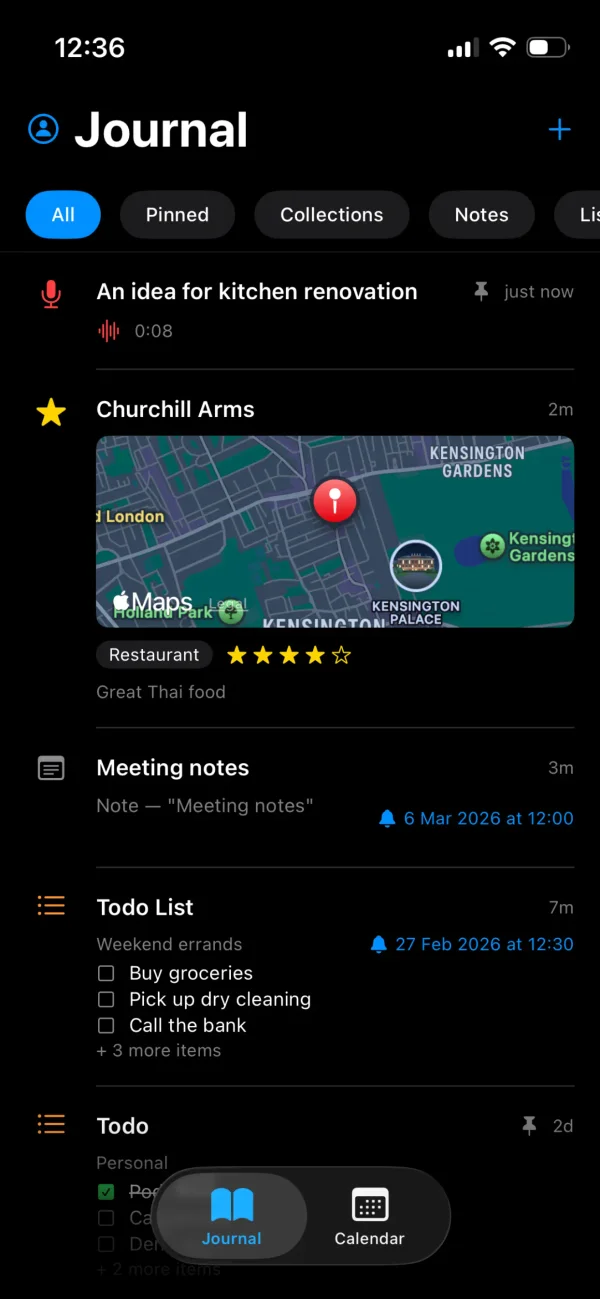
Capture every kind of moment in one place: notes, to-do lists, voice memos, links, events, recommendations, locations, photos, files, and daily mood entries. No other journal app gives you this much flexibility.
YOUR PRIVATE DIARY
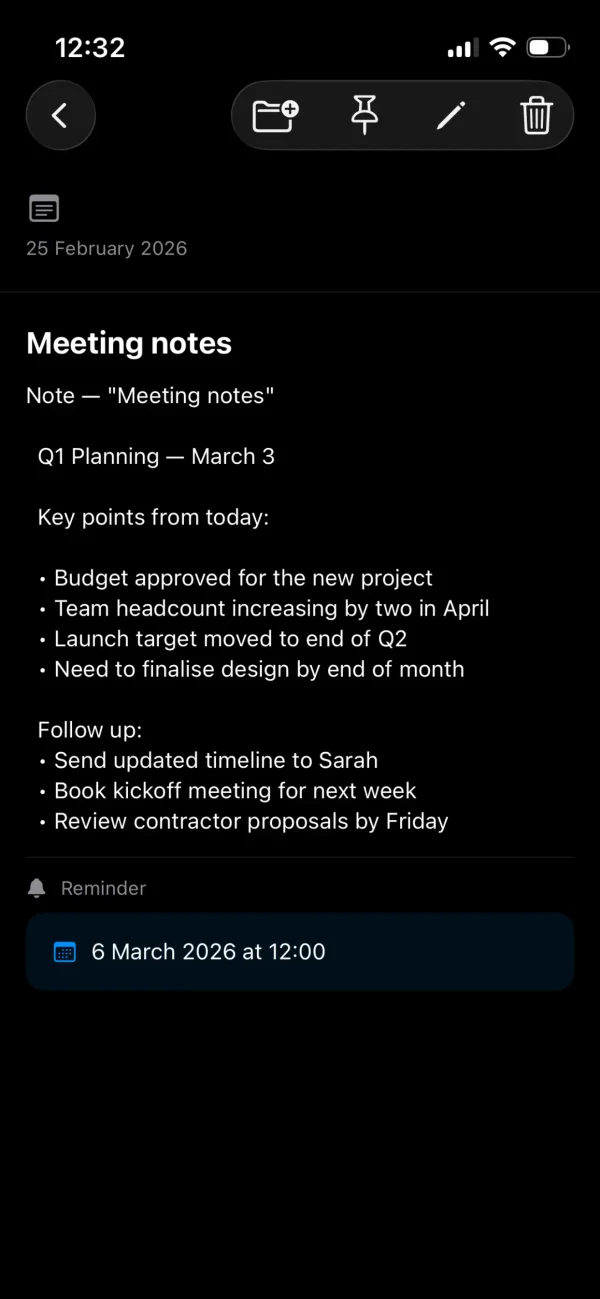
Write freely in a beautiful, distraction-free editor. Binder is your space - private, personal, and always available. Use it as a daily diary, a gratitude journal, or a place to think out loud.
TO-DO LISTS & DAILY PLANNER
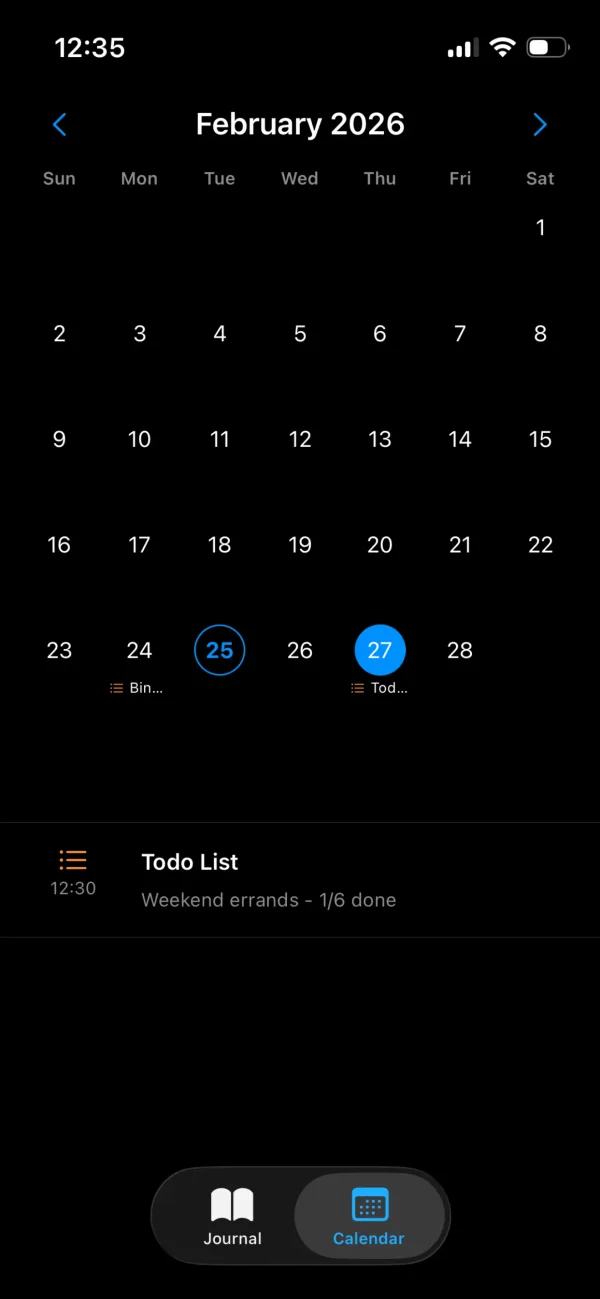
Create to-do lists with color-coded labels to prioritise at a glance. Set reminders on any entry so nothing slips through the cracks. Plan your day, track your habits, and organise your life — all in one app.
FIND ANYTHING INSTANTLY
Search across all your entries — notes, voice memo transcriptions, lists, links, and more. On iPhone, pull down to search. On Mac, use the dedicated Search tab with smart type suggestions. Even items inside Collections are searchable.
ORGANISE WITH COLLECTIONS
Group related entries into Collections — trip plans, project notes, reading lists, recipes, whatever you need. A beautiful card grid view keeps everything visual and easy to browse.
CAPTURE MORE THAN TEXT
- Voice memos
- Photo galleries with cover images
- Links that unfurl with rich previews
- Locations with map thumbnails
- Events with dates and details
- Recommendations with star ratings
- Daily mood tracking
- File attachments
ON EVERY DEVICE
Your journal lives on iPhone, iPad, and Mac. iCloud sync was rebuilt from the ground up — changes propagate instantly and conflicts resolve gracefully. Browse from the Mac menu bar or save links straight from Safari with the Share Extension.
SET REMINDERS, STAY ON TRACK
Attach reminders to any entry. Reminder notifications sync across all your devices so you never miss what matters.
Binder is free. No subscriptions, no ads, no tracking. Your data stays on your devices and in your private iCloud account — we never see it.
Just your life, beautifully organised.
Novedades
Versión 1.2.0 · 30/4/2026
The note editor is completely rewritten.
Write with inline bold and italic that appear as you type, drop in tables and edit them with full undo, and drag blocks to reorder them. Typography has been redesigned for long-form writing — wider readable column, Charter as the body font, better spacing throughout. Spell check, smarter undo, and a keyboard accessory toolbar on iOS round it out.
Embed any entry inside a note.
Notes can now contain voice memos, photos, locations, lists, events, recommendations, and location pins — and they stay live, not pasted copies. Update the original entry and the embed updates with it. Your notes can finally pull your whole journal together in one place.
Print and export to PDF.
Every entry type can now be printed or exported as a PDF, including notes with their tables and embedded entries intact. ⌘P on Mac.
Find what you're looking for, faster.
Find-in-note and find-in-list with ⌘F on Mac. A new unified search engine powers the command palette and sidebar, so results are quicker and more consistent.
Photos: faster, lighter, better.
Images are downsampled on import so your library stays compact, and existing oversized photos are migrated quietly in the background. Loading is tiered and cached, so scrolling through galleries feels instant. The full-screen photo viewer adds rotate, slideshow, and drag-and-drop import on Mac.
Plus a long list of refinements:
• In-app help for Mac, accessible from anywhere in the app
• Sort lists by colour
• Last-modified date now shows in list rows
• New Note from Spotlight or Siri (App Intent)
• ⌘N opens the new-entry sheet on Mac
• Direct delete with ⌘Z to undo
• Map thumbnails no longer re-render on scroll
• Faster import flow for photos and files
Thanks for using the app — feedback is always welcome.
Privacidad de la aplicación
Lo que Tomi Tiihonen declara en App Store sobre cómo esta aplicación gestiona los datos.
-
No se recopilan datos
El desarrollador no recopila ningún dato de esta aplicación.
Las prácticas de privacidad pueden variar, por ejemplo, según las funciones que uses o tu edad.
Información
- Vendedor
- Tomi Tiihonen
- Categoría
- Productividad
- Versión
- 1.2.0
- Actualizado
- 30/4/2026
- Publicado
- 4/3/2026
- Tamaño
- 3,8 MB
- Requiere
- iOS 26.2 o posterior
- Clasificación por edad
- 4+
- Precio
- Gratis
- Idiomas
- Inglés
- Copyright
- © 2026 Tomi Tiihonen
Quizá también te guste
-
 Quick Notes: Ideas & TagsApunta, fija y etiqueta todo
-
 JustYou: Private Notes ChatProductividad
-
 Mantle LauncherProductividad
-
 Rune Secure NotesProductividad
-
 MultiMind: AI CouncilProductividad
-
 Brain Dump TDAH: BrainSortPlanificador diario para TDAH
-
 DayBe: Ai Daily PlannerProductividad
-
 Amano: DNI, NIE y documentosPasaporte, TIE y padrón a mano
-
 Organizer *CliffProductividad
-
 CalendaricControl your time!