
Chromaform
Professional RAW Photo Editor
Diseñada para iPhone, iPad
Gratis · Compras en la aplicación
- Clasificación por edad4+
- CategoríaFoto y vídeo
- DesarrolladorChromaform, Inc.
- IdiomasInglés
- Tamaño34,8 MB
Enlaza a la página oficial de App Store
Download.org no aloja ningún archivo de Chromaform. El botón abre la página de la aplicación en App Store, donde la publica Chromaform, Inc. Ficha comprobada por última vez el 13/11/2026.
Capturas de pantalla
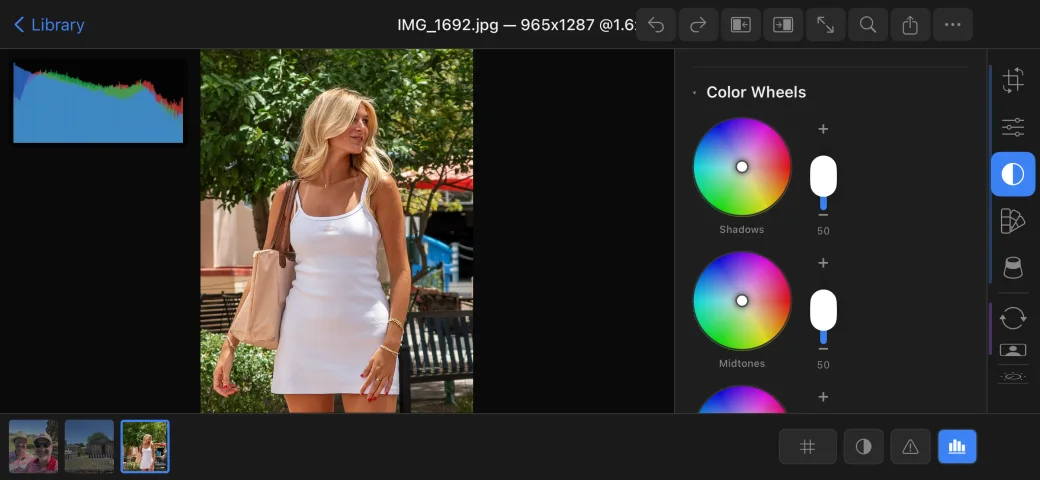
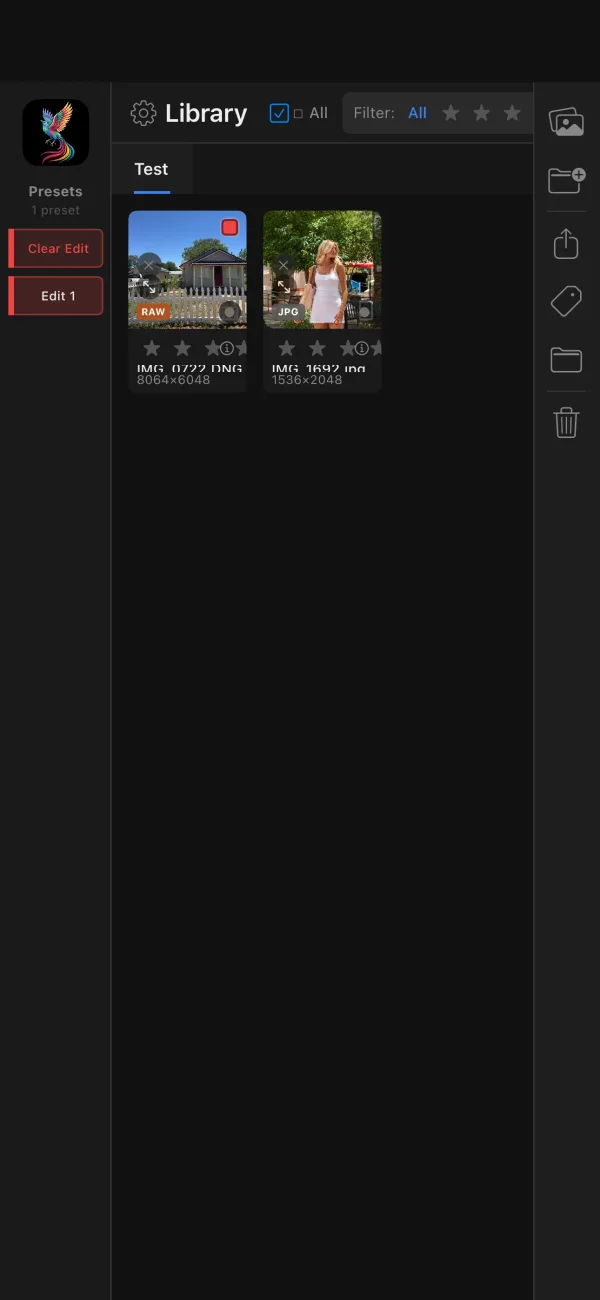
Acerca de
El desarrollador no ha proporcionado este texto en tu idioma.
Chromaform is a professional-grade RAW photo editor for photographers who demand precision, speed, and total creative control — with a full suite of on-device AI tools that never send your photos to the cloud.
REAL-TIME RAW EDITING
Open DNG, CR3, NEF, ARW, and other major camera RAW formats with true RAW processing. Exposure and recovery work directly from sensor data — no clipping, no compromise. Every adjustment renders live on the GPU through a Vulkan pipeline (vkdt + MoltenVK) and Metal-accelerated Core Image.
COMPLETE ADJUSTMENT TOOLKIT
• Light: Exposure, Contrast, Highlights, Shadows + an interactive per-channel Tone Curve
• Color: Temperature, Tint, Vibrance, Saturation
• Effects: Texture, Clarity, Dehaze, Vignette
• Detail: Sharpening, Noise Reduction, and Neural Denoise
• Optics: Chromatic Aberration removal
Fine-tune any slider with +/− buttons and reset any section with one tap.
COLOR GRADING
Cinema-style color wheels for shadows, midtones, and highlights. Grade the whole frame, or apply grades selectively to the foreground, background, or a gradient region.
ON-DEVICE AI TOOLKIT
• Generative Erase — remove unwanted objects and let the model paint in a clean background
• Smart Masking — tap any subject to select it with Segment Anything Model 2.1, then adjust just that region
• Recolor Clothing — automatically detect garments and recolor them to any hue
• Relight — add up to five virtual lights and drag them across the scene to reshape the lighting
• Portrait — face-aware adjustments
• Match — transfer the look of any reference photo with neural analysis
• Auto Adjust — one tap analyzes the scene with Apple's Vision framework (classification, face detection, saliency) for optimal exposure, white balance, and color
MASKING & GRADIENTS
Combine subject masks with linear, radial, and rectangular gradient masks. Paint masks in or out by hand, feather the edges, and apply any adjustment or color grade to the masked area only.
PRESETS & LUTS
Nine built-in looks: Natural, Vivid, Film Warm, Film Cool, Cinematic, B&W Classic, B&W High Contrast, Vintage Fade, and Matte. Import your own .cube 3D LUTs for custom film emulations.
CREATIVE EFFECTS
Add atmosphere with the Water tool — rain drops and streaks.
PIPELINE CONTROL
See every stage of the processing pipeline and toggle any phase on or off to understand exactly how your edit is built.
CLIPPING VISUALIZATION
Toggle the Clip overlay to see blown highlights (red) and crushed shadows (blue) — essential for exposure-critical work.
NON-DESTRUCTIVE WORKFLOW
Your originals are never modified. Edits are stored as lightweight recipes — reopen any image with your edits intact, or reset to original at any time.
PROJECT-BASED ORGANIZATION
Group photos into projects, rate with stars, filter by rating, and copy, paste, or batch-apply edit recipes across an entire shoot. Review full-screen in the loupe with pinch-to-zoom.
PRIVATE BY DESIGN
The entire pipeline runs on-device with MoltenVK and Metal. Your photos never leave your device.
Privacy Policy: https://chromaform.art/privacy
Terms of Use: https://www.apple.com/legal/internet-services/itunes/dev/stdeula/
Novedades
Versión v1.1 · 30/6/2026
New tools and refinements in this release:
• Recolor Clothing — automatically detect garments and recolor them to any hue
• Gradient Masks — linear, radial, and rectangular masks for any adjustment or color grade
• Selective Color Grading — apply color-wheel grades to just the foreground, background, or a gradient region
• Relight — drag virtual lights across the scene to reshape the lighting in real time
• Pipeline View — toggle any processing stage on or off to see how your edit is built
• Loupe review with pinch-to-zoom in the library
Plus performance improvements and refinements throughout. Thank you for using Chromaform!
Privacidad de la aplicación
Lo que Chromaform, Inc. declara en App Store sobre cómo esta aplicación gestiona los datos.
-
No se recopilan datos
El desarrollador no recopila ningún dato de esta aplicación.
Las prácticas de privacidad pueden variar, por ejemplo, según las funciones que uses o tu edad.
Información
- Vendedor
- Chromaform Inc.
- Categoría
- Foto y vídeo
- Versión
- v1.1
- Actualizado
- 30/6/2026
- Publicado
- 21/6/2026
- Tamaño
- 34,8 MB
- Requiere
- iOS 16.0 o posterior
- Clasificación por edad
- 4+
- Precio
- Gratis
- Compras en la aplicación
- Sí
- Idiomas
- Inglés
- Copyright
- © 2026 Chromaform, Inc.
Quizá también te guste
-
 Prism: Raw Photo EditorFoto y vídeo
-
 Toned Motion: Filtros de VídeoGrano de película y color
-
 Maple: Raw Photo EditorFoto y vídeo
-
 Daguerre: Marcos para FotosBorde blanco y marca de agua
-
 Lightfield StudioReenfoca tras el disparo
-
 HUEOFoto y vídeo
-
 IvoryCam - White Beauty CameraFoto y vídeo
-
 Fast ShutterFoto y vídeo
-
 NoirGrade: Cinematic LUTsEtalonaje para vídeo Log
-
 GRADE — Live GradingColor en rodaje a cámara y LUT