Custom PDF
Diseñada para iPhone, iPad, iPod touch
Gratis · Compras en la aplicación
- Clasificación por edad4+
- CategoríaUtilidades
- DesarrolladorChi Chung Wong
- IdiomasInglés+ 2 más
- Tamaño40,0 MB
Enlaza a la página oficial de App Store
Download.org no aloja ningún archivo de Custom PDF. El botón abre la página de la aplicación en App Store, donde la publica Chi Chung Wong. Ficha comprobada por última vez el 16/11/2026.
Capturas de pantalla


Acerca de
El desarrollador no ha proporcionado este texto en tu idioma.
Custom PDF is a powerful yet intuitive app designed for anyone who needs to create professional PDF documents with custom layouts. Whether you're combining multiple PDFs, arranging images, or creating photo collages, Custom PDF gives you complete control over your document layout.
KEY FEATURES:
Flexible Grid Layouts
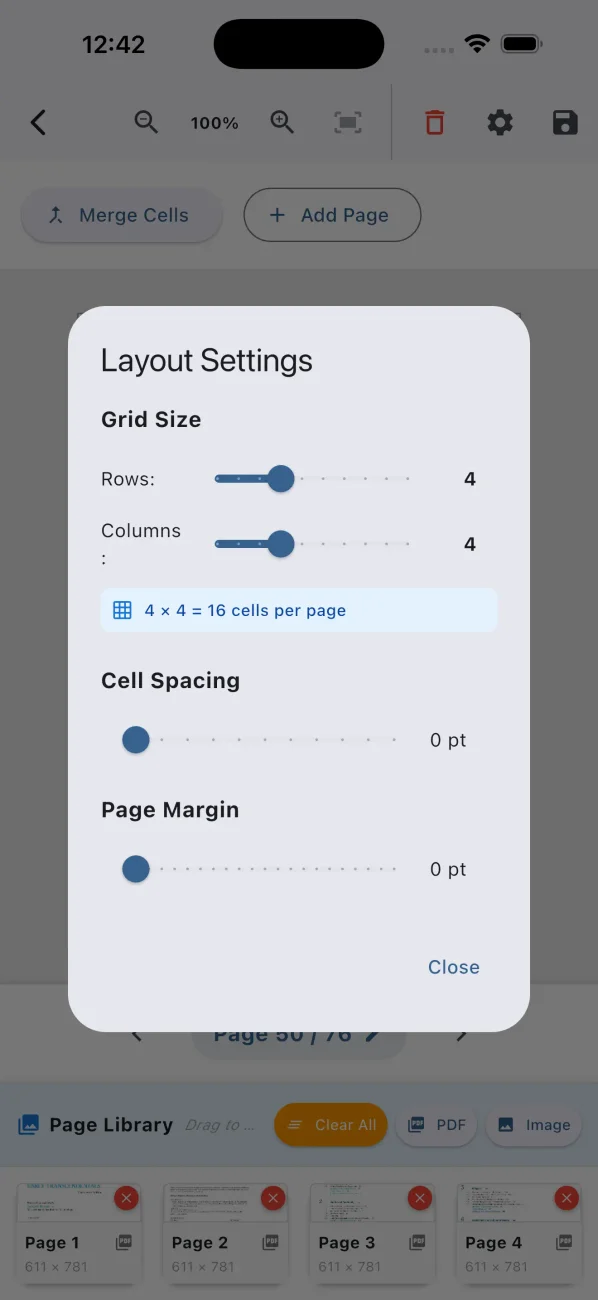
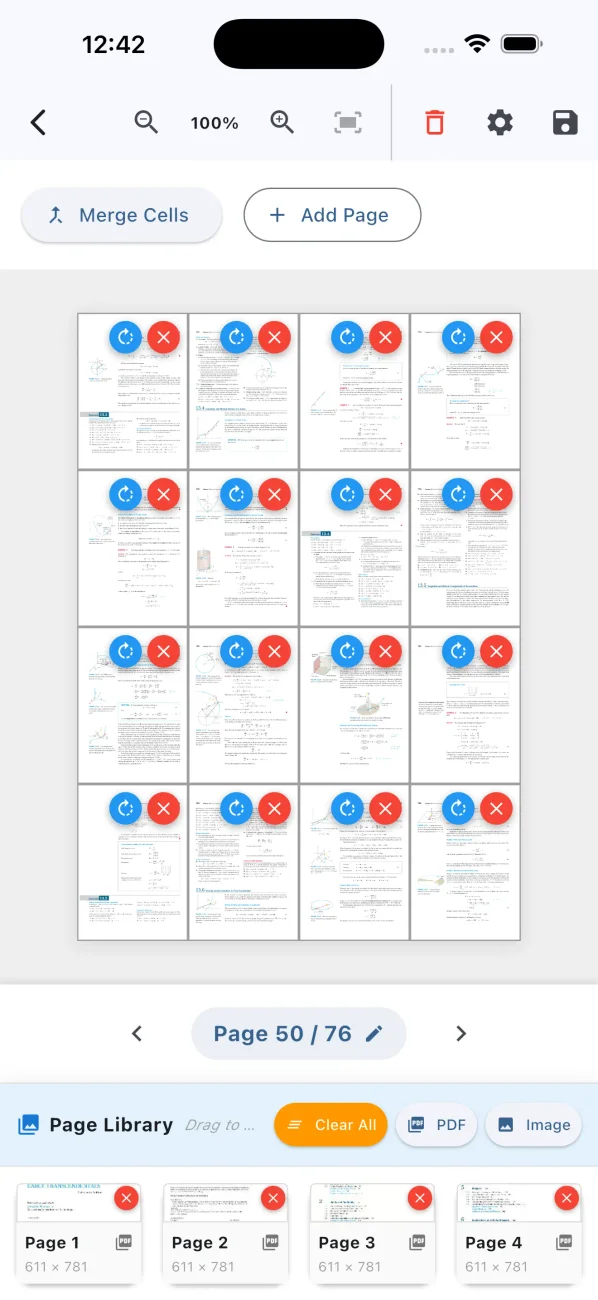
Design your PDF pages with customizable grid systems. Choose from various grid sizes including 2x2, 3x3, 4x4, and more. Adjust the number of rows and columns to fit your needs perfectly.
Import Multiple Sources
Import PDF documents and extract individual pages, or add images directly from your device. All imported content appears in your Page Library, ready to be arranged however you want.
Intelligent Cell Merging
Create unique layouts by merging adjacent cells. Whether you need a large header area, side-by-side comparisons, or custom photo arrangements, the cell merge feature makes it simple to design exactly what you envision.
Drag and Drop Interface
Arranging your content is as easy as drag and drop. Move pages from your Page Library to the grid, reorder them, and see your layout take shape in real-time.
Customizable Spacing and Margins
Fine-tune your documents with adjustable cell spacing and page margins. Control the white space between elements to create clean, professional-looking PDFs.
Multiple Output Pages
Not limited to a single page. Create multi-page PDF documents with different layouts on each page. Perfect for comprehensive reports, photo albums, or presentations.
Preview Before Export
Review your entire document before exporting. The preview feature lets you see exactly how your PDF will look, so you can make adjustments before saving.
Project Management
Save your work as projects. Create multiple projects, rename them, and come back to edit them anytime. Your work is automatically saved locally on your device.
Professional Export
Export high-quality PDF documents ready for sharing, printing, or archiving. Your exported files maintain the quality of your original content.
Multi-Language Support
Available in English, Traditional Chinese, and Japanese. The app automatically adapts to your device's language settings.
PERFECT FOR:
Combining multiple PDF documents into organized layouts
Creating photo collages and albums
Designing custom worksheets and educational materials
Arranging product catalogs and portfolios
Making comparison sheets and reports
Organizing receipts and documents
Creating presentations and handouts
EASY TO USE:
Create a new project and give it a name
Import PDF files or images
Drag pages from your library to the grid
Adjust layout settings and merge cells as needed
Preview your document
Export as PDF
Whether you're a student organizing study materials, a professional creating reports, a photographer building portfolios, or anyone who needs flexible PDF creation, Custom PDF provides the tools you need without complexity.
All data is stored locally on your device, ensuring your privacy and allowing you to work offline. No account registration required. No cloud storage. Just simple, powerful PDF creation at your fingertips.
Download Custom PDF today and start creating beautifully organized PDF documents your way.
Pricacy Policy: https://lessismore521.blogspot.com/2025/12/privacy-policy-for-custom-pdf.html
Terms of service: https://www.apple.com/legal/internet-services/itunes/dev/stdeula/
Privacidad de la aplicación
Lo que Chi Chung Wong declara en App Store sobre cómo esta aplicación gestiona los datos.
-
Datos usados para rastrearte
Pueden usarse para rastrearte en aplicaciones y sitios web propiedad de otras empresas.
- Identificadores
-
Datos vinculados a ti
Pueden recopilarse y vincularse a tu identidad.
- Identificadores
Las prácticas de privacidad pueden variar, por ejemplo, según las funciones que uses o tu edad.
Información
- Vendedor
- Chi Chung Wong
- Categoría
- Utilidades
- Versión
- 1.0.0
- Actualizado
- 5/1/2026
- Publicado
- 4/1/2026
- Tamaño
- 40,0 MB
- Requiere
- iOS 12.0 o posterior
- Clasificación por edad
- 4+
- Precio
- Gratis
- Compras en la aplicación
- Sí
- Idiomas
- Inglés, Japonés, Chino tradicional
- Copyright
- © 2025 Less Is More
Quizá también te guste
-
 Gramo - PDFUtilidades
-
 Onehand BooknotesUtilidades
-
 TarjomehUtilidades
-
 Kanji WidgetsUtilidades
-
 PDF Merger - Combine & JoinUtilidades
-
 Dock: Reloj StandBy y PlanetasPantalla de carga y mesilla
-
 Clean Master - Phone CleanersUtilidades
-
 Photo Print LayoutFotos en tamaño exacto
-
 BookletPro: PDF to BookletUtilidades
-
 Random Things GeneratorUtilidades