
Gig Message
Custom message templates
Diseñada para iPhone, iPad, iPod touch
0,99 €
- Clasificación por edad4+
- CategoríaProductividad
- DesarrolladorPaul Hartley
- IdiomasInglés
- Tamaño13,0 MB
Enlaza a la página oficial de App Store
Download.org no aloja ningún archivo de Gig Message. El botón abre la página de la aplicación en App Store, donde la publica Paul Hartley. Ficha comprobada por última vez el 20/11/2026.
Capturas de pantalla



Acerca de
El desarrollador no ha proporcionado este texto en tu idioma.
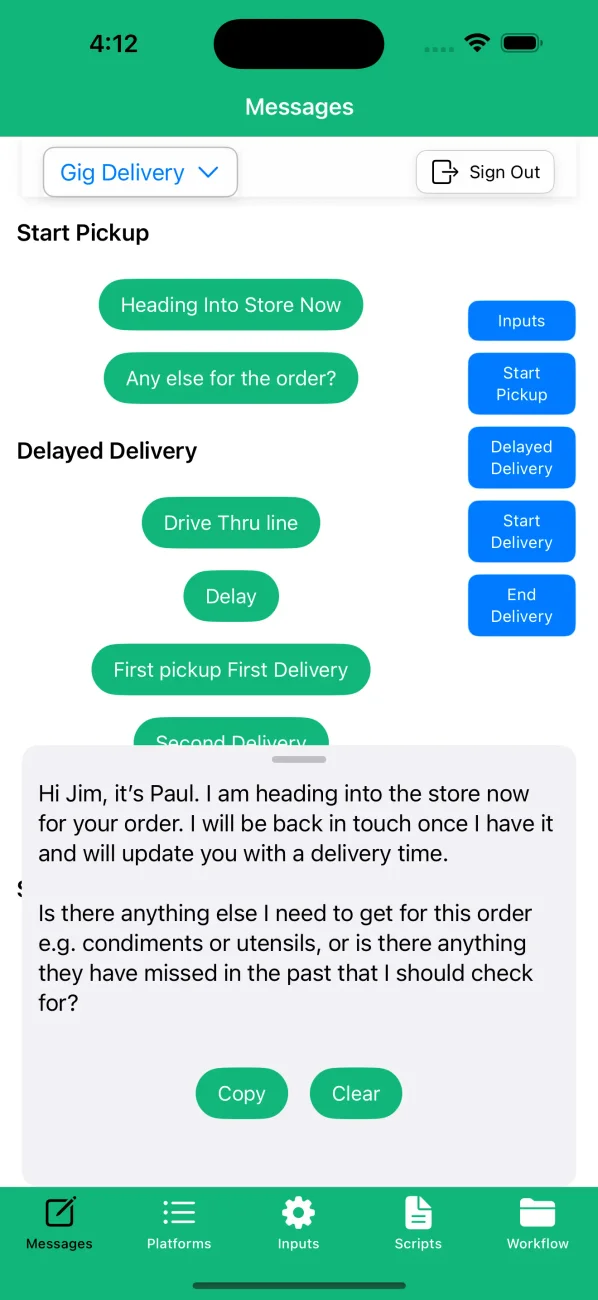
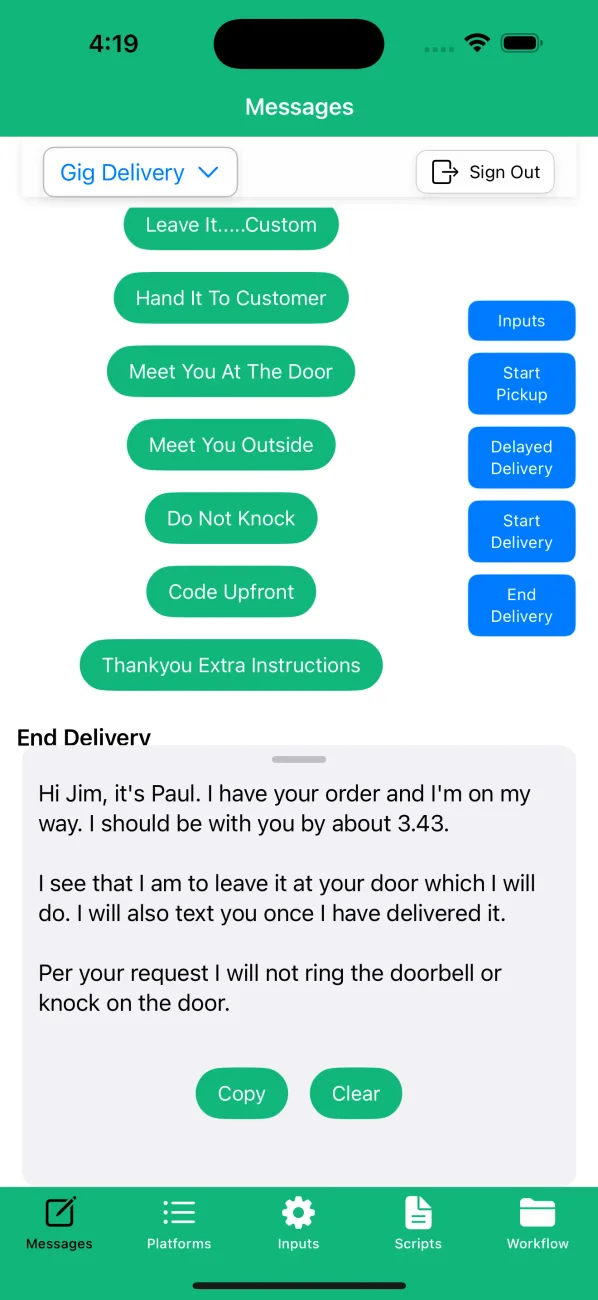
Gig Message is a powerful tool for anyone who sends custom or personalized template messages on a recurring basis.
With Gig Message, you can create, edit, and customize your scripts, organize them into logical workflows, and easily copy them into messages, email, or third-party apps—without hunting through the Notes app or manually re-copying templates.
The app comes pre-loaded with scripts and workflows we use from our own gig food delivery business. You can use them right out of the box, or tailor them to suit your own needs. We’ve found that making it easier to communicate with customers at every stage of the process leads to higher ratings, more tips, and less wasted time waiting at the door.
If you’re using Gig Message for gig deliveries, we recommend starting by scrolling to the bottom of the Messages screen and tapping “Show/Hide Scripts” to preview the wording and format of the templates. Then, try generating a few messages in different delivery stages to see if the inputs, flow, and scripts work for you....and if they don't you can change them to fit you.
The real strength of Gig Message is its flexibility.
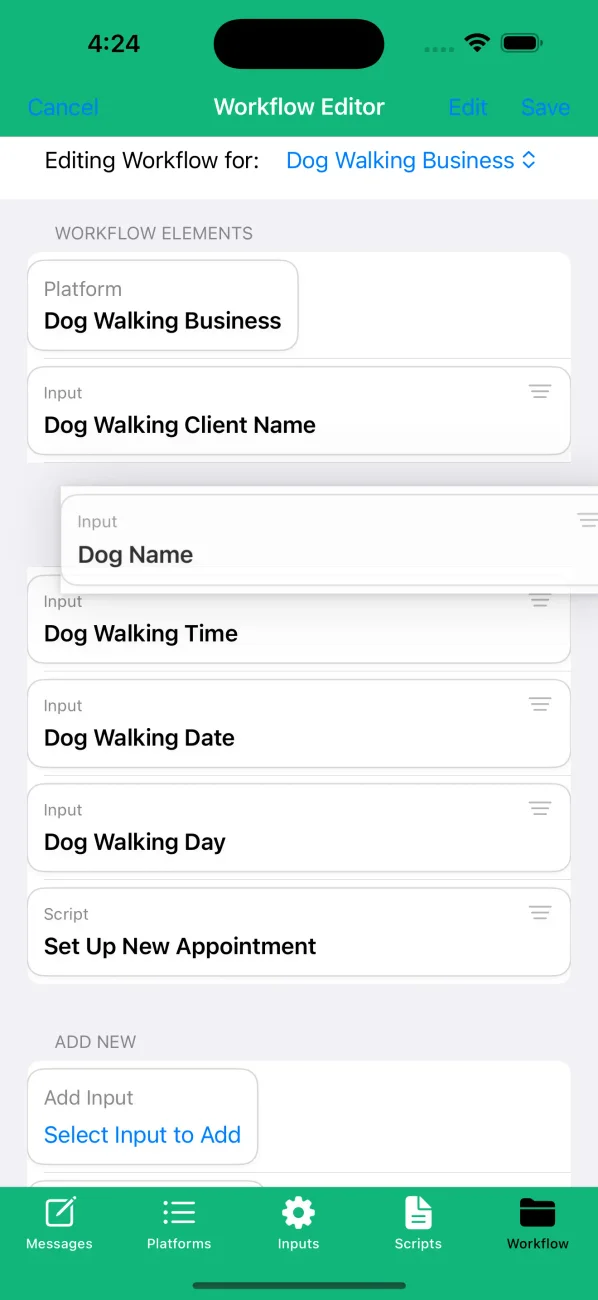
• Use the Platforms tab in the bottom navigation bar to create entirely new workflows for anything—dog walking, pool service, car or home rentals, appointment setting, even recurring reminders for family members. The pre-loaded workflow is for Gig Delivery, but you can create as many as you like.
• Use the Inputs tab to create new input fields that can be used in any workflow. The placeholder text you enter becomes the field name, and whatever you type into that field will appear wherever you’ve inserted that placeholder into a script.
• Use the Scripts tab to create brand-new scripts or edit existing ones. Tap the pencil icon to edit, or tap the trash icon to delete. When creating a script, the “Button Title” is what will appear on the workflow button, and the script content is what appears when you tap it. The plus (+) icon inserts any input field you’ve already created directly into your script at the cursor position.
• Use the Workflow tab to put it all together. Select the workflow you want to edit from the “Editing Workflow For” menu. You can add sections (which create quick-scroll buttons), add inputs and scripts, reorder items by dragging, and delete elements by swiping left.
We’d love to hear from you! Email Support@GigMessage.com with your questions, feedback, or suggestions for new features. if you need help creating your own personalized workflows we would love to hear from you and can work with you by email, phone or zoom.
Novedades
Versión 3.4 · 2/12/2025
Fixed an issue so that you can make changes to the original seeded scripts for Gig Delivery.
Privacidad de la aplicación
Lo que Paul Hartley declara en App Store sobre cómo esta aplicación gestiona los datos.
-
Datos vinculados a ti
Pueden recopilarse y vincularse a tu identidad.
- Información de contacto
- Contenido del usuario
- Identificadores
Las prácticas de privacidad pueden variar, por ejemplo, según las funciones que uses o tu edad.
Información
- Vendedor
- Paul Hartley
- Categoría
- Productividad
- Versión
- 3.4
- Actualizado
- 2/12/2025
- Publicado
- 5/8/2025
- Tamaño
- 13,0 MB
- Requiere
- iOS 15.6 o posterior
- Clasificación por edad
- 4+
- Precio
- 0,99 €
- Idiomas
- Inglés
- Copyright
- © Unconstrained Education LLC
Quizá también te guste
-
 AI Guide Book - AI LiteracyProductividad
-
 SkyTrack LiveProductividad
-
 Docs24 - Organize documentsProductividad
-
 Docu Boss for OneDriveProductividad
-
 Nota: Gestiona plantillasCopia y comparte plantillas
-
 TalkProductividad
-
 ChatInbox: Mail por remitenteCorreo ordenado por personas
-
 Lumia Stream LinkProductividad
-
 Urbanmount For ProsProductividad
-
 Texty Pro - Business TextingProductividad