GlitchShredder
Glitch, Stutter & Bitcrush FX
Diseñada para iPhone, iPad, iPod touch
5,99 €
- Clasificación por edad4+
- CategoríaMúsica
- DesarrolladorDiego Capoccitti
- Tamaño11,1 MB
Enlaza a la página oficial de App Store
Download.org no aloja ningún archivo de GlitchShredder. El botón abre la página de la aplicación en App Store, donde la publica Diego Capoccitti. Ficha comprobada por última vez el 12/11/2026.
Capturas de pantalla
Acerca de
El desarrollador no ha proporcionado este texto en tu idioma.
GlitchShredder is a glitch and stutter effect for iPhone and iPad, available as a standalone app and as an AUv3 plugin for GarageBand, AUM, Cubasis, Logic Pro for iPad and other compatible hosts.
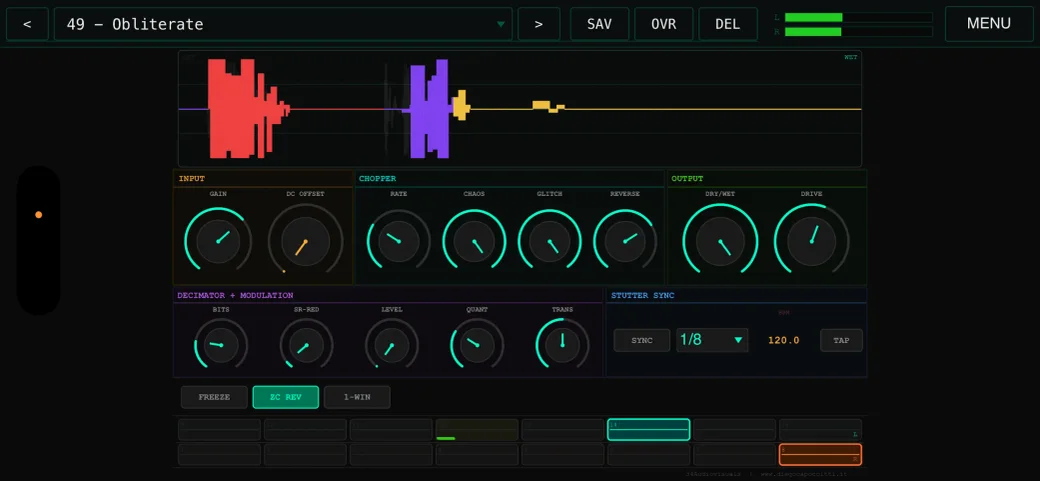
At its core is the Chopper: it captures fragments of the incoming audio, repeats, reverses and recombines them in real time, turning any source — vocals, drums, synths, guitar — into unpredictable glitch textures or tightly synced stutter rhythms.
KEY FEATURES
• Independent stereo chopper: L/R channels with 16 segment slots each, for natural glitch divergence and organic stereo width.
• Chaos and Glitch Probability: from predictable behavior to total chaos, with spontaneous segment jumps adjustable in probability and rate.
• Reverse Probability and ZC Reverse: random segment reversal, or ping-pong mode that flips direction at the end of every segment.
• Stutter Sync: automatic sync to the host tempo (AudioPlayHead) with manual BPM fallback and built-in Tap Tempo. 9 rhythmic subdivisions, from 1/4 to 1/64 plus triplets and dotted values.
• Quantized Jumps: locks spontaneous glitch jumps to the beat grid for chaos that stays in time.
• Transient Snap: detects transients in the input signal and forces a new segment on every hit, with adjustable sensitivity threshold.
• Segment Leveler: per-segment RMS normalization to smooth out level jumps between loud and quiet fragments.
• Bit Crusher and Sample Rate Reduction: post-chopper digital degradation for lo-fi textures, from subtle to destroyed.
• Drive: output soft clipper with a tanh curve, for progressive, controlled saturation without hard clipping.
• Equal-power Dry/Wet and independent Input Gain control.
• Single Win mode: a single capture slot for a continuous loop, freeze/looper style.
• MIDI: any Note On triggers freeze; notes C3–D#4 jump directly to slots 1–16.
• Real-time visualization: oscilloscope with dry/wet overlay colored by active slot, plus a 2×16 segment grid with waveform preview.
PRESETS AND INTERFACE
GlitchShredder ships with a ready-to-use factory preset library, managed through the 34AudioLibrary system (.a34 format): folder organization, quick search, and the ability to save your own settings. Presets are compatible with the desktop version of the plugin.
The touch-first interface offers knobs with vertical drag for coarse adjustment, horizontal drag for fine adjustment, double-tap to reset to default, and long-press for manual value entry. The panel supports pinch-to-zoom up to 2.5x, while the preset bar and controls stay accessible at all times. A live help pop-up on the knob or a bottom info bar (your choice) shows the description of each parameter.
WHO IT'S FOR
GlitchShredder is built for producers, DJs, sound designers and musicians who want to add glitch, stutter, granular or lo-fi elements to their productions directly from iPhone or iPad — in the studio or on the go, standalone or integrated into your favorite AUv3 setup.
No account required, no connection needed to use the plugin.
Novedades
Versión 1.1.1 · 10/9/2026
- UI Bugfix
Privacidad de la aplicación
Lo que Diego Capoccitti declara en App Store sobre cómo esta aplicación gestiona los datos.
-
No se recopilan datos
El desarrollador no recopila ningún dato de esta aplicación.
Las prácticas de privacidad pueden variar, por ejemplo, según las funciones que uses o tu edad.
Información
- Vendedor
- Diego Capoccitti
- Categoría
- Música
- Versión
- 1.1.1
- Actualizado
- 10/9/2026
- Publicado
- 10/9/2026
- Tamaño
- 11,1 MB
- Requiere
- iOS 15.0 o posterior
- Clasificación por edad
- 4+
- Precio
- 5,99 €
- Copyright
- © 2026 Diego Capoccitti