Grainsmith Field
Granular synth & AUv3 effect
Diseñada para iPhone, iPad
6,99 €
- Clasificación por edad4+
- CategoríaMúsica
- DesarrolladorPlastic Factory LLC
- Tamaño82,3 MB
Enlaza a la página oficial de App Store
Download.org no aloja ningún archivo de Grainsmith Field. El botón abre la página de la aplicación en App Store, donde la publica Plastic Factory LLC. Ficha comprobada por última vez el 28/11/2026.
Capturas de pantalla


Acerca de
El desarrollador no ha proporcionado este texto en tu idioma.
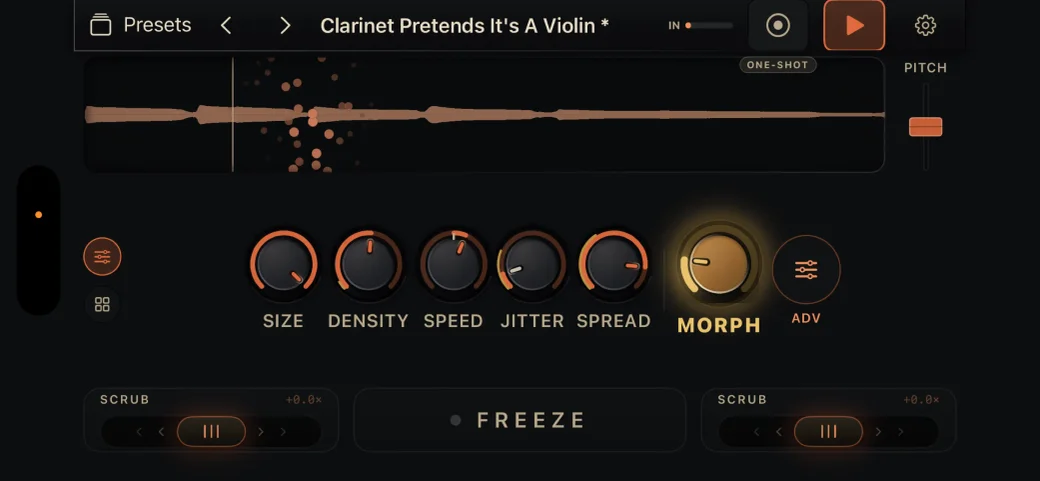
Grainsmith Field is a granular instrument for iPad and iPhone. Load a sound or record one live, then pull it apart into grains. Stretch and scatter it until it stops sounding like the source, or pitch it and play it like an instrument.
It shares its granular engine with our desktop Grainsmith plugin, but it's rebuilt for touch. Field is a single multitouch screen: four XY pads control paired parameters (Density and Size, Jitter and Spread, Pitch and Reverse, Cutoff and Resonance), and a Morph control sweeps several at once.
THREE PLAYHEADS
Run up to three independent grain streams from one sample at the same time. Each head has its own position, speed, pitch, level, pan, grain size, and spread. Grab a playhead line on the waveform to move it independently, or move them as a group. Double-tap to gather them. Set a second head a fifth or an octave away and the streams blend into a single granular texture.
MODULATION
Six modulation slots drive the controls: LFOs and Euclidean patterns with per-route depth, assigned by long-pressing a knob. The MOVE dial sets the Morph macro itself in motion, and each destination drifts on its own phase. Rates sync to tempo, in the app or from the host clock.
RECORD AND MANGLE
Capture audio from your hardware input and granulate it as it comes in, or loop a phrase and let the engine chew on it. Scrub the waveform directly. Freeze the grain cloud to hold a sound for as long as you want. Run the stereo delay to smear the grain tails into echoes; it syncs to tempo too. Export captures as WAV to the Files app.
RECORD YOUR PERFORMANCE
Start a recording from the presets menu and everything you play is captured to a WAV file. Keep playing through app switches and screen locks; a Lock Screen Live Activity shows while recording runs. Recordings save to the Files app and share straight from Field.
PLAY IT AS AN INSTRUMENT
Switch to Instrument mode and play the grain engine from a MIDI keyboard: four-voice polyphony, an attack/release envelope, and a root-note control. The pitch ribbon snaps to musical intervals: Free, Chromatic, Scale, Octaves, or Oct+5ths, with twelve scale options and a probability control. Works with hardware MIDI in the standalone app and with host MIDI in AUv3.
USE IT IN YOUR HOST
The AUv3 music effect loads in AUM, Logic for iPad, and other AUv3 hosts. Parameters are exposed for host automation and MIDI learn. Your patch saves and restores with the session, including head count, every per-head control, the modulation slots, and pitch snap mode.
ALSO IN THE BOX
- Ten factory presets grouped by character, with a browser and a Favorites section for your own
- Background audio: the standalone keeps playing when you switch apps
- Reverb, stereo delay with tempo sync, filter, grain-shape windows, pitch randomization
- Runs on iPhone with a compact layout
No account and no subscription. Field collects no data.
Novedades
Versión 1.6.2 · 27/11/2026
GENTLER STOP AND START
Stop now fades the grains out and Play fades them back in, while delay and reverb tails keep ringing. Set the fade length, from 0 to 10 seconds, in Settings > Performance. Thanks to cellicello for the request.
LEVEL AND HOST CONTROL
A new main output Level in Settings > Performance. Level, Fade Time, Record and Play can all be mapped in your AUv3 host.
PITCH ON IPHONE
The pitch control on iPhone is now a readout. Tap it for a full-size panel with a wide pitch slider, step buttons, mode, scale, key and grain level.
NORMALIZE
Long-press the waveform and choose Normalize to bring a quiet recording up to full level. Undo Normalize puts it back.
FIXES
- Importing a file on iPhone no longer freezes the screen.
- Presets with "/" in the name now save.
- Tapping the waveform starts playback from the new spot right away.
- Copy, Export and saved sessions no longer change a sample's pitch after the host changes sample rate.
- Performance chips now show in short hosted windows.
Privacidad de la aplicación
Lo que Plastic Factory LLC declara en App Store sobre cómo esta aplicación gestiona los datos.
-
No se recopilan datos
El desarrollador no recopila ningún dato de esta aplicación.
Las prácticas de privacidad pueden variar, por ejemplo, según las funciones que uses o tu edad.
Información
- Vendedor
- Plastic Factory LLC
- Categoría
- Música
- Versión
- 1.6.2
- Actualizado
- 27/11/2026
- Publicado
- 25/6/2026
- Tamaño
- 82,3 MB
- Requiere
- iOS 16.0 o posterior
- Clasificación por edad
- 4+
- Precio
- 6,99 €
- Copyright
- © 2026 Plastic Factory LLC