
- Clasificación por edad4+
- CategoríaEducación
- DesarrolladorLuis Angel Mamani Mamani
- IdiomasInglés
- Tamaño5,8 MB
Enlaza a la página oficial de App Store
Download.org no aloja ningún archivo de ieyLearning. El botón abre la página de la aplicación en App Store, donde la publica Luis Angel Mamani Mamani. Ficha comprobada por última vez el 18/11/2026.
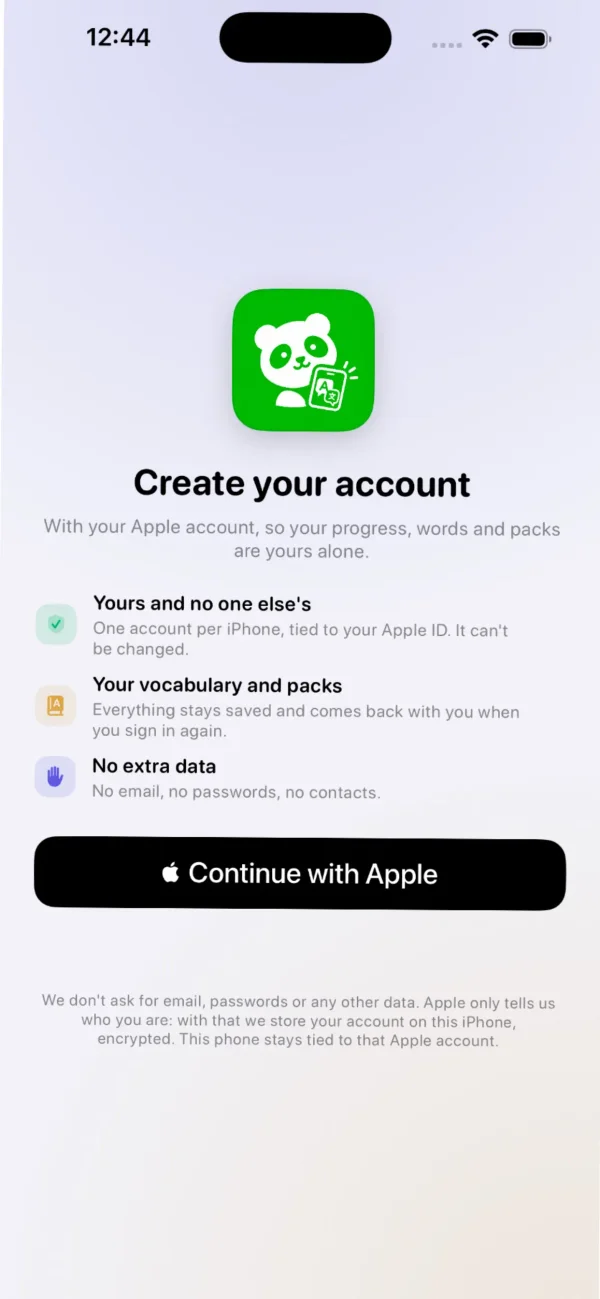
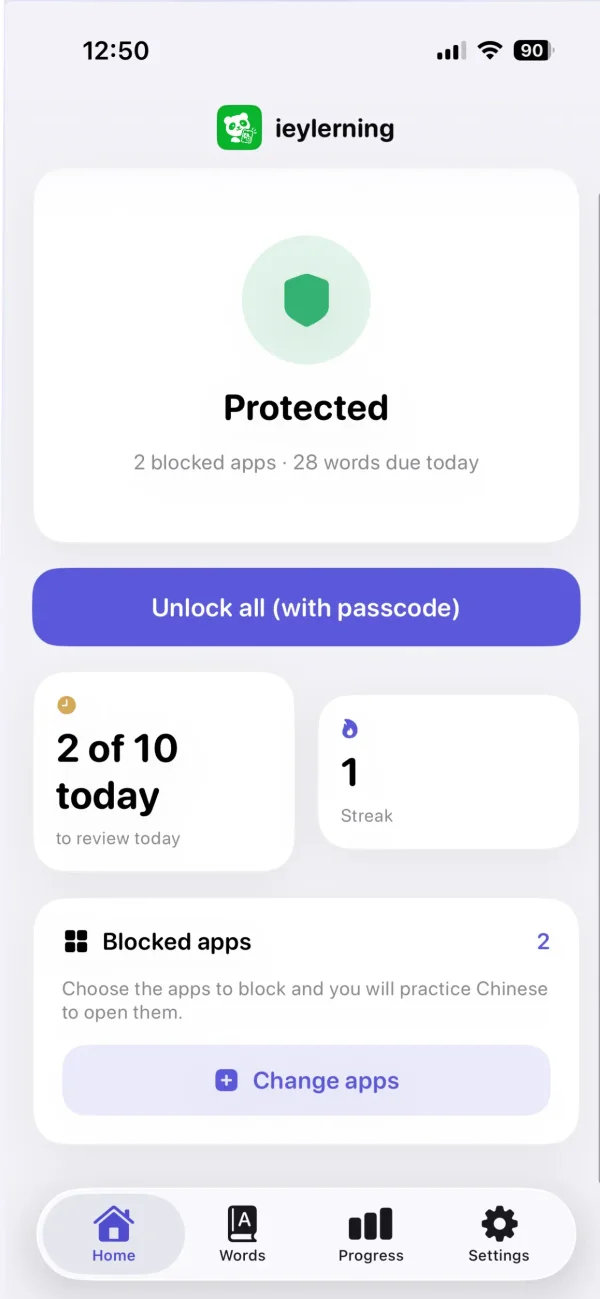
Capturas de pantalla
Acerca de
El desarrollador no ha proporcionado este texto en tu idioma.
Turn a distraction into a moment to learn.
ieyLearning is a language-learning app with an optional Screen Time pause for the apps that pull you away. Study a few cards, then return to what you were doing. No account required.
WHAT YOU LEARN
- 521 words in Chinese, English, Spanish and Portuguese, with the same list in all four languages: choose what you are learning and everything adapts.
- 14 categories and 83 groups: food, travel, family, time, work, body, home, nature and more.
- Every word with its reading (pinyin for Chinese) and its translations into the other languages.
- 216 grammar questions in 36 groups, with six questions and an explanation in each one.
- Grammar by level: A1, A2 and B1 for Spanish, English and Portuguese; HSK 1, 2 and 3 for Chinese.
- Daily reviews and a study streak.
- All word packs and all the grammar are included.
GROUPS FOR EVERY MODE
Words, Matching and Grammar each have their own groups and language pair. See every group, open it to check its words or questions, switch it on or off, rename it, delete it, or create a new one. Add words and questions without leaving the group. The groups that come with the app can be edited just like your own.
THE PAUSE
Grant the Screen Time permission when the app asks for it, choose the apps, categories or websites you want to pause, and create a passcode. In Settings you choose the duration; in "What you are asked" you pick the groups and change the unlock method. When the shield appears, tap Practice and then the notification, or open ieyLearning manually, to complete the challenge. Reopening the protected app depends on a compatible association; you can also return manually.
Unlock with a word card, matching pairs, a grammar question, your passcode, words plus passcode, or Face ID as a shortcut for the passcode. Each unlock keeps its own timer. The passcode can be protected with Face ID, and a re-lock countdown warns you before the shield returns.
YOUR DATA STAYS ON YOUR IPHONE
Your library and progress are stored on your iPhone. There are no servers, no analytics and no tracking. The Apple activity report is processed inside its extension and is never sent anywhere. An account is optional: you can use the whole app without signing in, and Sign in with Apple only adds a convenience.
Free: no in-app purchases, no subscriptions and no advertising. Interface in English.
Requires iOS 26.2 or later. iPhone only. The Screen Time permission is needed for the pause feature; studying does not require it.
Novedades
Versión 1.3 · 5/11/2026
Learning now works the same in every language and every unlock mode.
- Groups for each mode: Words, Matching and Grammar show their own groups, with their words or questions. Open, edit, rename, delete, switch on or off, or create a new group from the same screen.
- Language-aware word editor: Hanzi and Pinyin only for Chinese; other languages ask for the word and an optional reading.
- Each unlock mode keeps its own language pair and group selection.
- Words mode unlocks as soon as you answer the card; the passcode and Face ID only appear when the chosen mode includes them.
- Face ID is offered right after creating your passcode and is attempted automatically when unlocking with the passcode.
- The app-pairing game in onboarding now continues to the passcode step instead of staying on "All set!".
- Settings is simpler: duration and the emergency exit stay; the unlock method is chosen from "What you are asked".
- English interface.
Privacidad de la aplicación
Lo que Luis Angel Mamani Mamani declara en App Store sobre cómo esta aplicación gestiona los datos.
-
No se recopilan datos
El desarrollador no recopila ningún dato de esta aplicación.
Las prácticas de privacidad pueden variar, por ejemplo, según las funciones que uses o tu edad.
Información
- Vendedor
- Luis Angel Mamani Mamani
- Categoría
- Educación
- Versión
- 1.3
- Actualizado
- 5/11/2026
- Publicado
- 1/10/2026
- Tamaño
- 5,8 MB
- Requiere
- iOS 26.2 o posterior
- Clasificación por edad
- 4+
- Precio
- Gratis
- Idiomas
- Inglés
- Copyright
- © 2026 Luis Angel Mamani Mamani
Quizá también te guste
-
 WordGate: Aprende y abreAprende y desbloquea tu día
-
 EduBlock ProEducación
-
 Lilu: Aprender chino mandarínVídeos reales con pinyin y HSK
-
 Safety Check StudentsEducación
-
 Integral Calculator appEducación
-
 Thesaurus App - FreeReferencia
-
 Italian Driving Quiz – DrivooEducación
-
 WristDocs: Lector PDF de WatchWord, Excel y PPT sin conexión
-
 Skritter: Write ChineseEducación
-
 Aprende chino Chinesimple HSK1Tu curso de chino desde cero