
Kanban Planner
Task boards & weekly planning
Diseñada para iPhone, iPad, Mac
Gratis · Compras en la aplicación
- Clasificación por edad4+
- CategoríaProductividad
- DesarrolladorClaudius Kristmann
- IdiomasInglés+ 1 más
- Tamaño11,2 MB
Enlaza a la página oficial de App Store
Download.org no aloja ningún archivo de Kanban Planner. El botón abre la página de la aplicación en App Store, donde la publica Claudius Kristmann. Ficha comprobada por última vez el 17/11/2026.
Capturas de pantalla



Acerca de
El desarrollador no ha proporcionado este texto en tu idioma.
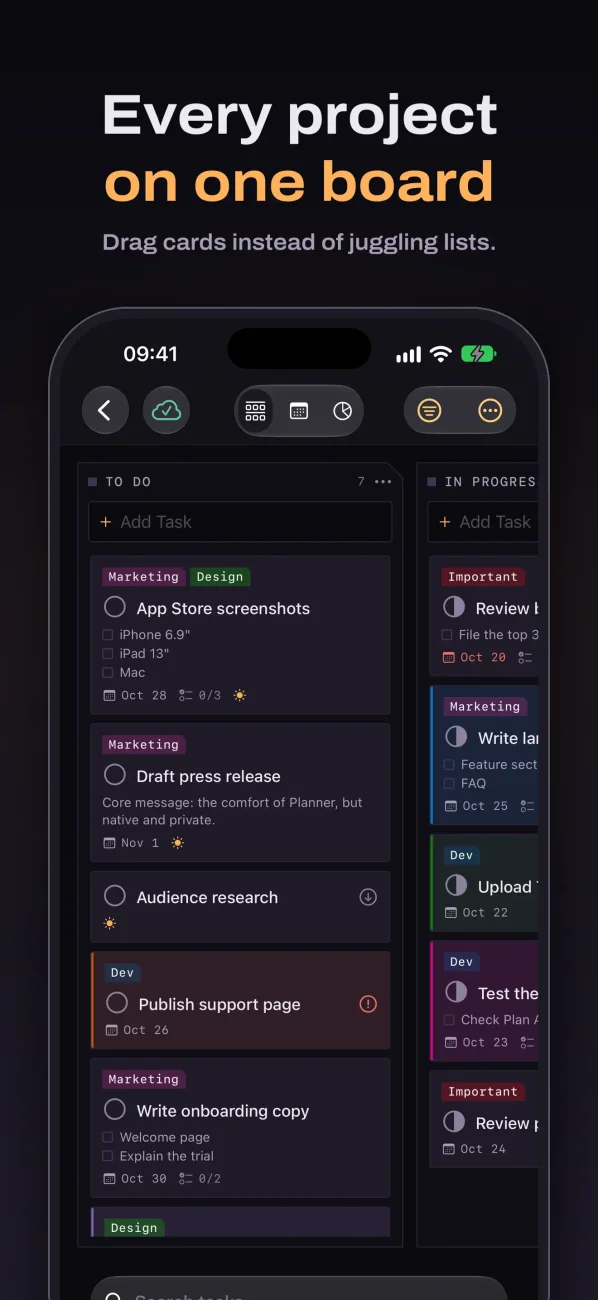
Every project on one board – and Claude Code keeps it up to date for you. Kanban Planner shows you what’s next every morning, plans your week in one tap and runs on iPhone, iPad and Mac, no account needed.
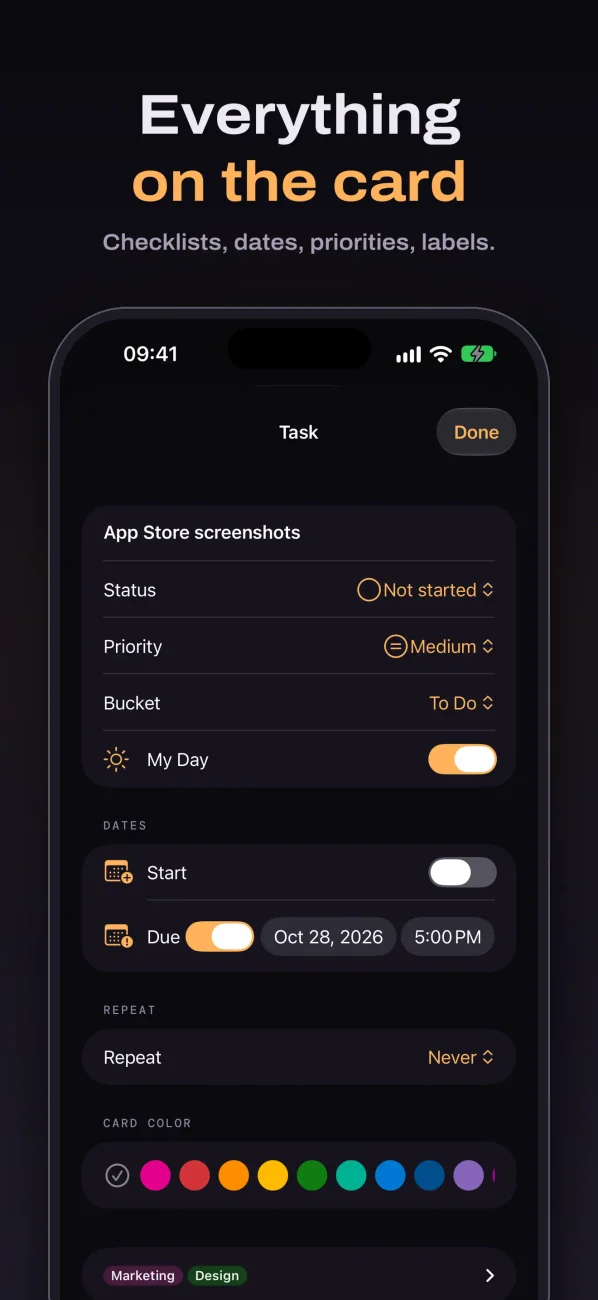
Drag cards to the next column with a finger or a mouse as the work moves along. Due date, priority and checklist show right on the card.
MY DAY
Anything due or planned for today shows up in My Day on its own. Add other cards yourself; your own picks start fresh each morning.
WEEK PLANNING
Let the app spread your open tasks across the week. Due dates are hard limits, goals with a near deadline pull their tasks forward, and a long checklist counts as more work. You decide how much fits into one day, and you can still drag anything to another.
BOARDS
• Name your columns and give them a color
• New cards take on the color of their column
• Moving a card updates its status for you
• Priorities, labels, checklists and attachments
• Recurring tasks: checking one off creates the next
• Optional reminders before a task comes due
GOALS
Gather cards from a plan under a single goal and track the progress.
CLAUDE INTEGRATION
The AI assistant Claude Code can manage your board. It reads what’s due, adds cards, checks off checklist items and plans your week. For this you download the MCP server, a small add-on program for the Mac. Other MCP clients work too; the Mac app syncs the changes to your iPhone and iPad through iCloud.
FOR DEVELOPERS
Connect your GitHub repositories, and their issues and pull requests show up as cards, with the due date from the milestone. The connection is read-only: nothing is ever written back to GitHub.
ON EVERY DEVICE
iPhone, iPad and Mac share one board through your own iCloud. Widgets keep the next tasks on the Home Screen, and checklist items can be checked off right there.
PRO AND FREE TRIAL
Creating and editing needs Pro; without Pro, your plans stay readable. Pro is available as a yearly subscription with a 14-day free trial (once per Apple Account) or as a monthly subscription, for iPhone, iPad and Mac with the same Apple Account. Subscriptions renew automatically unless canceled at least 24 hours before the end of the current period in your Apple Account settings. If you bought Pro before version 1.1, you keep every feature.
Terms of Use: https://kanban.kristmanntechnologies.de/en/terms
Privacy Policy: https://kanban.kristmanntechnologies.de/en/privacy
PRIVACY
Your tasks stay on your devices and in your own iCloud. The app needs no account, and we don’t run servers of our own or any analytics.
Novedades
Versión 1.1.0 · 26/10/2026
Kanban Planner Pro is now available as a yearly subscription with a 14-day free trial or as a monthly subscription. Without Pro, your plans stay readable; creating and editing needs Pro.
There's also a short question on first launch so the app fits what you use it for. If you already bought Pro, you keep everything.
Privacidad de la aplicación
Lo que Claudius Kristmann declara en App Store sobre cómo esta aplicación gestiona los datos.
-
Datos no vinculados a ti
Pueden recopilarse, pero no se vinculan a tu identidad.
- Compras
Las prácticas de privacidad pueden variar, por ejemplo, según las funciones que uses o tu edad.
Información
- Vendedor
- Claudius Kristmann
- Categoría
- Productividad
- Versión
- 1.1.0
- Actualizado
- 26/10/2026
- Publicado
- 10/9/2026
- Tamaño
- 11,2 MB
- Requiere
- iOS 18.0 o posterior
- Clasificación por edad
- 4+
- Precio
- Gratis
- Compras en la aplicación
- Sí
- Idiomas
- Inglés, Alemán
- Copyright
- © 2026 Kristmann Technologies
Quizá también te guste
-
 Kanban Lens: Pomodoro y agendaCalendario y recordatorios
-
 KanbanDo: Kanban Task PlannerKanban, listas y planificación
-
 Tablero Kanban de TareasLista de Tareas y Organizador
-
 Reminq - Reminder KanbanProductividad
-
 Tackpad: Kanban Task BoardProductividad
-
 TidyCards - Kanban Boards TodoProductividad
-
 Next Thing: Daily FocusProductividad
-
 Fosterwell: Diario de acogidaVisitas, informes, seguimiento
-
 KanGoBanProductividad
-
 Flow: ADHD Planner for AdultsProductividad