LevLr2
Dynamics Processor AudioUnit
Diseñada para iPhone, iPad, Mac, iPod touch
1,99 €
- Clasificación por edad4+
- CategoríaMúsica
- DesarrolladorRob Jackson
- Tamaño12,7 MB
Enlaza a la página oficial de App Store
Download.org no aloja ningún archivo de LevLr2. El botón abre la página de la aplicación en App Store, donde la publica Rob Jackson. Ficha comprobada por última vez el 12/11/2026.
Capturas de pantalla

Acerca de
El desarrollador no ha proporcionado este texto en tu idioma.
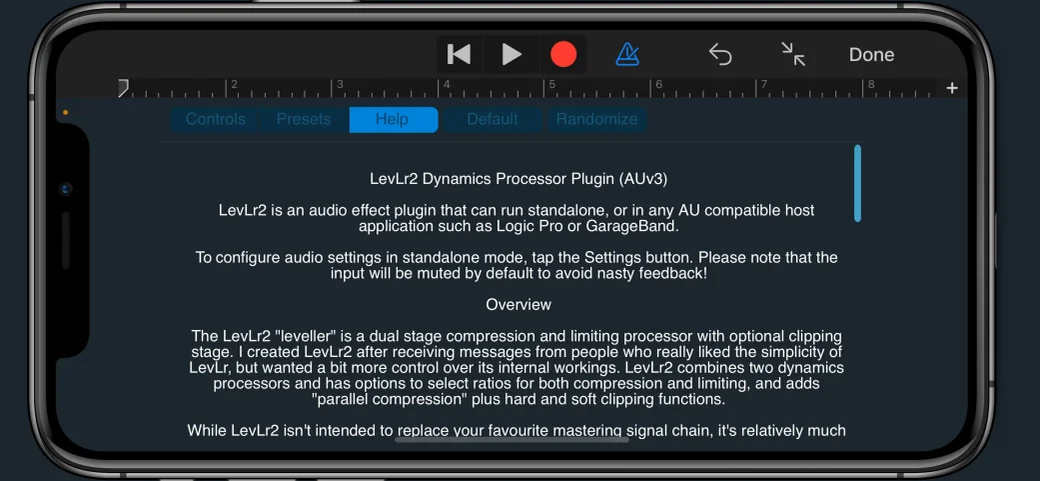
LevLr2 Dynamics Processor Plugin (AUv3)
LevLr2 is an audio effect plugin that can run standalone, or in any AU compatible host application such as Logic Pro or GarageBand.
To configure audio settings in standalone mode, tap the Settings button. Please note that the input will be muted by default to avoid nasty feedback!
Overview
The LevLr2 "leveller" is a dual stage compression and limiting processor with optional clipping stage. I created LevLr2 after receiving messages from people who really liked the simplicity of LevLr, but wanted a bit more control over its internal workings. LevLr2 combines two dynamics processors and has options to select ratios for both compression and limiting, and adds "parallel compression" plus hard and soft clipping functions.
While LevLr2 isn't intended to replace your favourite mastering signal chain, it's relatively much lighter on CPU and adds virtually zero latency, so is also suitable for live use. The super fast attack times under the hood also makes LevLr2 great on drums, especially when using parallel compression.
For a super-simple lightweight "mastering suite" you could partner LevLr2 with SimplEQ.
LOOK AFTER YOUR EARS / SPEAKERS!
LevLr2 can make things VERY LOUD, so please be careful with extreme / high values or when using the Randomize function!
Controls
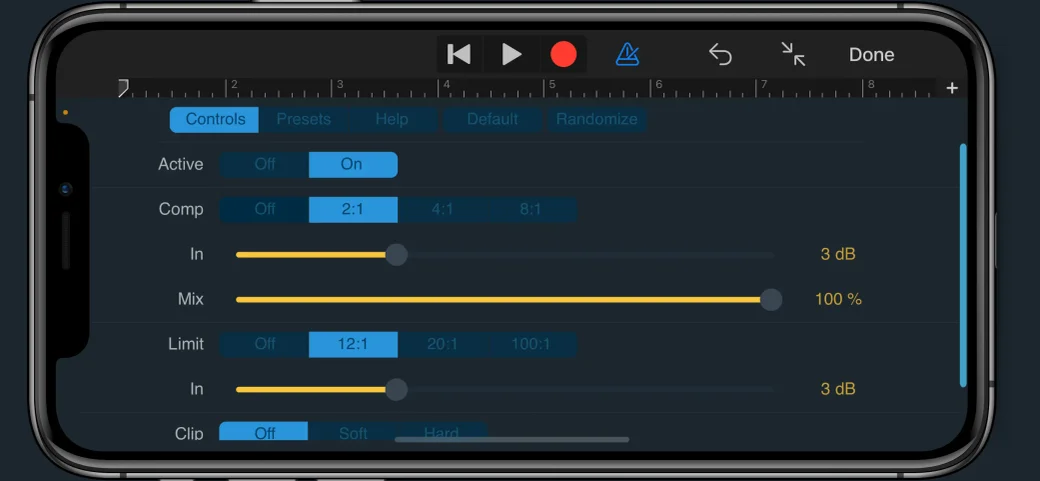
Active - Toggles the effect On or Off. You can use this control to A/B your settings with the original signal and this will fade gradually between the two with no distracting pops or clicks!
Comp - Activates the compressor stage by selecting a compression ratio. Typically lower values are more subtle.
In - Determines how hard you drive the compressor. You can also think of this as the compressor threshold, so for example, at 6dB on the In slider, the threshold of the compressor will be -6dB. The compressor also applies makeup gain automatically based on restoring a 0dB level signal after it has been compressed.
Mix - Sets the balance between the incoming and compressed audio. At zero, this will be the same as if the compressor was bypassed, and at 100% is the compressed signal only. A good parallel compression effect can be achieved by setting the Comp ratio and In high and the Mix to around 50%.
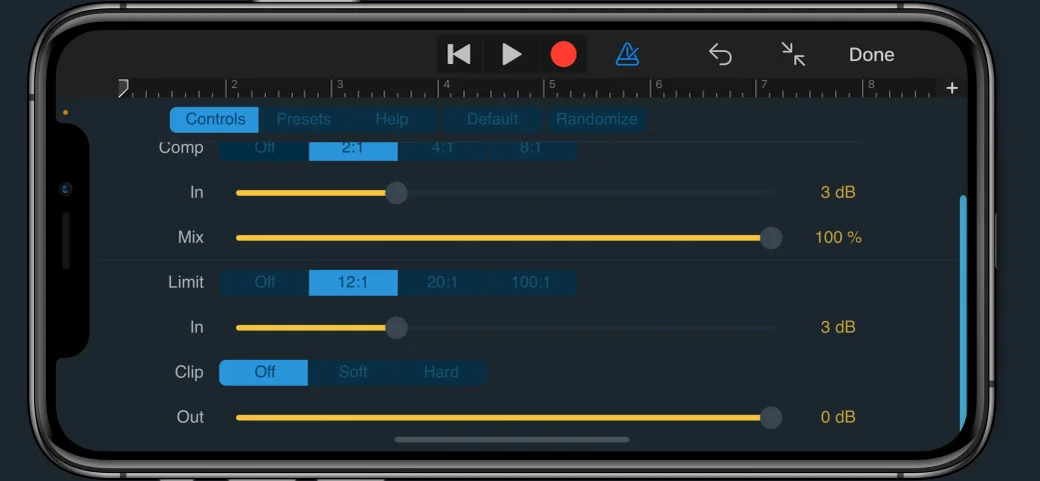
Limit - Activates the limiter stage by selecting a limiter ratio. Typically lower values are more subtle and the highest value is close to "brick wall" limiting.
In - Determines how hard you drive the limiter. You can also think of this as the limiter threshold, so for example, at 3dB on the In slider, the threshold of the limiter will be -3dB. The limiter also applies makeup gain automatically based on restoring a 0dB level signal after it has been limited.
Clip - Adds an optional Soft or Hard clipper after compression and limiting. The clipping will be more noticeable once you've applied some compression and limiting and depending on the settings, can add subtle warmth to aggressive crunch!
Out - Applies a final stage gain trim to the output at the very end of the internal signal chain. In theory, the LevLr2 output should never exceed 0dB, but if you're driving levels really hard, you may want to back this off to around -0.2dB to avoid inter-sample peaks (ISPs) further downstream when recording or mixing-down for example.
For more info and support please visit:
www.waverley-instruments.com/robjackson
Novedades
Versión 1.0.3 · 15/9/2025
Small UI button and slider cosmetic tweaks for improved contrast.
Privacidad de la aplicación
Lo que Rob Jackson declara en App Store sobre cómo esta aplicación gestiona los datos.
-
No se recopilan datos
El desarrollador no recopila ningún dato de esta aplicación.
Las prácticas de privacidad pueden variar, por ejemplo, según las funciones que uses o tu edad.
Información
- Vendedor
- Rob Jackson
- Categoría
- Música
- Versión
- 1.0.3
- Actualizado
- 15/9/2025
- Publicado
- 14/7/2025
- Tamaño
- 12,7 MB
- Requiere
- iOS 12.0 o posterior
- Clasificación por edad
- 4+
- Precio
- 1,99 €
- Copyright
- © 2025 Rob Jackson