Live TimeStamp Camera
Date & time stamp video proof
Diseñada para iPhone
Compras en la aplicación
- Clasificación por edad4+
- CategoríaFoto y vídeo
- DesarrolladorBRIAN SCOTT GATENS
- IdiomasInglés
- Tamaño2,2 MB
Es posible que Live TimeStamp Camera no esté disponible en App Store en este momento
No se pudo acceder a la ficha de la tienda en nuestra última comprobación. El enlace sigue llevando a la página oficial de App Store.
Capturas de pantalla

Acerca de
El desarrollador no ha proporcionado este texto en tu idioma.
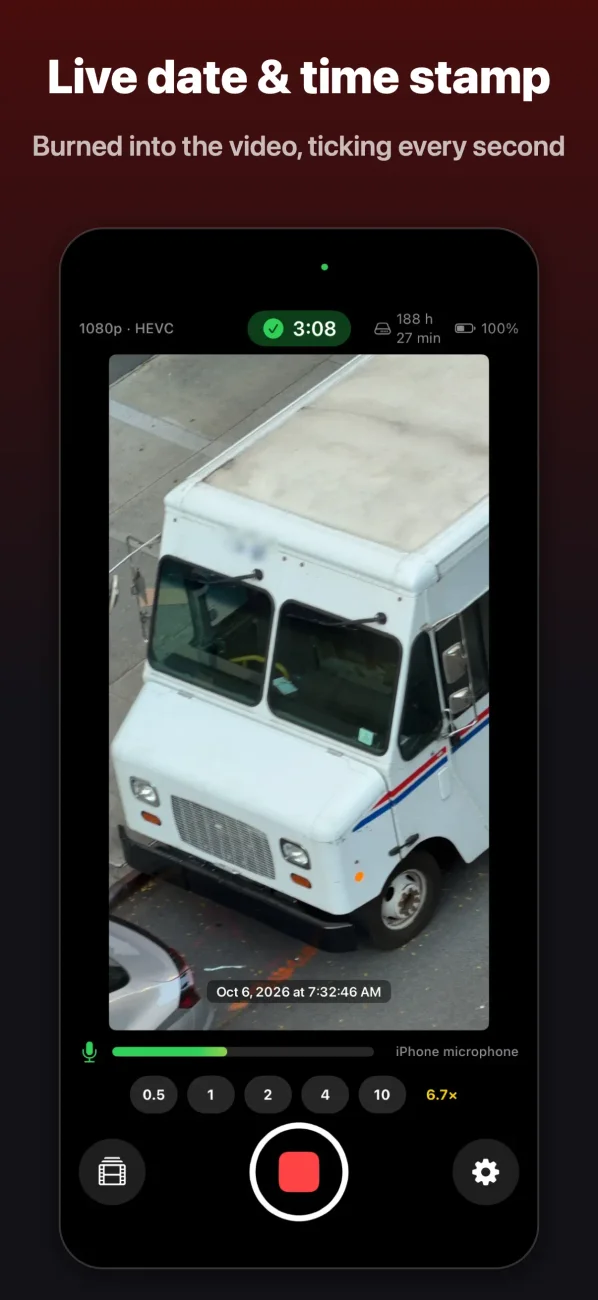
Record video with the date and time burned right into the picture, live and ticking every second, so there's never any question about when it was filmed.
Built for anything you may need to prove later: apartment move-in and move-out, damage for insurance claims, work before and after on a job site, deliveries, parking and traffic problems, and idling trucks and buses.
LIVE DATE AND TIME STAMP
• Drawn onto the video as you record, ticking every second
• White text on a dark rounded pill, easy to read in any light
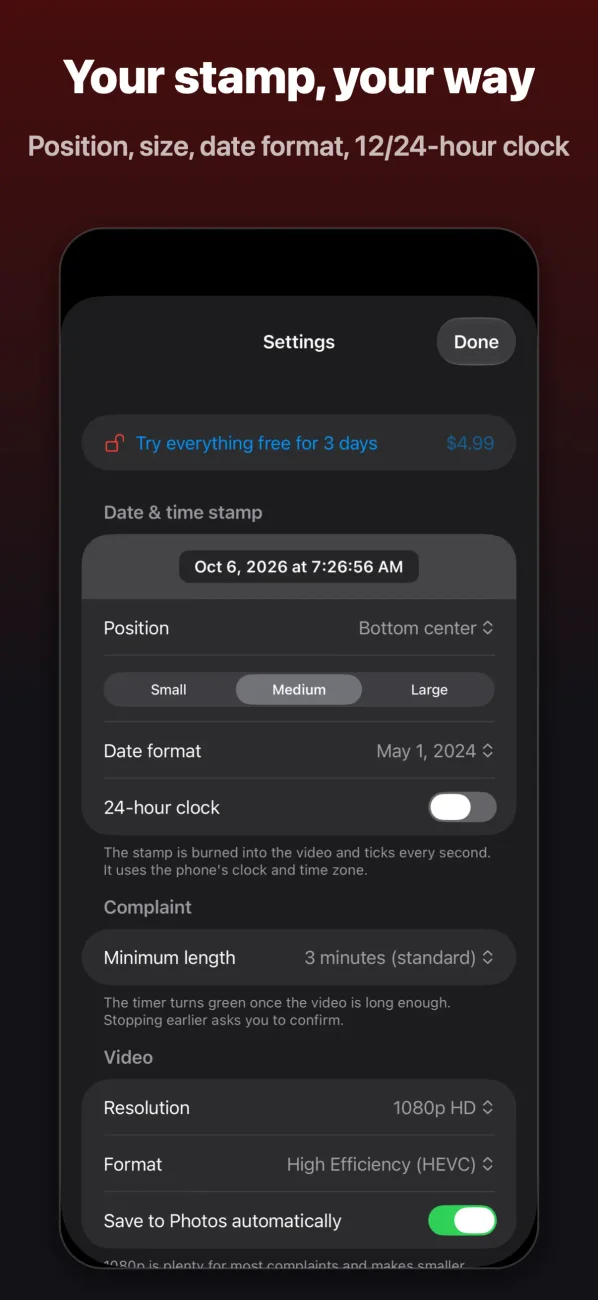
• Choose the position (any corner, top or bottom center) and size (small, medium, large)
• Five date formats and a 12- or 24-hour clock
• What you see in the viewfinder is exactly what's recorded
• Optional time check: compares the phone's clock with Apple's time server, so the stamp shows the correct time even if the clock was changed, with a second line saying whether it was verified. The result is also saved in the video file
NEVER LOSES SOUND
• Won't record without microphone access
• Live sound meter. The record button stays off until sound is coming in
• Clear warning if sound stops during a recording
• Uses the iPhone's own microphone even when AirPods are connected, because headset mics filter out background sounds like engines
• Every saved video is checked to make sure the sound covers the whole recording
RECORDINGS PROTECTED
• Saved continuously while recording, and recovered automatically if the app or phone stops unexpectedly
• Ringing phone calls don't stop the recording (with incoming calls set to Banner)
• Checks storage, battery and temperature before you start, and stops and saves safely before a problem can cut a recording off
• Screen stays awake while recording
• Optional minimum length (3 minutes or 1 minute) with a timer that turns green when your video is long enough
EASY TO USE
• Saves straight to Photos
• Zoom buttons and pinch to zoom, for reading license plates and signs from a distance
• Tap to focus
• 1080p or 4K, HEVC or H.264
COMPRESS FOR UPLOAD
Many complaint and upload forms limit file size. Compress for upload makes a smaller copy that fits your limit (130 MB by default, adjustable), keeps the date and time stamp and the sound, and saves it to Photos next to the original.
FREE TRIAL, THEN A ONE-TIME UNLOCK
Every feature is free for 3 days. After the trial, recording, the live date and time stamp, and saving to Photos stay free forever. Only Compress for upload needs the one-time unlock. No subscription, no ads, no account.
PRIVATE
Everything happens on your iPhone. The app collects no data and has no tracking or ads.
Live TimeStamp Camera is an independent app and is not affiliated with any government agency.
MORE FROM THE DEVELOPER
Have videos that are too big to upload, or recorded with another camera? Multi Video Compress TimeStamp shrinks whole batches of videos to your size limit, adds each video's recording date and time, and makes stamped screenshots of any moment.
Novedades
Versión 1.3 · 25/11/2026
Louder, clearer sound
Want your recordings louder? A new Sound Volume setting lets you choose Normal, Louder or Loudest. Louder gets you closer to the iPhone's own Camera app, and loud bursts like horns or door slams are kept in check so they don't distort. The app now also records in stereo like the Camera app, and always uses the microphone next to the camera. Turn on Steady sound level to stop the iPhone from turning the sound down after an engine revs. Find it all in Settings.
Know right away if the sound cuts out
If something takes over the microphone while you're recording, like a phone call, Siri, or AirPods or your car connecting, the app now shows a warning on screen right away. The results screen tells you exactly which part of the video has no sound.
Thanks to everyone who sent feedback. Keep it coming!
Privacidad de la aplicación
Lo que BRIAN SCOTT GATENS declara en App Store sobre cómo esta aplicación gestiona los datos.
-
No se recopilan datos
El desarrollador no recopila ningún dato de esta aplicación.
Las prácticas de privacidad pueden variar, por ejemplo, según las funciones que uses o tu edad.
Información
- Vendedor
- BRIAN SCOTT GATENS
- Categoría
- Foto y vídeo
- Versión
- 1.3
- Actualizado
- 25/11/2026
- Publicado
- 18/10/2026
- Tamaño
- 2,2 MB
- Requiere
- iOS 17.6 o posterior
- Clasificación por edad
- 4+
- Compras en la aplicación
- Sí
- Idiomas
- Inglés
- Copyright
- © 2026 Brian Gatens
Quizá también te guste
-
 Confetti Photobooth: PartyEvent & Party Booth Kiosk
-
 Timestamp Camera: GPS LocationFoto y vídeo
-
 Filmstampr: Cámara con fechaSello de hora real cámara film
-
 SnapStamp: Timestamp CameraFoto y vídeo
-
 GPS Camera: Photo ProofFoto y vídeo
-
 Timestamp Camera - Photo DateFoto y vídeo
-
 AC FotosFoto y vídeo
-
 GeoCam: Cámara GPS y mapaFotos y vídeos con fecha
-
 Stampr - GPS Photo StampFoto y vídeo
-
 Timestamp Camera Date and TimeFoto y vídeo