
NowSense
Lock Screen next event timer
Diseñada para iPhone, iPad
Compras en la aplicación
- Clasificación por edad4+
- CategoríaUtilidades
- Desarrolladorworkisplayislife
- Tamaño15,1 MB
Es posible que NowSense no esté disponible en App Store en este momento
No se pudo acceder a la ficha de la tienda en nuestra última comprobación. El enlace sigue llevando a la página oficial de App Store.
Capturas de pantalla


Acerca de
El desarrollador no ha proporcionado este texto en tu idioma.
I built NowSense because I kept losing track of the next thing. The meeting at 2, the call at 3:30, the pickup I swore I would remember. So I made an app that keeps the next thing in plain sight.
LOCK SCREEN COUNTDOWN
Your next thing counts down in a Live Activity on your Lock Screen. You check the time anyway, so now you get the plan with it.
DYNAMIC ISLAND
The countdown also sits in the Dynamic Island while you use other apps. Press and hold it to see the rest of your day.
HOME SCREEN WIDGETS
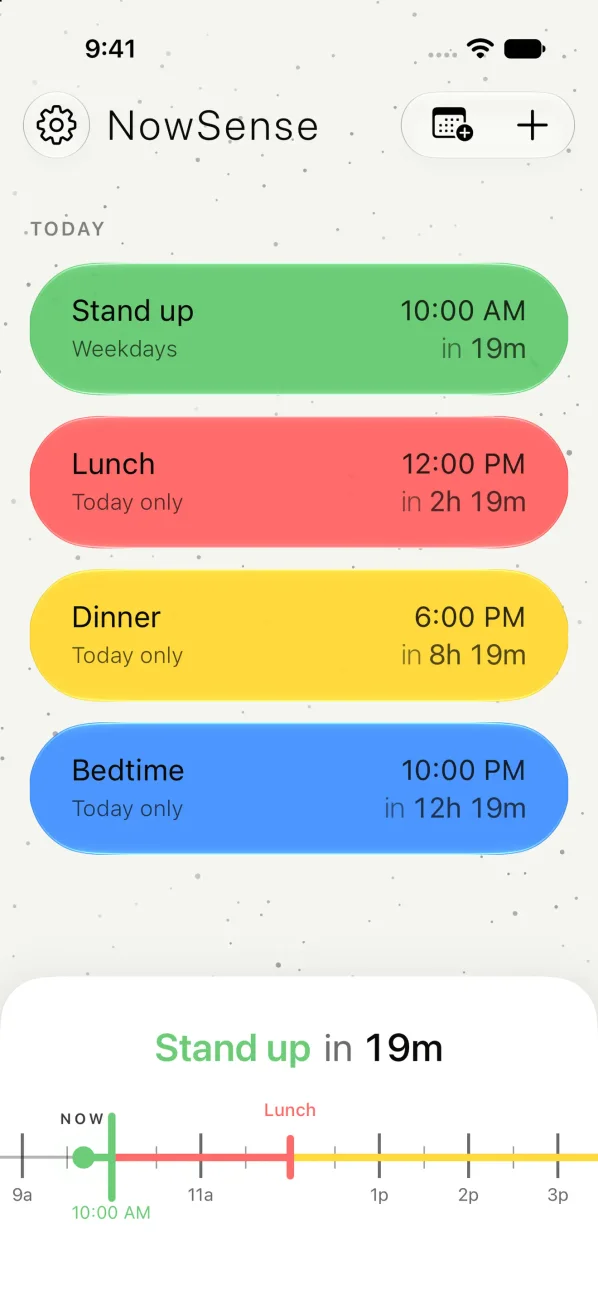
The Up Next widget comes in three sizes. Small is a dial that shows how close the next thing is. Medium shows what is next on a timeline, and large adds the rest of today's list. On iPad you also get an extra large size.
A TIMELINE WITH NOW MARKED
Your day sits on one simple timeline, with Now marked on it. You see what is coming and how much room you have before it.
YOUR CALENDARS, YOUR CHOICE
NowSense brings in your calendar events, and you choose which calendars it reads. Canceled and declined events stay out, so they cannot sneak back in.
ONLY THE MEETINGS YOU ARE IN
Meetings you organize always show, even when iOS lists them as pending. Invites from others that you have not accepted stay hidden until you say yes.
SYNCED WITH ICLOUD
When your calendar updates on one device, your Live Activity updates on all your devices. No account and no login.
PROGRESSIVE ALERTS
Turn them on and you get up to three reminders, an hour, 20 minutes and 5 minutes before. Each one is a little louder, like a friend who taps your shoulder a bit harder each time.
MILESTONES YOUR WAY
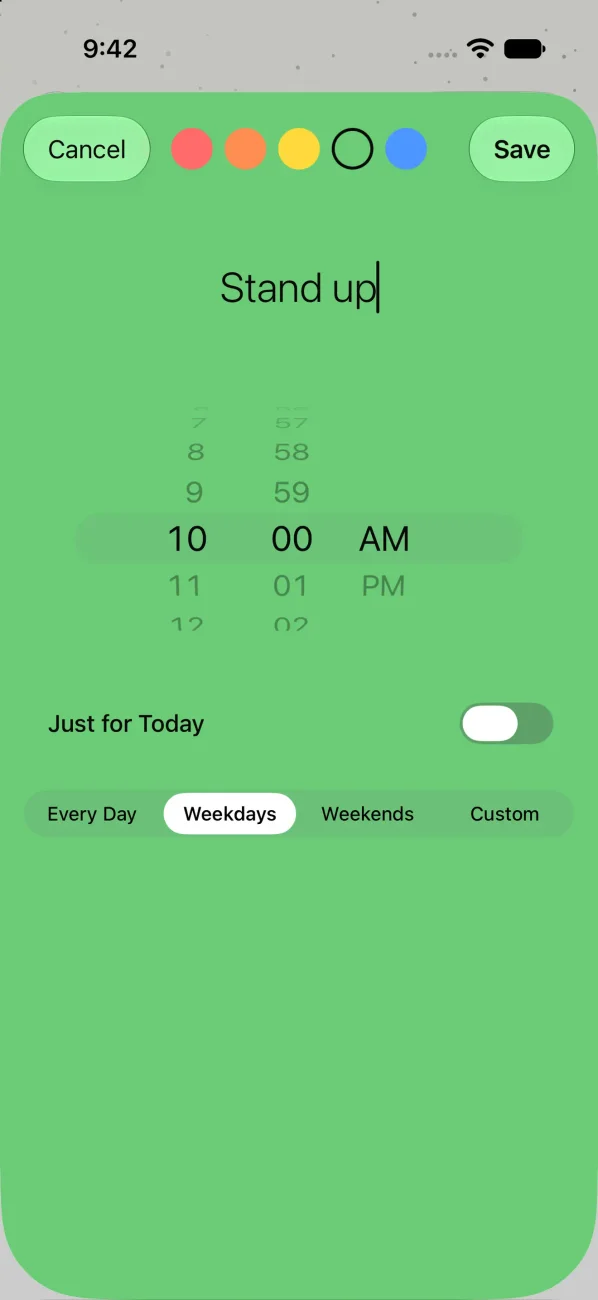
Add your own milestones, as many as you like. Make one just for today or repeat it every day, on weekdays, on weekends or on the days you pick. Give each one its own color, so lunch and the school run never look the same.
TRY IT FREE FOR 7 DAYS
Every feature is open for a full week, with no account needed. After the free week, the app locks until you unlock Pro, a one-time purchase. No subscription, and nothing is charged automatically. Your milestones stay saved.
I hope it keeps your next thing in view the way it does for me. On your iPhone and iPad.
App Store support: support@nowsense.app
Privacy: https://nowsense.app/privacy
Terms of Use (EULA): https://www.apple.com/legal/internet-services/itunes/dev/stdeula/
Novedades
Versión 1.0.12 · 5/11/2026
- iCloud sync: when your calendar updates on one device, your Live Activity updates on all your devices.
- Ask to Buy: the app now says it is waiting for approval.
- Setup button no longer moves. Button text fits at large text sizes.
- Home screen fits the closed iPhone Duo.
Privacidad de la aplicación
Lo que workisplayislife declara en App Store sobre cómo esta aplicación gestiona los datos.
-
Datos vinculados a ti
Pueden recopilarse y vincularse a tu identidad.
- Contenido del usuario
- Identificadores
- Datos de uso
-
Datos no vinculados a ti
Pueden recopilarse, pero no se vinculan a tu identidad.
- Diagnóstico
Las prácticas de privacidad pueden variar, por ejemplo, según las funciones que uses o tu edad.
Información
- Vendedor
- Siddharth Vanchinathan
- Categoría
- Utilidades
- Versión
- 1.0.12
- Actualizado
- 5/11/2026
- Publicado
- 2/9/2026
- Tamaño
- 15,1 MB
- Requiere
- iOS 17.2 o posterior
- Clasificación por edad
- 4+
- Compras en la aplicación
- Sí
- Copyright
- © 2026 Workisplayislife
Quizá también te guste
-
 Dot It Down: A simple task appUtilidades
-
 Deep TaskUtilidades
-
 Soon-ishWidgets de cuenta atrás
-
 Casi la linternaenviar código morse
-
 Just TimersUtilidades
-
 PDF Tools: Edit, Merge & SignUtilidades
-
 AIAIAI AudioUtilidades
-
 Transcription dictado a textoInstant transcription service
-
 Mero Kitta - Survey DepartmentUtilidades
-
 Cuenta Atras Calendario WidgetCumpleaños, Vacaciones, Reloj