
Saber: Handwritten Notes
The app built for handwriting
Diseñada para iPhone, iPad, Mac, iPod touch
Gratis
- Clasificación por edad4+
- CategoríaProductividad
- DesarrolladorAdil Hanney
- IdiomasInglés
- Tamaño53,4 MB
Enlaza a la página oficial de App Store
Download.org no aloja ningún archivo de Saber: Handwritten Notes. El botón abre la página de la aplicación en App Store, donde la publica Adil Hanney. Ficha comprobada por última vez el 23/11/2026.
Capturas de pantalla

Acerca de
El desarrollador no ha proporcionado este texto en tu idioma.
Saber is the notes app built for handwriting.
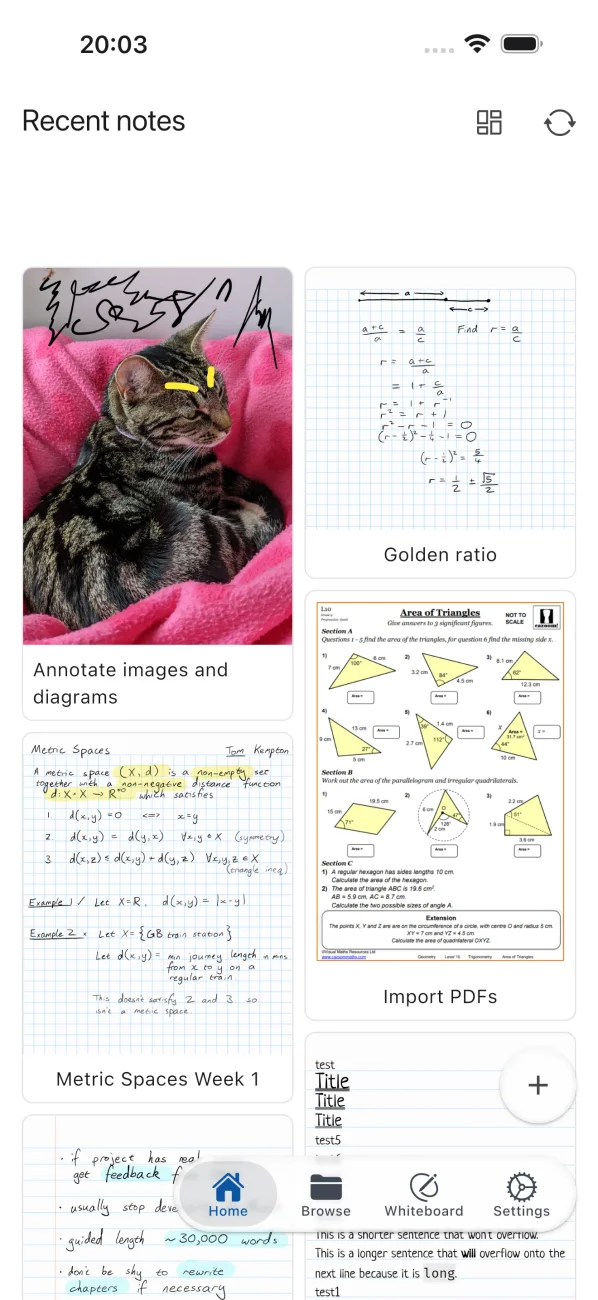
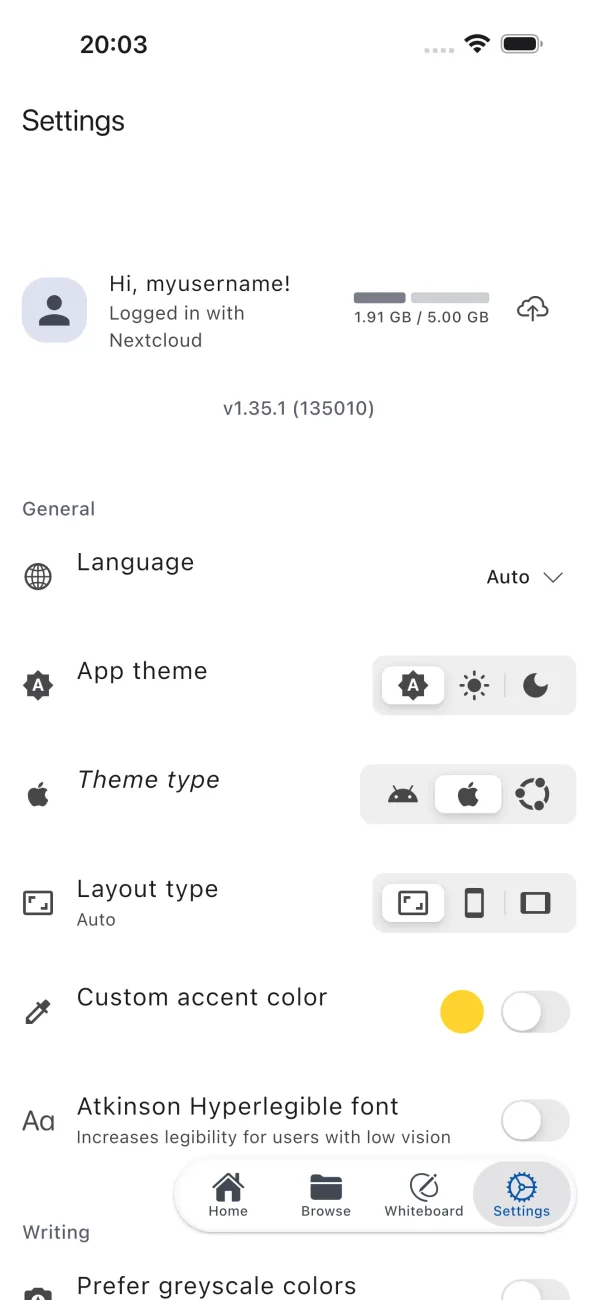
It's designed to be as simple and intuitive as possible, while still delivering unique features that you'll actually use. Additionally, Saber is available across all your devices, large and small, and syncs between them seamlessly.
Notably, it can invert your notes when you're in dark mode. This allows you to write with white ink on a black background, which is much easier on the eyes in low-light environments like when the teacher turns off the lights in class.
Images and PDFs are also inverted, so you can still use a digital printout or a textbook without the fuss.
Saber uses a dual-password system to protect your notes from anyone but you, even if they have complete control over the server. You can safely store your notes on the official Saber server, another server, or even host your own!
The app is completely open-source so that anyone can view the source code and see exactly what it's doing and how it handles your data. Many other note-taking apps are closed-source and proprietary, meaning that their inner workings are a mystery to the public.
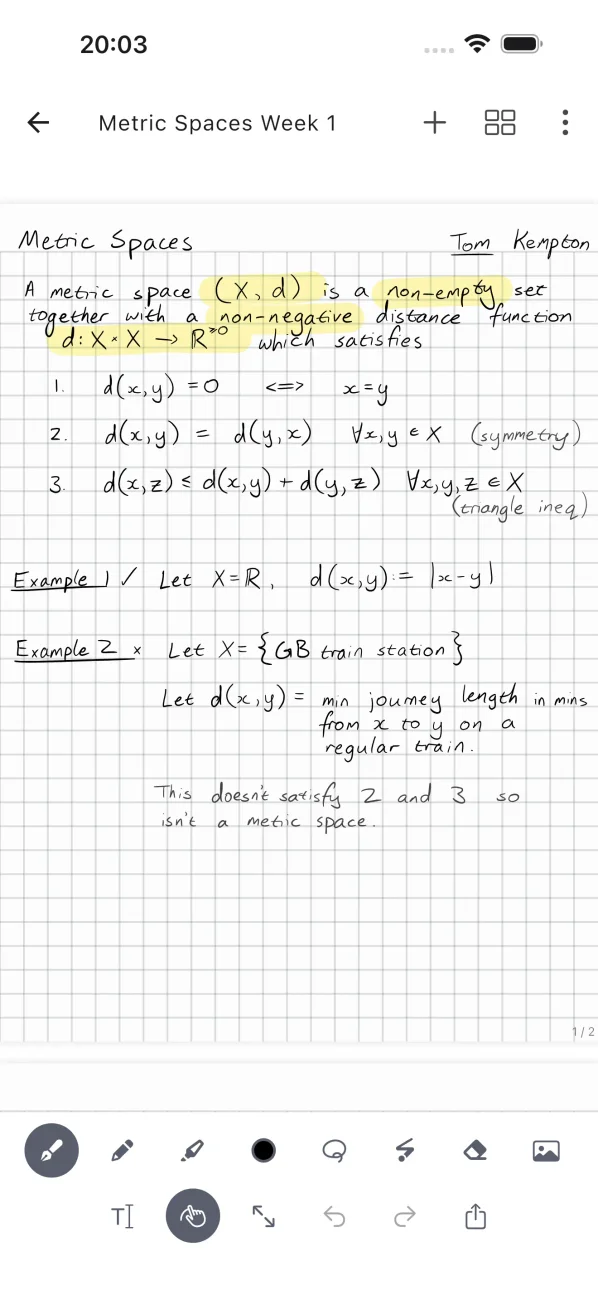
As someone who studies maths, highlighting multi-line equations was always a hassle with other apps, where the highlighter would change color when it overlapped with itself. Another problem I had was that in some apps, the highlighter would render on top of the text, fading it out and making it hard to read.
Saber's highlighter has no such issues. It utilizes canvas compositing to render the highlighter in a way that is consistent with/better than traditional paper, where it handles overlaps and maintains color consistency.
Saber has everything you need to keep your notes organized. Create folders inside folders inside folders to your heart's content with no limit on the number of nested folders. And even though a note may be buried deep within a nested folder, you can still access it easily with your most recent notes always available on the home screen.
Discover a whole new way to capture and organize your thoughts with Saber. Whether you're a student, professional, or creative mind, Saber is your trusted companion for digital handwriting. Download now and let your ideas flow freely!
Novedades
Versión 1.38.0 · 22/11/2026
• A PDF import is grouped into one atomic history item, rather than one per page, letting you undo the import with one click.
• Improved sizing of imported PDFs of differing aspect ratios, particularly landscape ones.
• Slightly improved scrolling performance.
• Fixed pages imported from a PDF not registering changes from the typed text tool.
Privacidad de la aplicación
Lo que Adil Hanney declara en App Store sobre cómo esta aplicación gestiona los datos.
-
Datos no vinculados a ti
Pueden recopilarse, pero no se vinculan a tu identidad.
- Datos de uso
- Diagnóstico
Las prácticas de privacidad pueden variar, por ejemplo, según las funciones que uses o tu edad.
Información
- Vendedor
- Adil Hanney
- Categoría
- Productividad
- Versión
- 1.38.0
- Actualizado
- 22/11/2026
- Publicado
- 26/4/2023
- Tamaño
- 53,4 MB
- Requiere
- iOS 15.0 o posterior
- Clasificación por edad
- 4+
- Precio
- Gratis
- Idiomas
- Inglés
- Copyright
- © 2022-2026 Adil Hanney
Quizá también te guste
-
 Meeting Notes & Work PlannerProductividad
-
 Notesnook: Private notepadProductividad
-
 Notas: Apuntes para escribirCuaderno digital, editar PDF
-
 JoplinProductividad
-
 QuickNotes X: Notas, AI y PDFNote-Taking, Made Easy.
-
 Notewise - Notas IA, PDF, DocsEscribe, graba, crea, recuerda
-
 AxNote: Note TakingProductividad
-
 Plano infinito de notasCuaderno manuscrito infinito
-
 AFFiNE: Notas, Pizarra & IADocs, tareas, Markdown
-
 NoteEase-notas manuscritasPapel borrador ilimitado