SayLy
Japanese translator keyboard
Diseñada para iPhone, iPad
Gratis · Compras en la aplicación
- Clasificación por edad17+
- CategoríaUtilidades
- DesarrolladorSingularity Games Co., Ltd.
- IdiomasInglés
- Tamaño5,4 MB
Enlaza a la página oficial de App Store
Download.org no aloja ningún archivo de SayLy. El botón abre la página de la aplicación en App Store, donde la publica Singularity Games Co., Ltd. Ficha comprobada por última vez el 12/11/2026.
Capturas de pantalla


Acerca de
El desarrollador no ha proporcionado este texto en tu idioma.
SayLy — for the days Japanese is hard.
Living in Japan as a foreigner, the problem isn't really "I don't know Japanese." It's that by the time you've typed out the sentence, the moment has passed. Your friend sent three more messages. The store clerk is already waiting. The landlord's email needs a reply that sounds natural, not like a robot. You know what you want to say — it's just that your fingers and your Japanese aren't on the same page yet.
SayLy is built for those days.
---
Hold the mic, send Japanese (new in 2.1)
Open the SayLy keyboard in any chat app — LINE, Messages, WhatsApp, Instagram, WeChat — and there's a microphone button right in the middle. Hold it, speak in English or Chinese, let go. A natural Japanese sentence appears. Tap it. It sends.
You never leave the conversation. You never look down and type. About as fluid as replying in your own language.
---
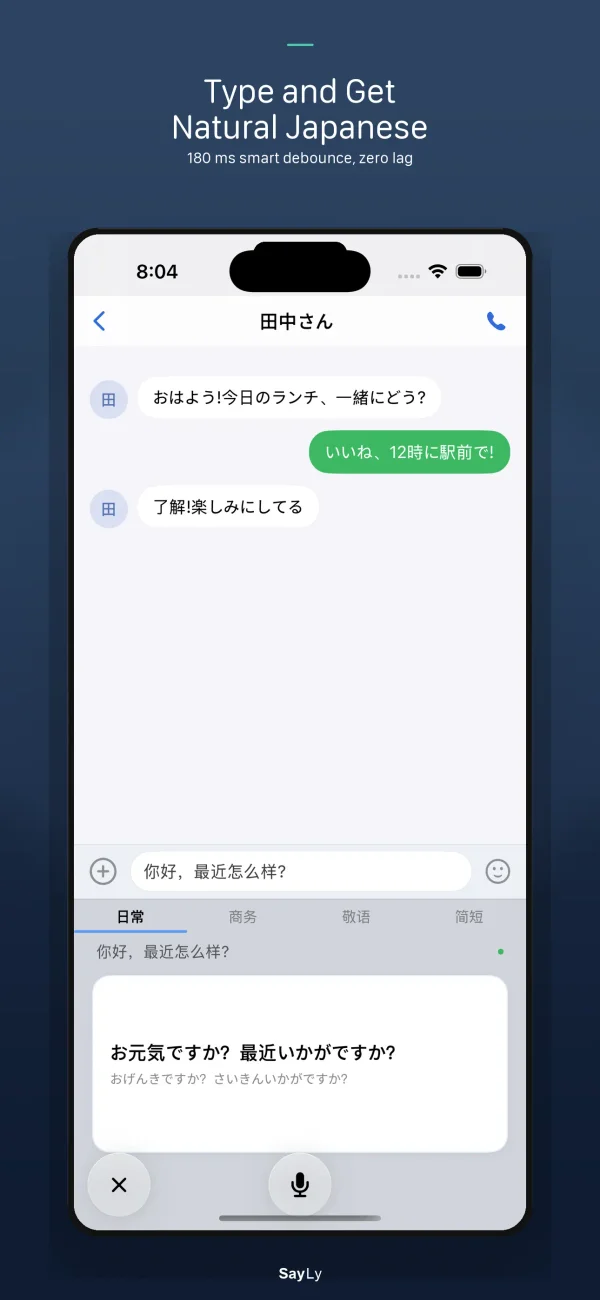
Or type, and let SayLy do the rest
Type in your usual keyboard, then switch to SayLy. A Japanese translation is waiting. Tap to replace, tap to send.
· Results appear the moment you stop typing
· Phrasing follows the tone you picked in settings
· Around 10,000 common phrases work offline
· Paste Japanese in, see what it means in your language
---
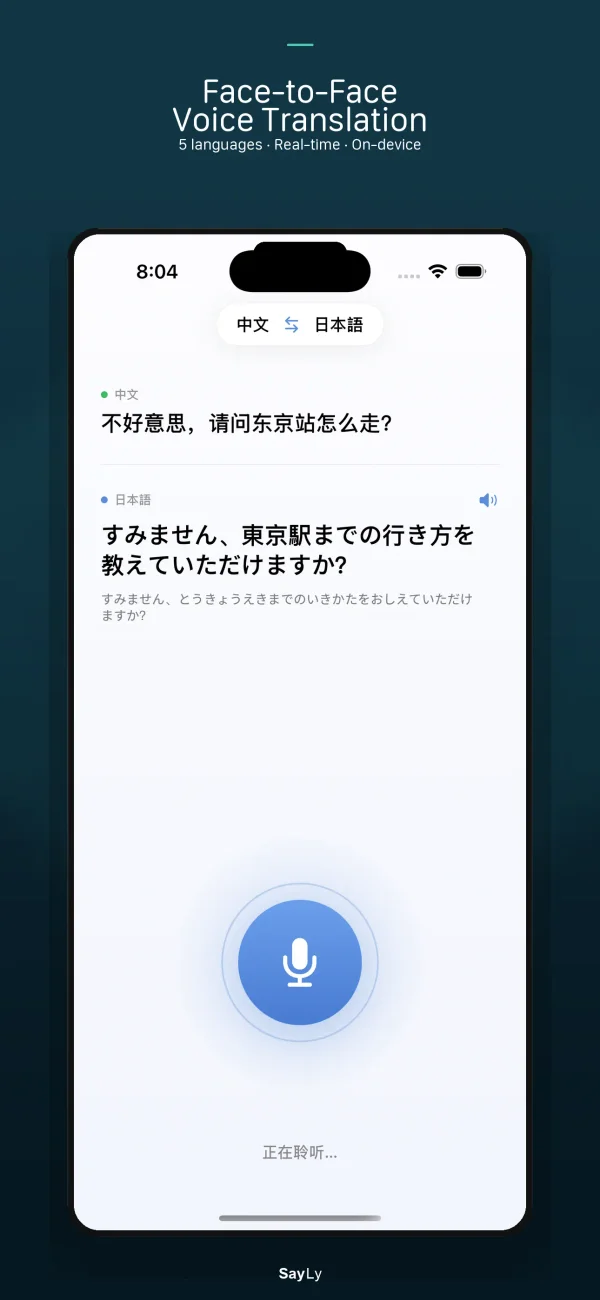
Face-to-face voice translation
For restaurants, directions, paperwork, doctor visits — put the phone on the table, press the big mic, speak. Japanese shows up on screen for the other person to read. When they reply, flip the direction.
· Chinese, English, Korean, Vietnamese, Spanish ↔ Japanese
· Speech recognition runs on-device via Apple Speech, nothing uploaded
---
Four tones, one setting
Casual with friends is not how you talk to your landlord. SayLy has four modes:
· Casual — friends, coworkers, text threads
· Business — meetings, emails, work chats
· Polite (Keigo) — store staff, landlords, bosses, interviews
· Brief — when one short line is all you need
Pick your default in settings. Every translation follows that tone automatically.
---
Apple platform support
Lock Screen widget, Home Screen widget, Control Center quick access (iOS 18+), Siri Shortcuts, iPad layout, Magic Keyboard shortcuts, Dark Mode, four keyboard themes (Standard, Pro, Ocean, Sakura), and full Dynamic Type accessibility.
---
Free vs Pro
Free: 20 AI translations per day, shared across voice and keyboard. Pro: $0.99/month, unlimited. Cancel any time.
---
Your privacy
We don't store your messages. We don't read them. We don't sell them.
· No ads, no tracking, no data collection
· Voice stays on your device (Apple's Speech framework)
· Translation requests pass through our server to Google Gemini, text not retained
· Pro subscriptions handled entirely by Apple
Privacy Policy: https://sgames.hanlian.com/sayly-privacy.html
Terms of Use (EULA): https://www.apple.com/legal/internet-services/itunes/dev/stdeula/
---
Subscription
SayLy Pro is an auto-renewable subscription at $0.99/month. Payment is charged to your Apple ID at confirmation. Renews automatically unless canceled at least 24 hours before the end of the current period. Manage or cancel in Settings → Apple ID → Subscriptions.
Questions, feedback, bug reports: sgames@hanlian.com
The people who make SayLy also live in Japan. Every feature here is something we needed first, and shipped once we liked using it ourselves. If there's something SayLy still doesn't do for you, tell us.
Novedades
Versión 2.1.0 · 15/4/2026
2.1 — Hold the mic, send Japanese without leaving your chat
The big new thing in this update is a microphone button inside the SayLy keyboard.
Open the SayLy keyboard in LINE, Messages, WhatsApp, Instagram, WeChat — any chat app. Hold the mic. Speak a sentence in English or Chinese. Let go. A natural Japanese line appears right there, and one tap sends it. You never leave the conversation, you never look down to type, the thread doesn't go cold while you hunt for the right kanji.
We built this because we kept hearing the same thing: "I know what I want to say, but by the time I finish typing it, the moment is gone." This release is our answer.
Also improved:
· Typed translation is much faster — results land the moment you stop typing, basically no wait
· You get one clean translation per scene now, not three options to scroll through. (You already picked your default tone in Settings — we don't need to ask again.)
· The keyboard is shorter, matching iOS's own keyboard height, no more eating half your screen
· A one-tap clear button next to the mic, for when you want to start over
· Press and release haptics feel obvious, not the "did I tap it?" mush from before
· The translation tone is calibrated — no more random cutesy phrases like "やっほー" showing up in a casual reply. It reads like something a real adult would say.
· Fixed a rare "SayLy is sleeping" first-press issue after a long idle stretch
This update is for the people who message friends, reply to landlords, text coworkers, and fill out school group chats every day in a language they're still learning. Every change here came from actual feedback. Thank you for sticking with SayLy.
Privacidad de la aplicación
Lo que Singularity Games Co., Ltd. declara en App Store sobre cómo esta aplicación gestiona los datos.
-
No se recopilan datos
El desarrollador no recopila ningún dato de esta aplicación.
Las prácticas de privacidad pueden variar, por ejemplo, según las funciones que uses o tu edad.
Información
- Vendedor
- Singularity Games Co., Ltd.
- Categoría
- Utilidades
- Versión
- 2.1.0
- Actualizado
- 15/4/2026
- Publicado
- 26/3/2026
- Tamaño
- 5,4 MB
- Requiere
- iOS 16.0 o posterior
- Clasificación por edad
- 17+
- Precio
- Gratis
- Compras en la aplicación
- Sí
- Idiomas
- Inglés
- Copyright
- © 2026 SayLy