Snappy - Interactive Camera
Auto capture by sound & motion
Diseñada para iPhone, iPad
Gratis · Compras en la aplicación
- Clasificación por edad4+
- CategoríaFoto y vídeo
- DesarrolladorMasayuki Akamatsu
- IdiomasInglés+ 1 más
- Tamaño5,1 MB
Enlaza a la página oficial de App Store
Download.org no aloja ningún archivo de Snappy - Interactive Camera. El botón abre la página de la aplicación en App Store, donde la publica Masayuki Akamatsu. Ficha comprobada por última vez el 14/11/2026.
Capturas de pantalla


Acerca de
El desarrollador no ha proporcionado este texto en tu idioma.
A camera that shoots without you pressing the shutter.
Sound, movement, brightness, heading, what's in frame — Snappy watches the sensors and releases the shutter the moment the condition you set is met. Use it with the phone on a tripod or a table, from a distance, when your hands are busy, or when you want to be in the picture yourself.
The shutter button still works, of course. It's an ordinary camera too.
■ Eight trigger conditions
• Shake — shoots when you shake the phone
• Sound — shoots when it hears a loud noise
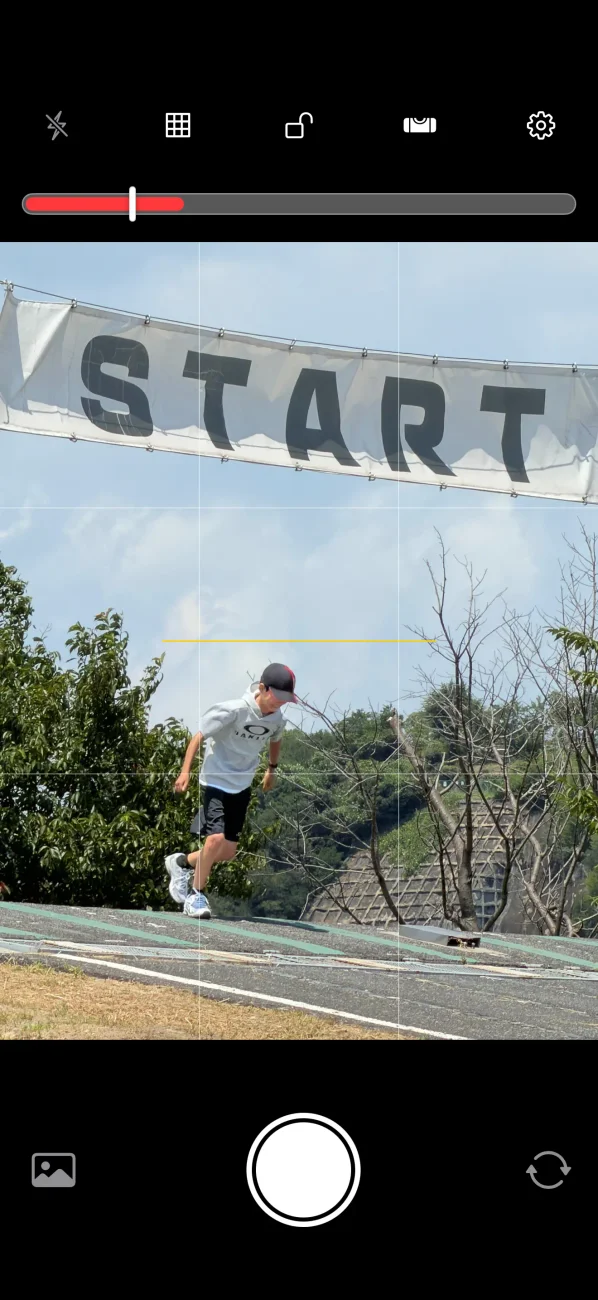
• Motion — shoots when something moves in frame, with a threshold you can set by performing the movement once
• Brightness — shoots when it gets brighter
• Distance — shoots when something comes closer than the distance you set, using LiDAR or TrueDepth
• Compass — shoots when the phone faces a heading you choose
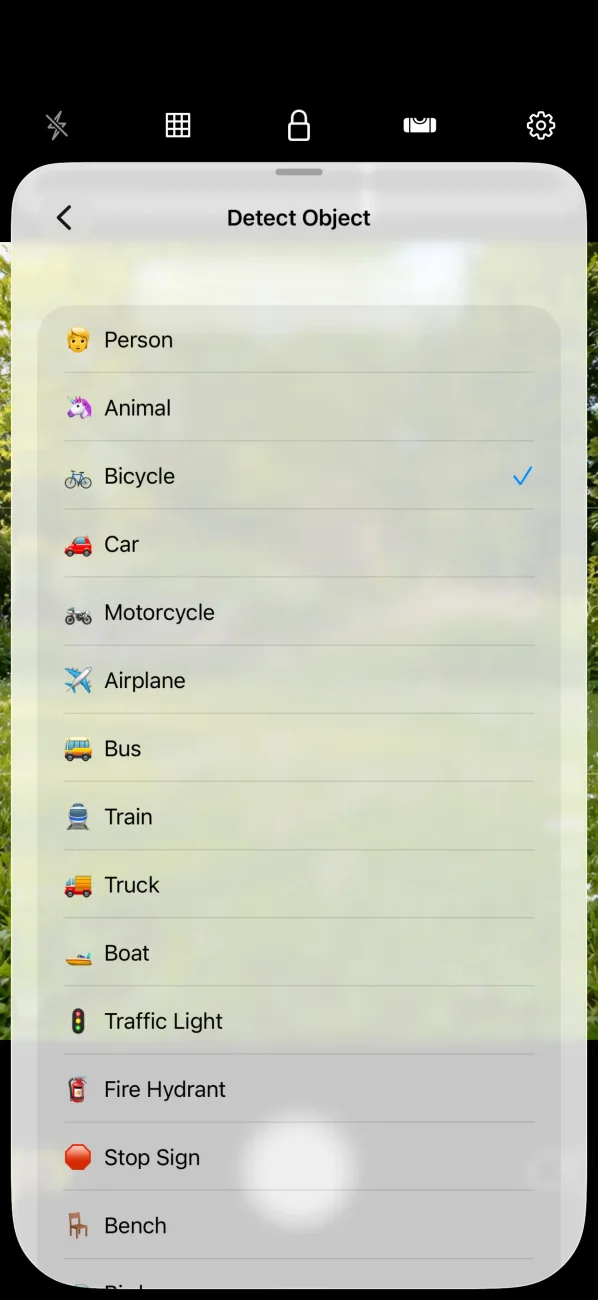
• Object — shoots when something you picked appears in frame, from 77 kinds including people, cats, dogs, birds, animals and cars
• Gesture — shoots on a peace sign held up to the camera, or on both arms raised, which reads from right across a room
Most conditions can be flipped to shoot when the value *falls* instead. When it goes quiet, when it gets dark, when the movement stops — the reverse works too.
■ Set the threshold with your finger
The indicator just above the preview shows what the sensor is feeling right now. Drag the white line and the threshold moves with it, while you watch the frame. No need to open Settings.
■ Two trigger modes
• Continuous — keeps shooting for as long as the condition stays met
• Standby — shoots once, then waits until the condition is no longer met before it will shoot again
Choose Standby when the situation holds steady — someone standing still, a room that stays bright — so you don't end up with a hundred of the same photo.
■ Features
• Shot count (1–10; 11–100 or unlimited with Pro)
• Interval Time between shots, from 0.0 to 99.9 seconds
• Delay Time before the shot, from 0.0 to 99.9 seconds, with a countdown ring around the shutter button
• A sound when the condition is met, so you know it noticed even from behind the camera
• Automatic capture lock — the sensors keep watching, but nothing is taken
• Grid (thirds / center)
• Inclinometer showing side-to-side and front-to-back tilt at once, turning with the way you hold the device
• Aspect ratio (default / square)
• Saved size (1/4; Full and 1/2 with Pro)
• Save to Photos, or with Pro to a folder on this device or in iCloud Drive
• Add location
• Capture review
• Disable Auto-Lock, so a long session isn't cut short by the screen turning off
• Front and back camera
Photos are saved to the iOS Photos library — or, with Pro, to a dated folder on this device or in iCloud Drive — with what triggered the shot written into the file's EXIF.
■ Some ways to use it
• Leave it by the door or in the garden and catch whoever — or whatever — turns up
• Clap your hands to take the shot from across the room
• Raise both arms from across the room and be in the photo yourself
• Catch fireworks and lightning on brightness
• Put it beside a path and shoot whatever comes within a metre
• Shake the phone to shoot
• Shoot when the phone faces a particular direction
Open the Quick Guide from Description in Settings. It includes recipes like these.
This app shows ads. The Pro in-app purchase removes them, and unlocks the Full and 1/2 sizes, saving to this device or iCloud Drive, and shot counts of 11 or more and unlimited. Without Pro, photos are saved at 1/4 size to the Photos library, and Shot Count is 1 to 10.
Novedades
Versión 2.2.1 · 21/9/2026
Minor fixes (2.2.1)
What's New (2.2.0)
■ Save to a folder
Photos can now go to a folder on this device or in iCloud Drive instead of the Photos library — one folder per day, numbered in the order they were taken, and visible in the Files app. Choose in Settings under Save To.
■ Pro
Remove Ads is now Pro, and if you bought it you already have Pro — there is nothing to buy again. Pro removes ads and unlocks the Full and 1/2 sizes, saving to this device or iCloud Drive, and shot counts of 11 or more and unlimited. Without Pro, photos are saved to the Photos library at 1/4 size, and Shot Count is 1 to 10.
■ Auto-Adjust by Rehearsal
In Motion, tap Auto-Adjust by Rehearsal and perform the movement you want to shoot on for five seconds. The gauge and the threshold are set from it: the scene at rest sits at the bottom, and your movement fills it. Reset puts the gauge back.
■ Keeps to the interval
The next shot no longer waits for the last one to finish saving, so a short Interval Time is kept. A spinner shows while photos are being saved, and where they are going.
■ Also
The Sound gauge reads in decibels. The inclinometer turns with the way you hold the device, sideways or upside down, and its line now moves the other way for front-to-back tilt. On iPad, the settings sheet can be dragged taller or shorter.
■ Fixed
On a new install, Shake could be far more sensitive than intended; it is back to the intended level, including on devices already affected. The inclinometer no longer reads a device turned a quarter turn as level. A failed purchase or restore now says so.
Privacidad de la aplicación
Lo que Masayuki Akamatsu declara en App Store sobre cómo esta aplicación gestiona los datos.
-
Datos usados para rastrearte
Pueden usarse para rastrearte en aplicaciones y sitios web propiedad de otras empresas.
- Identificadores
-
Datos vinculados a ti
Pueden recopilarse y vincularse a tu identidad.
- Ubicación
- Identificadores
- Datos de uso
-
Datos no vinculados a ti
Pueden recopilarse, pero no se vinculan a tu identidad.
- Ubicación
- Datos de uso
- Diagnóstico
Las prácticas de privacidad pueden variar, por ejemplo, según las funciones que uses o tu edad.
Información
- Vendedor
- 正行 Akamatsu
- Categoría
- Foto y vídeo
- Versión
- 2.2.1
- Actualizado
- 21/9/2026
- Publicado
- 11/12/2008
- Tamaño
- 5,1 MB
- Requiere
- iOS 17.6 o posterior
- Clasificación por edad
- 4+
- Precio
- Gratis
- Compras en la aplicación
- Sí
- Idiomas
- Inglés, Japonés
- Copyright
- © Masayuki Akamatsu
Quizá también te guste
-
 Photos Search TextBuscar fotos para texto
-
 EraShotFoto y vídeo
-
 AutoFocus - Camera CoachFoto y vídeo
-
 Photos SearchFoto y vídeo
-
 KatzSnapAutomatische actiecamera
-
 unClickFoto y vídeo
-
 Rokkaku Camera Pro (DSSC-1)Foto y vídeo
-
 PoseCam: Poses para Fotos IACoach de Pose y Cámara Selfie
-
 SHOOTS: Cámara temporizadorSesión de fotos manos libres
-
 Lumen - AI CameraFoto y vídeo