SpecPad
Markup PDFs, Plans & Photos
Diseñada para iPhone, iPad
Gratis · Compras en la aplicación
- Clasificación por edad4+
- CategoríaUtilidades
- DesarrolladorJohn Steinmetz
- IdiomasInglés
- Tamaño19,7 MB
Enlaza a la página oficial de App Store
Download.org no aloja ningún archivo de SpecPad. El botón abre la página de la aplicación en App Store, donde la publica John Steinmetz. Ficha comprobada por última vez el 18/11/2026.
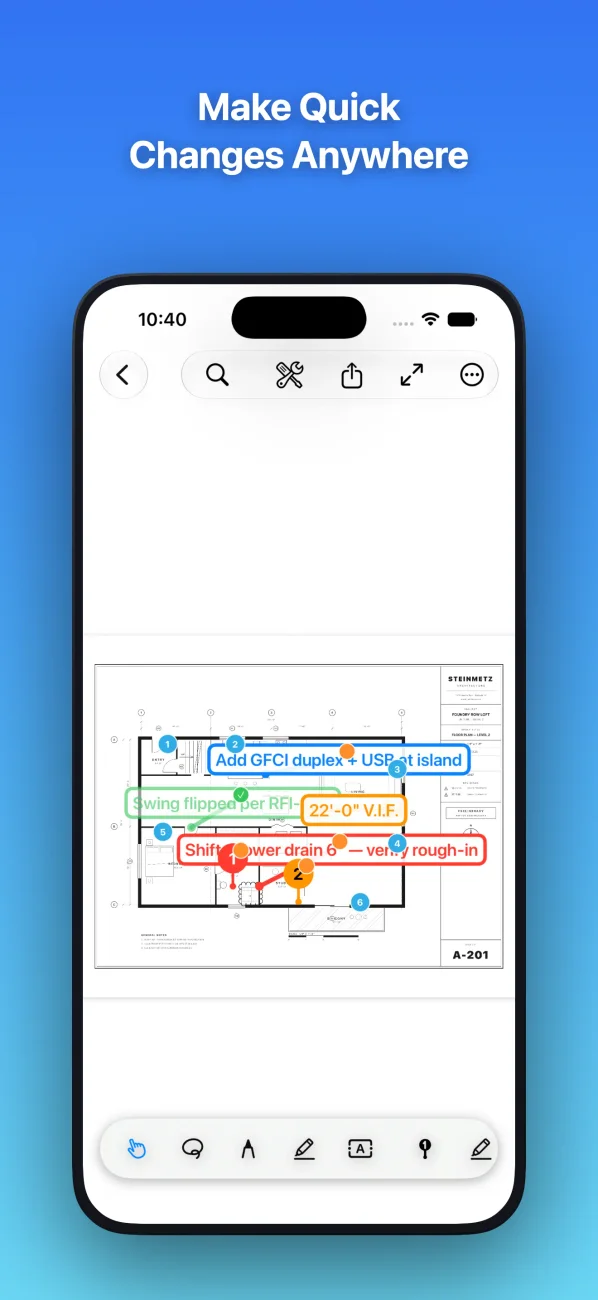
Capturas de pantalla


Acerca de
El desarrollador no ha proporcionado este texto en tu idioma.
SpecPad is a work notebook for people who deal in drawings: plans, schematics, boards, site photos. Mark them up, measure them, keep everything organized in notebooks, and export clean PDFs when it's time to send.
It started with one problem: photographing a circuit board and needing labels that point at the exact pins. So callouts in SpecPad anchor to the photo itself. Zoom way in, drag the image around, the pin stays on the pad. That same stubbornness runs through the rest of the app: revision clouds you draw by hand and type inside, drawings you calibrate once and then measure in real units, redaction bars that actually remove what's under them on export.
PAGES
• Canvas pages have no edges. They grow as you draw
• Notepad pages are real paper sizes (Letter, A4, Tabloid — blank, grid, or lined) and print true to size
• Text Documents for the days you just need to type: headings, lists, dividers
• PDFs import as true vector pages. Mark them up and export with the markup embedded, while the original text stays searchable
• Scan paper with the camera, or start from a photo
MARKUP
• Leader-line callouts anchored to the pixels of a photo
• Draw a rough circle around anything and it becomes a proper scalloped revision cloud with a text box inside
• Calibrate a drawing against one known length, then dimension anything on it in feet-inches or metric
• Numbered pins, a count tool with running totals, Bates-style numbering
• Punch lists: any markup can be Open or Resolved, and resolved items fade in reports
STENCILS & STAMPS
• 180 stencils across electronics, schematics, network & IT, construction, life safety, hatches, medical, education, proofreading, office, and design
• Pick your workflow and the toolbar tailors itself to your trade
• Star the tools you use daily to pin them to the bar
• Lasso anything you've drawn and save it as a reusable stamp, or import your own stencils
INK & SHAPES
• Apple Pencil ink and highlighter, with shape snapping for when a rough box should become a clean one
• Cables that route around parts with the label riding the wire, and named nets that light up together
• Arrows, dimension lines, speech bubbles, hatches
SHARING & SYNC
• Export PDF, PNG, branded markup reports, and annotation schedules
• Search everything, typed or handwritten
• Notebooks sync with iCloud. Share one to work together
• Focus mode, presentation mode, and audio recording on a page for walkthroughs
SPECPAD PRO
The free app is useful every single day, no paywall in your face. Pro adds unlimited pages, spreadsheet exports, path and area measurement, revision compare, and the project index. Subscribe, or buy lifetime once and be done.
Made for iPad. Works on iPhone too.
SpecPad comes from a small shop, not a big one. If your trade is missing a stencil or a tool, write in — I read everything.
Privacy Policy: https://steinmetzlabs.com/apps/specpad/privacy.html
Terms of Use: https://steinmetzlabs.com/apps/specpad/terms.html
Support: https://steinmetzlabs.com/apps/specpad/support.html
Novedades
Versión 1.6.0 · 4/11/2026
Bug Fixes & Improvements
Privacidad de la aplicación
Lo que John Steinmetz declara en App Store sobre cómo esta aplicación gestiona los datos.
-
Datos no vinculados a ti
Pueden recopilarse, pero no se vinculan a tu identidad.
- Compras
- Identificadores
Las prácticas de privacidad pueden variar, por ejemplo, según las funciones que uses o tu edad.
Información
- Vendedor
- John Steinmetz
- Categoría
- Utilidades
- Versión
- 1.6.0
- Actualizado
- 4/11/2026
- Publicado
- 24/7/2026
- Tamaño
- 19,7 MB
- Requiere
- iOS 18.0 o posterior
- Clasificación por edad
- 4+
- Precio
- Gratis
- Compras en la aplicación
- Sí
- Idiomas
- Inglés
- Copyright
- © 2026 John Steinmetz
Quizá también te guste
-
 Markki Photo Inspection ReportUtilidades
-
 PCBmakerUtilidades
-
 MECHATRONX for Arduino & ESP32Utilidades
-
 Survey C-Plus: AutoCAD ExportLevantamiento y diseño
-
 EU_NFCUtilidades
-
 Pipe Pressure drop calculatorUtilidades
-
 PCB Studio MakerUtilidades
-
 HidroCalc BásicaCalculadora pérdida de carga
-
 Cálculo de Carga Eléctrica NECTablero, Acometida y Calibre
-
 NEMA GuideUtilidades