
- Clasificación por edad4+
- CategoríaProductividad
- DesarrolladorSatish Nagdev
- IdiomasInglés
- Tamaño1,6 MB
Enlaza a la página oficial de App Store
Download.org no aloja ningún archivo de SummarizeIt. El botón abre la página de la aplicación en App Store, donde la publica Satish Nagdev. Ficha comprobada por última vez el 14/11/2026.
Capturas de pantalla





Acerca de
El desarrollador no ha proporcionado este texto en tu idioma.
SummarizeIt uses Apple Intelligence to instantly summarize web articles and analyze their sentiment—entirely on your device. No data leaves your iPhone, iPad, or Mac.
FEATURES
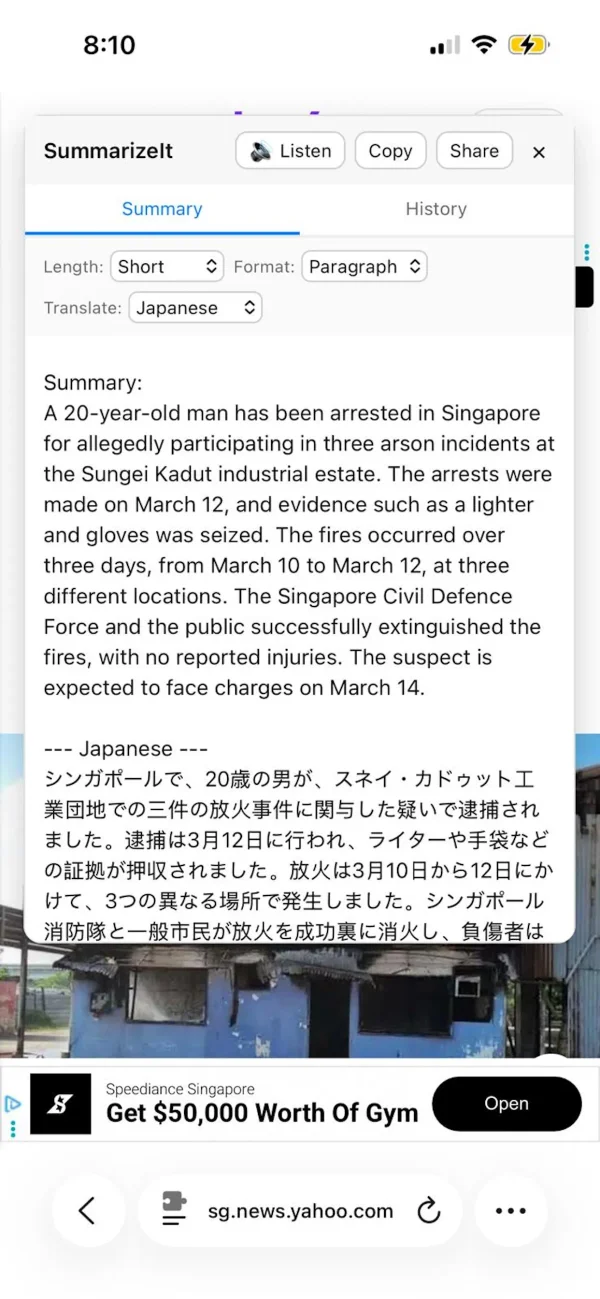
1. Instant Summaries: Get concise summaries of news articles, blog posts, and web content in seconds
2. Customizable Length & Format: Choose between Short, Standard, or Detailed summaries in paragraph or key points format
3. Sentiment Analysis: Understand the emotional tone (Positive, Neutral, or Negative)
4. Translation: Translate summaries into 9 languages including French, German, Spanish, Japanese, Chinese, Korean, Italian, Portuguese, and English
5. Summary History: Browse and manage past summaries with one-tap delete
6. Text-to-Speech: Listen to summaries read aloud with natural-sounding voices and proper language accents
7. Multi-Language Support: Works with English, Chinese, Japanese, Korean, Spanish, French, German, Italian, Portuguese, and more
8. Privacy-First: All processing happens on-device using Apple Intelligence
9. No Internet Required: Works offline once the page is loaded
10. Smart Detection: Automatically finds the article you're viewing on continuous scroll pages
11. Saved Preferences: Your summary length, format, and translation settings are remembered between sessions
PERFORMANCE
1. Short articles (less than 2,000 words): 15-30 seconds
2. Medium articles (2,000-5,000 words): 40-80 seconds
3. Long articles (5,000+ words): 90-150 seconds
REQUIREMENTS iPhone 16 or newer, OR iPad with M1 chip or newer, OR Mac with M1 chip or newer iOS 26.0+ or macOS 26.0+ Apple Intelligence enabled
How it works:
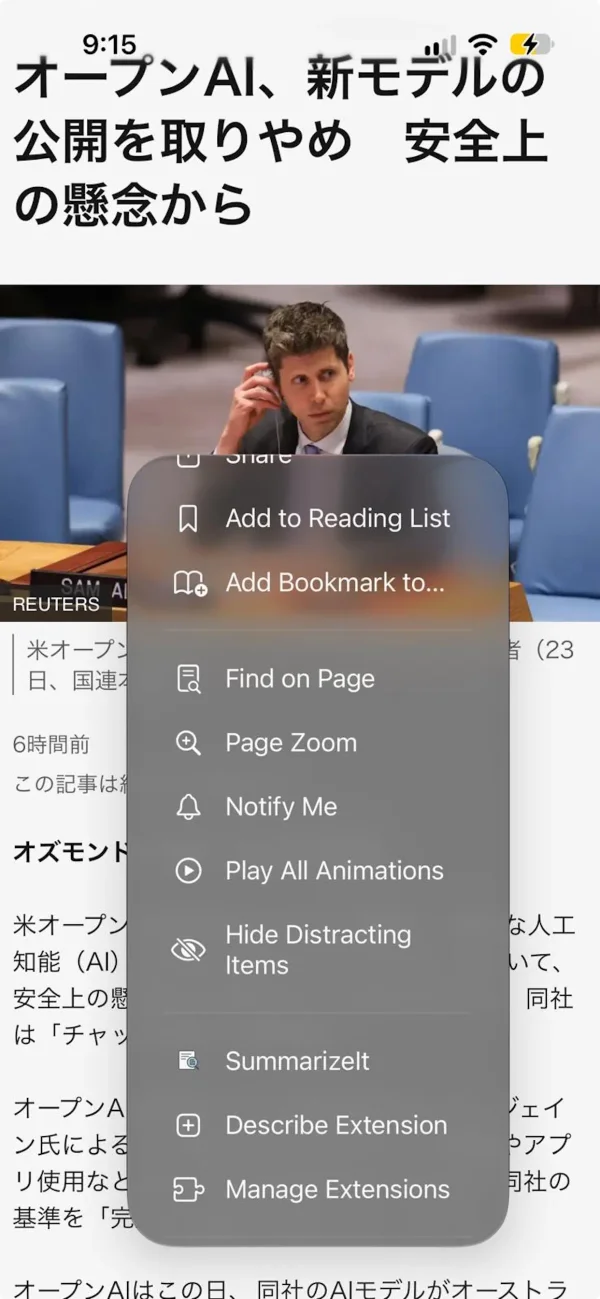
1. Open any article in Safari
2. Tap the SummarizeIt icon
3. Wait 15-90 seconds depending on article length
4. Read your summary with sentiment analysis
5. Adjust length, format, or add a translation as needed
6. Optionally listen to the summary with text-to-speech
7. Copy or share the summary
8. View past summaries in the History tab
PRIVACY & SECURITY
1 100% on-device processing using Apple Intelligence
2. No data sent to external servers
3. No tracking or analytics
4. No personal data collection
5. Your browsing history stays private
Perfect for:
1. Busy professionals who need to stay informed quickly
2. Students researching multiple sources
3. Anyone who wants to save time reading long articles
4. Language learners who want summaries translated or read aloud
5. People who prefer audio content while multitasking
Note: Text-to-speech feature may occasionally pause due to Safari Web Speech API limitations. This is a known Safari limitation and not an issue with the extension.
Novedades
Versión 2.1.1 · 29/9/2026
Rebuilt for iOS 27 and Apple Intelligence's new on-device model.
• Translation now covers 17 languages, including Traditional Chinese, Danish, Dutch, Norwegian, Swedish, Turkish, Vietnamese and Polish
• Long articles that previously failed to summarize now work
• Correct support for every Apple Intelligence device, including the newest Macs and iPhones
• Article language is now reported accurately
• Clearer messages when Apple Intelligence is turned off or still downloading, instead of a generic error
• Dark mode support for the summary panel
• Accessibility improvements: VoiceOver labels, keyboard navigation and focus handling
• Copy and Share now give you just the summary, without the metadata header
Everything still runs entirely on your device. Nothing is sent anywhere.
Privacidad de la aplicación
Lo que Satish Nagdev declara en App Store sobre cómo esta aplicación gestiona los datos.
-
No se recopilan datos
El desarrollador no recopila ningún dato de esta aplicación.
Las prácticas de privacidad pueden variar, por ejemplo, según las funciones que uses o tu edad.
Información
- Vendedor
- Satish Nagdev
- Categoría
- Productividad
- Versión
- 2.1.1
- Actualizado
- 29/9/2026
- Publicado
- 17/9/2025
- Tamaño
- 1,6 MB
- Requiere
- iOS 27.0 o posterior
- Clasificación por edad
- 4+
- Precio
- Gratis
- Idiomas
- Inglés
- Copyright
- © Nagdev Satish, 2026
Quizá también te guste
-
 MeetingInsights: AI MinutesProductividad
-
 FocusCard: Gánate la pantallaCamina o lee para abrir apps
-
 RecRemoverProductividad
-
 Business Card Scanner CardScanProductividad
-
 Kiri - Private offline AI AppProductividad
-
 NextDate TimelineProductividad
-
 Mantenimiento Casa : HOUSEFILERegistro de Reparaciones Casa
-
 Sotto - Offline Auto NotetakerProductividad
-
 Relic: Copy VaultProductividad
-
 SuperrPaper: AI NotebookProductividad