
TB Morphit
Headphones correction plug-in
Diseñada para iPhone, iPad, iPod touch
9,99 €
- Clasificación por edad4+
- CategoríaMúsica
- DesarrolladorToneBoosters
- Tamaño11,2 MB
Enlaza a la página oficial de App Store
Download.org no aloja ningún archivo de TB Morphit. El botón abre la página de la aplicación en App Store, donde la publica ToneBoosters. Ficha comprobada por última vez el 12/11/2026.
Capturas de pantalla
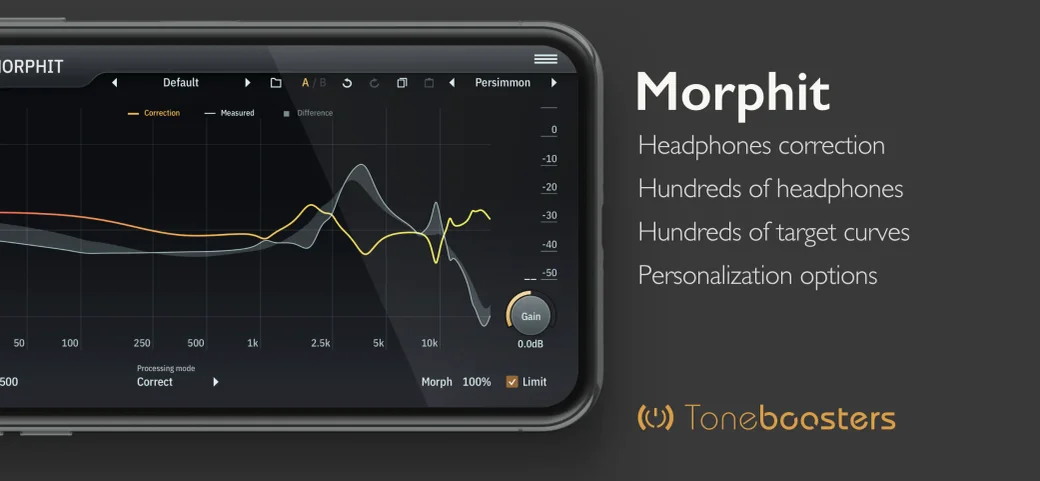


Acerca de
El desarrollador no ha proporcionado este texto en tu idioma.
ToneBoosters Morphit is an AUv3 plugin for headphones correction and simulation and removes any unwanted coloration from your headphones!
Enable accurate monitoring and calibration, mix with studio reference equalization, and improve the accuracy of your headphones. Used and trusted by thousands of studios worldwide, and now available on your mobile device!
The ToneBoosters Morphit app captures the microphone (or external sound card) input and processes the signals in real time. To use it as a plug-in, use an AUv3-compatible host app such as Steinberg Cubasis, Apple Garageband, Audio Evolution Mobile Studio, Auria, AUM, or others. ToneBoosters Morphit will appear in the list of Audio Unit extensions for effect plug-ins.
How to use Morphit as AUv3 plugin for headphones correction:
1. Connect your headphones to your iOS device (using the headphones jack, using BlueTooth, or using an adapter as supplied by Apple). You can use any of the many supported headphones listed here: www.toneboosters.com/tb_morphit_v1.html
2. Start your favourite AUv3 host app (Steinberg Cubasis, Apple Garageband, Audio Evolution Mobile Studio, Auria, AUM, or others) and add TB Morphit as Audio Unit insert effect to a track or output bus. See below on how to use Audio Units in various host apps.
3. Select the headphones you are using from the list of supported headphones provided within the TB Morphit app. That's it - all audio going through the Audio Unit plugin is optimised for your headphones.
Key features:
- The same professional sound as the acclaimed desktop version
- Hundreds of headphones supported!
- Unique feature: allow morphing of the amount of correction from 0 to 200%
- Unique feature: allow simulation of any of the supported headphones and see how your mix translates
- Unique feature: personalize the headphones target curve
- Unique feature: use Harman calibration / target curves
- Unique feature: data/measurement visualization mode
- No external hardware required; works with any of the supported headphones models
- Undo/redo, and A/B comparison
- Color themes for the user interface
- Max screen support in Garageband
- Optimised for iPad and compatible with iPhone and iPod Touch
See if your headphones are supported:
www.toneboosters.com/tb_morhpit_v1.html
What you should know:
- Licenses acquired for this platform are not compatible with other platforms.
- Audio Unit (AUv3) extensions require an iPad mini 2, iPad 4 or later models.
Novedades
Versión 2.1.8 · 28/5/2026
- New headphones profiles: Sony WF-C700N, Beyerdynamic DT1990Pro MKII
- Fix an issue that prevented deletion of programs in the programs manager
- New option to enable highlighting of UI elements that accept keyboard input
- New option to customize color scheme
- Improved undo/redo functionality
Privacidad de la aplicación
Lo que ToneBoosters declara en App Store sobre cómo esta aplicación gestiona los datos.
-
No se recopilan datos
El desarrollador no recopila ningún dato de esta aplicación.
Las prácticas de privacidad pueden variar, por ejemplo, según las funciones que uses o tu edad.
Información
- Vendedor
- Dirk Breebaart
- Categoría
- Música
- Versión
- 2.1.8
- Actualizado
- 28/5/2026
- Publicado
- 16/11/2019
- Tamaño
- 11,2 MB
- Requiere
- iOS 13.0 o posterior
- Clasificación por edad
- 4+
- Precio
- 9,99 €
- Copyright
- © 2012-2026 ToneBoosters.com
Quizá también te guste
-
 AK476 - FET CompressorMúsica
-
 TheStrip by DDMFMúsica
-
 Type A - Vintage EnhancerMúsica
-
 SpatializerMúsica
-
 FabFilter Saturn 2Música
-
 FabFilter Pro-Q 4Música
-
 BLEASS Multiband CompressorDeep Dynamics Detail
-
 L2 Aura - Leveling AmplifierMúsica
-
 TAIP - Baby AudioMúsica
-
 BLEASS SaturatorCreative Audio Destruction