- Clasificación por edad4+
- CategoríaUtilidades
- DesarrolladorTalon Strike Software
- IdiomasInglés
- Tamaño5,1 MB
Enlaza a la página oficial de App Store
Download.org no aloja ningún archivo de When Will I. El botón abre la página de la aplicación en App Store, donde la publica Talon Strike Software. Ficha comprobada por última vez el 20/11/2026.
Capturas de pantalla

Acerca de
El desarrollador no ha proporcionado este texto en tu idioma.
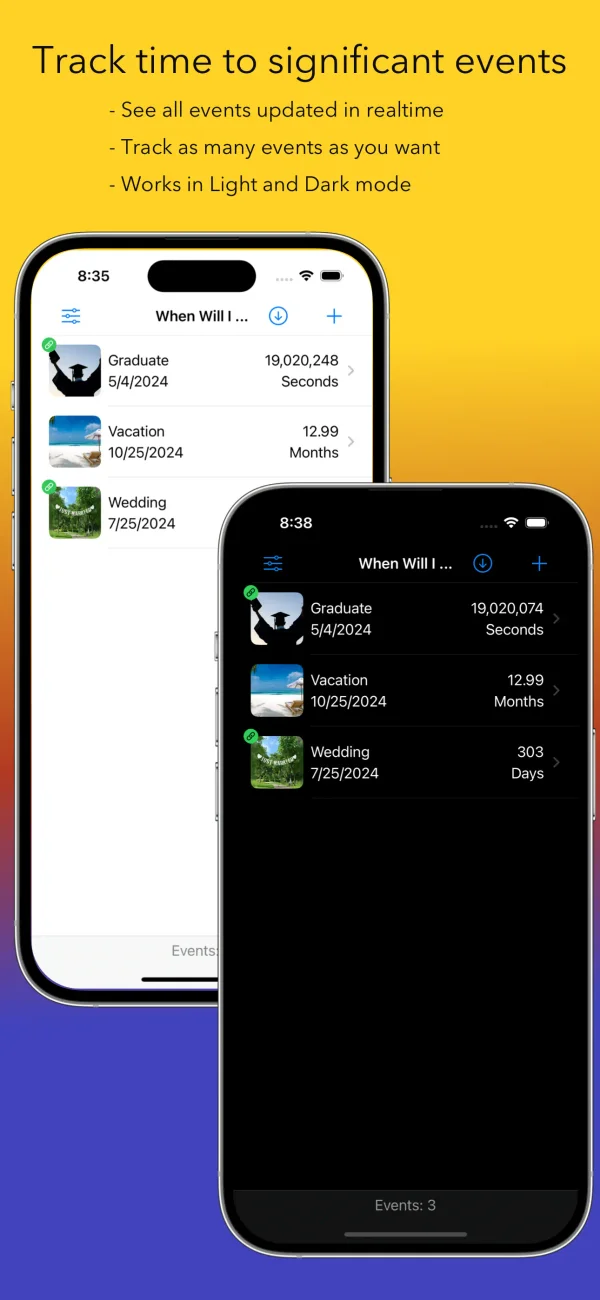
When Will I is a fun and informative utility to show the time left to a specific event. Whether you're waiting for Christmas, retirement, your birthday, or the next episode of your favorite TV show, When Will I can tell you exactly how long it will be.
With When Will I, you can:
- Track multiple events at once
- Choose from a variety of time units (minutes, seconds, hours, weeks, months, etc.)
- Set custom images for each event
- Sync your events to your connected Apple Watch
Novedades
Versión 1.1.0 · 21/4/2024
This app has been updated by Apple to prepare for watchOS 27 compatibility. No new features are included.
- Features:
- Can now show the time elapsed from when the event was first entered
- When an event is completed you get fireworks - because who doesn't like fireworks?
- Added a "show age" option in settings where you can set your birthday and then within each event you can see your age at the different percentage completed options.
- If Apple Watch app is installed added a setting in Settings to unsync completed events from the watch
- Quality of Life Improvements:
- Reference Date can now default to the current date or you can set it manually like before
- Rearranged the edit event screen for better grouping and clarity
- Reworked the time calculations to be a bit more accurate, particuarly for days
- Bugs fixed:
- When an event is manually marked completed and the list is filtered to only show active events, the manually completed event will get filtered out as well
- If "only show active events" is set in settings, we now show only the active events in the list view when the app is first launched. Before the app briefly showed all the events before filtering out the inactive ones
- Fixed other bugs we added when adding the new features
Privacidad de la aplicación
Lo que Talon Strike Software declara en App Store sobre cómo esta aplicación gestiona los datos.
-
Datos usados para rastrearte
Pueden usarse para rastrearte en aplicaciones y sitios web propiedad de otras empresas.
- Ubicación
- Identificadores
- Datos de uso
- Diagnóstico
-
Datos vinculados a ti
Pueden recopilarse y vincularse a tu identidad.
- Ubicación
- Identificadores
- Datos de uso
-
Datos no vinculados a ti
Pueden recopilarse, pero no se vinculan a tu identidad.
- Diagnóstico
Las prácticas de privacidad pueden variar, por ejemplo, según las funciones que uses o tu edad.
Información
- Vendedor
- Mark Astin
- Categoría
- Utilidades
- Versión
- 1.1.0
- Actualizado
- 21/4/2024
- Publicado
- 4/10/2023
- Tamaño
- 5,1 MB
- Requiere
- iOS 17.0 o posterior
- Clasificación por edad
- 4+
- Precio
- Gratis
- Idiomas
- Inglés
- Copyright
- © 2024 TalonStrike Software Solutions
Quizá también te guste
-
 Momentra Time CounterUtilidades
-
 AlassëAsistente de Cumpleaños
-
 Momento: Timers & CountdownUtilidades
-
 World Clock: USA Time ZonesUtilidades
-
 Lunar Birthday Reminder CNUtilidades
-
 Countdown - A Simple CountdownUtilidades
-
 Countdown Widget - PeekDayUtilidades
-
 Countdowns: Track Every MomentUtilidades
-
 Global Time MachineReloj mundial y zonas horarias
-
 Future PastUtilidades