Zishu
Learn to write Chinese
Diseñada para iPhone, iPad, iPod touch
Gratis · Compras en la aplicación
- Clasificación por edad4+
- CategoríaEducación
- DesarrolladorBen Morrison
- IdiomasInglés
- Tamaño67,4 MB
Enlaza a la página oficial de App Store
Download.org no aloja ningún archivo de Zishu. El botón abre la página de la aplicación en App Store, donde la publica Ben Morrison. Ficha comprobada por última vez el 12/11/2026.
Capturas de pantalla


Acerca de
El desarrollador no ha proporcionado este texto en tu idioma.
Learn to write Chinese characters, stroke by stroke.
Zishu is a personal Chinese handwriting tutor that works completely offline. Draw every character stroke by stroke on screen and get instant validation against authentic stroke order data, with a brush that feels like real ink.
INK BRUSH
Strokes look and behave like ink: fuller when you slow down, thinner when you move fast, with a soft dry-brush edge on long, quick strokes. The original calligraphy brush, a classic line, and an invisible style are also available.
STROKE DETECTION THAT UNDERSTANDS HANDWRITING
Every stroke is checked as you write, including direction and every turn, so a 竖折 needs its turn. Connected strokes can be written in one motion, with three styles to grow into as you get faster: Light (a few natural joins), Everyday (了 in a single flow, 氵 and 讠 in one stroke) and Running script (looser, more cursive). Boxes like 口 can be written in one stroke however you write them: as an R, a Z or a loop. Or turn it off and write every stroke separately.
TRUE HANDWRITING
Prefer to write without feedback? Handwriting mode shows your own ink, and True Handwriting lets you write the whole character freely, then tap Check to see how you did. Both work in Learning, too.
DAILY REVIEW WITH SPACED REPETITION
Every character you practice is scheduled on expanding intervals (1, 3, 7, 14, 30, 60 days). Miss one and it comes back sooner. A Daily Review card shows exactly what is due today, and practice automatically features the characters you struggle with.
MEANING RECALL
Optionally hide meanings during review: see only the pinyin, write the character, then check whether you remembered what it means. Meanings you forget come back sooner, on their own schedule.
AUTOMATIC GRADING
Each character is graded from your strokes. Confirm or override with a tap, or turn on auto-advance and just keep writing.
EVERYTHING YOU NEED TO STUDY
- HSK 1 to 6, radicals, and frequency sets
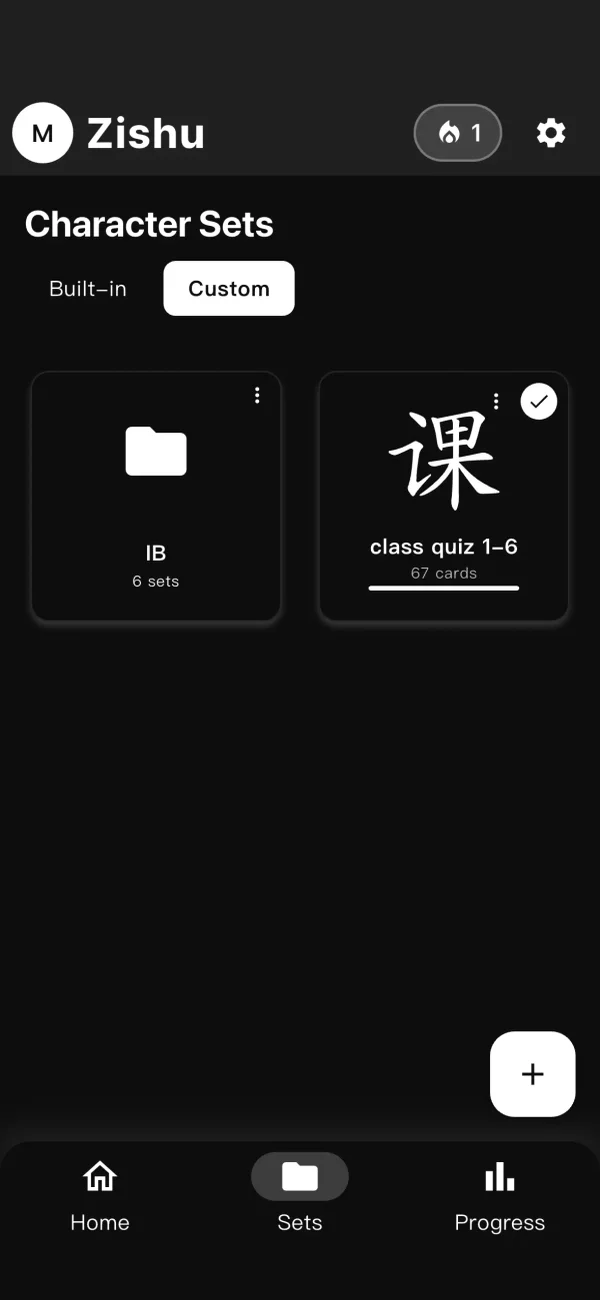
- Custom sets from any text, organized in folders, plus review sets built from your mistakes
- Radical meanings shown when you complete a character
- Built-in dictionary with pinyin and definitions, and your own notes
- Native Mandarin pronunciation
- Streaks, goals with a daily pace, and detailed progress
SIMPLIFIED OR TRADITIONAL
Pick the characters you're learning when you first open the app, and switch anytime in Settings. Every set converts, and your progress is kept.
MADE FOR IPHONE AND IPAD
A comfortable, adjustable writing area on iPad. Interface in English, Simplified Chinese and Traditional Chinese.
100% OFFLINE AND PRIVATE
No account, no ads, no tracking. All your data stays on your device, with built-in backup export and import.
Zishu is free and made by one student developer. If it helps you, there is a tip jar in the menu. Nothing is locked behind it.
Novedades
Versión 1.3.1 · 3/11/2026
This update fixes a few problems from 1.3.0, mainly with connected strokes, which didn't work as well as they should have. My bad for letting something not fully complete slip out.
• Connected strokes rebuilt: boxes like 口 can now be written in one stroke however you write them, as an R, a Z or a loop, big or small, neat or fast.
• Three connected-stroke styles to grow into as you speed up: Light, Everyday and Running script.
• Stroke checking fixed: strokes with turns, like 竖折 and 横折, now need every turn drawn, instead of accepting a straight line.
• New Ink brush, now the default: solid ink that fills out when you slow down and thins when you go fast. The original brush is still in Settings → Stroke type.
• True Handwriting: write the whole character freely, then tap Check to see how you did.
• Handwriting and True Handwriting now work in Learning too.
• Refreshed Light and Dark themes, and many smaller fixes.
Privacidad de la aplicación
Lo que Ben Morrison declara en App Store sobre cómo esta aplicación gestiona los datos.
-
No se recopilan datos
El desarrollador no recopila ningún dato de esta aplicación.
Las prácticas de privacidad pueden variar, por ejemplo, según las funciones que uses o tu edad.
Información
- Vendedor
- Ben Morrison
- Categoría
- Educación
- Versión
- 1.3.1
- Actualizado
- 3/11/2026
- Publicado
- 5/8/2025
- Tamaño
- 67,4 MB
- Requiere
- iOS 15.0 o posterior
- Clasificación por edad
- 4+
- Precio
- Gratis
- Compras en la aplicación
- Sí
- Idiomas
- Inglés
- Copyright
- © 2026 Archer Morrison
Quizá también te guste
-
 Strokie: Chinese Hanzi WritingEducación
-
 BW Hanzi: Caligrafía ChinaOrden de trazos y pinyin
-
 Write It! ChineseOrden de trazos y léxico HSK
-
 Copybook Club: escritura chinaCuadernos con orden de trazos
-
 Wanyu: Aprende ChinoVocabulario HSK y gramática
-
 Hanzi Stroke: Escribe chinoHSK y caracteres chinos
-
 WriteChinese - chinoAprende a escribir chino
-
 HanziKit: Escritura chinaTrazos, caligrafía PDF, HSK
-
 ChengYu - Daily Chinese IdiomsEducación
-
 HanziDragon: escribir chinoHSK caracteres, trazos, pinyin