BFF2- Blackboard Version 2
BFF-KING STORM- PEGI 3Classification d’âge
- PersonnalisationCatégorie
- 28/10/2026Mis à jour
- 2,19 €Prix
Renvoie vers la fiche Google Play officielle de com.BFF.watchfacestudio.bff2G_blackboardversion_multicolor. Dernière vérification le 24/11/2026.
À propos de cette application
Traduction automatique par Google. Langue d’origine : Anglais (États-Unis).
Version tableau noir pour Wear OS par BFF-Storm (sauf pour le cadran carré)
REMARQUE : Assurez-vous que le compte Google Play de votre téléphone et de votre montre est identique. Pour éviter ce problème : « Vos appareils ne sont pas compatibles ».
REMARQUE : Les cadrans vendus par BFF-Storm sur le Play Store sont actuellement en cours de finalisation, compatibles avec le nouveau système d'exploitation Wear OS Google / One UI de Samsung. Nous nous engageons donc à les mettre à jour dès que possible si une nouvelle fonctionnalité est ajoutée. En cas de problème, vous pouvez nous contacter via Gmail :
support@bffstormwatchface.com
Nous vous assistons et répondons à vos questions 24h/24 et 7j/7.
REMARQUE : Assurez-vous d'avoir activé toutes les autorisations dans Paramètres -> Applications.
REMARQUE : Comment installer le cadran ?
1 - Assurez-vous que la montre est connectée au secteur via Bluetooth, ouvrez la page de l'application pour l'installer.
Cliquez sur l'option « Installer sur d'autres appareils » (icône triangulaire à droite du bouton d'installation ou d'achat gratuit).
Désactivez les paramètres du téléphone pour l'installer sur la montre. Puis, procédez à l'installation.
Une fois l'installation réussie, une notification s'affichera sur la montre. Vous pourrez y rechercher l'application.
Si l'application n'apparaît pas, ouvrez l'application Galaxy Wearable sur votre téléphone, sélectionnez les cadrans, puis faites défiler la section des applications téléchargées et sélectionnez-les pour les afficher.
2 - Si vous avez installé des applications complémentaires sur votre téléphone par erreur, vous pouvez les supprimer une fois le cadran installé.
3 - En cas de problème de synchronisation entre votre téléphone, le Play Store et votre montre, installez le cadran directement depuis votre montre, ou essayez depuis le navigateur web de votre PC ou consultez notre site web pour rechercher un produit.
Ce cadran est compatible avec tous les appareils Wear OS avec API niveau 30 ou supérieur.
REMARQUE : Bouton Personnaliser :
- Appuyez pour sélectionner le raccourci de l'application
- Appuyez pour ouvrir le raccourci de l'application
REMARQUE : Certaines fonctionnalités peuvent ne pas être disponibles sur certaines montres. Ce cadran ne s'applique pas aux montres à cadran carré.
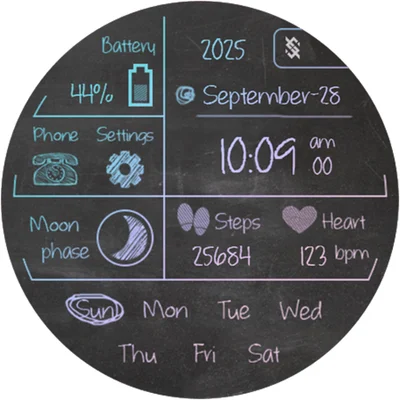
Le BFF2 - Tableau noir Version 2 Multicolore de BFF-Storm.
Fonctionnalités du cadran : (Voir la description de l’image)
- Affichage 12/24 h selon les paramètres du téléphone
- Heure : Jour, Mois, Année
- Santé : Nombre de pas, Fréquence cardiaque
- Batterie
Autres informations personnalisées
- Arrière-plans optionnels *2
- Couleurs optionnelles : Chiffres et Lune *10
Prise en charge de l’affichage permanent :
- Couleur d’arrière-plan : définie par défaut
- Couleur des chiffres modifiable
Raccourcis d’application :
- 4 raccourcis d’application personnalisables. (Voir la description de l’image pour savoir où se trouvent les 4 boutons.)
Plus de détails dans la description de l’image.
Personnalisation :
1 - Maintenez l’écran appuyé
2 - Appuyez sur l’option de personnalisation
Retrouvez-nous sur :
Facebook : https://www.facebook.com/BFFKINGSTORM
Instagram : https://www.instagram.com/bffstormer/
Site web : https://bffstormwatchface.com/
Merci !
Afficher le texte d’origine
NOTE : You need to make sure the Google Play account on your phone and watch is the same. To avoid the situation: "Your devices are not compatible".
NOTE: The Watch faces sold by BFF-Storm on the Play Store are currently in the process of feature completion based on Samsung's new Wear Os Google / One UI operating system. So we are committed to update the watch face as soon as possible if a new function is completed. And when you have problems using it, you can contact us via gmail:
support@bffstormwatchface.com
We will support and answer questions 24/7.
NOTE: Make sure you have enabled all permissions from settings -> Applications.
NOTE: How to install watch face?
1 - Make sure the watch is connected to the electricity via bluetooth, open the watch face app page to install.
Open the "Install on more device" option (Triangle icon to the right of the free install or purchase button).
Turn off the settings on the phone just to set it on the watch. And do the installation.
After successful installation, a notification will be displayed on the watch, you can search the application on the watch.
If the app doesn't appear on the watch, open the Galaxy Wearable app on your phone, select watch faces and scroll down to the downloaded apps section and select watch faces to have them show up on the watch.
2 - If you have installed companion apps on your phone by mistake, you can delete them once the watch face has been installed.
3 - If you have sync problems between your phone, Play Store and watch, install watch face directly from your watch, or you can try from your PC web browser or visit our website to Search product.
This watch face supports all Wear OS devices with API Level 30+.
NOTE : Customize button:
-Tap to select app shortcut
-Tap to open the app shortcut
NOTE : Some features may not be available on some watches. This watch face will not apply to square face watches.
The BFF2- Blackboard Version 2 Multicolor by BFF-Storm.
Watch Face Features: (You can see them on the picture description)
- 12/24Hr based on phone settings
- Time information: Day, Month, Year.
- Health information: Step counts, Heart rate.
- Battery
Other customized information
- Optional Background *2
- Optional color Number and Moon *10
Always on display supports:
- Background color : Set to background by default
- Color numbers can be changed.
App shortcuts :
-4 customize app shortcuts. (You can see in the image description for where the 4 buttons are.)
You can see more details on our image description.
Customize :
1 - Touch and hold the screen
2 - Tap on customize option
Please visit us at:
Facebook: https://www.facebook.com/BFFKINGSTORM
Instagram: https://www.instagram.com/bffstormer/
Webpage: https://bffstormwatchface.com/
Thank You !!
Sécurité des données
Ce que BFF-KING STORM déclare sur Google Play au sujet des données que cette application collecte et partage.
- Aucune donnée partagée avec des tiersEn savoir plus sur la manière dont les développeurs déclarent le partage
- Aucune donnée collectéeEn savoir plus sur la manière dont les développeurs déclarent la collecte
Nouveautés
28/10/2026
BFF2- Blackboard Version 2 Multicolor
Coordonnées du développeur
- Site webbffstormwatchface.com
- E-mail13kdollarmonth@gmail.com
- Politique de confidentialitébffstormwatchface.com
- AdresseT. Dong Vien - X. Phu Dong - H. Gia Lam - TP. Ha Noi Hà Nội 10000 Vietnam
Informations
- Proposée par
- BFF-KING STORM
- Catégorie
- Personnalisation
- Mis à jour
- 28/10/2026
- Publié
- 23/04/2023
- Classification d’âge
- PEGI 3
- Prix
- 2,19 €
- Nom du package
- com.BFF.watchfacestudio.bff2G_blackboardversion_multicolor