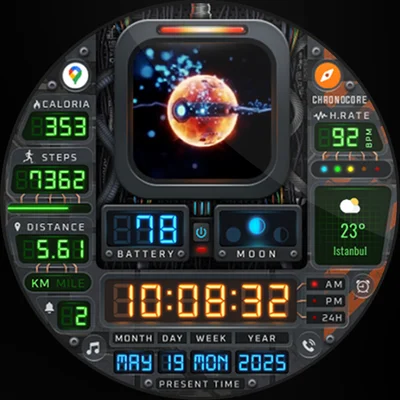
Chrono Core - Watch Face
EK Watch Faces ™- PEGI 3Classification d’âge
- PersonnalisationCatégorie
- 17/09/2026Mis à jour
- 1,99 €Prix
Renvoie vers la fiche Google Play officielle de com.ekwatchfaces.backtothefuture. Dernière vérification le 13/11/2026.
À propos de cette application
Traduction automatique par Google. Langue d’origine : Anglais (États-Unis).
Laissez le pouls du futur battre à votre poignet !
🌟 Conçu pour Wear OS
[Uniquement pour les appareils Wear OS - API 33+ ]
🌌Laissez le pouls du futur vibrer à votre poignet !
CARACTÉRISTIQUES
● 🚀 Chronomètre animé
● 🎨 10 textures métalliques ou 20 couleurs
● 📊 Pas - Distance - Calories - Batterie - Fréquence cardiaque - Calendrier - 1 complication personnalisée - 2 raccourcis ajustables - Notifications
● 🌕 Phases de la lune en direct
● 🕒 Format 12/24 h (selon le réglage de l'heure de votre téléphone)
● 🚧 Unités km/mi prises en charge (sélection automatique selon la langue du téléphone aux États-Unis et au Royaume-Uni)
● 👀 Affichage permanent pris en charge
📌 NOTES D'INSTALLATION :
1 - 🔗 Assurez-vous que votre montre est correctement connectée à votre téléphone. Ouvrez l'application Téléphone sur votre téléphone et appuyez sur "TÉLÉCHARGER SUR LA MONTRE", puis suivez les instructions sur votre montre.
⌛ Quelques minutes après avoir appuyé sur le bouton d'installation sur votre montre, le cadran sera installé. Vous pourrez alors sélectionner votre nouveau cadran !
📱 L'application Téléphone sert d'interface pour faciliter l'installation et la recherche du cadran sur votre appareil Wear OS.
⚠️ Remarque : Si vous rencontrez un problème de paiement, pas de panique ! Vous ne serez débité qu'une seule fois, même si l'on vous demande de payer à nouveau. Patientez 5 minutes ou redémarrez votre montre et réessayez. Il peut s'agir d'un problème de synchronisation entre votre appareil et les serveurs Google.
2 - 💻 Vous pouvez également essayer d'installer le cadran depuis un navigateur web sur votre ordinateur.
⚠️ Veuillez noter que tout problème rencontré de ce côté-ci est indépendant du développeur. Le développeur n'a aucun contrôle sur le Play Store. Merci.
🔑 Pour une fonctionnalité complète, veuillez activer manuellement les autorisations relatives aux capteurs et aux données de complications !
SITE WEB
https://www.ekwatchfaces.com
INSTAGRAM
https://www.instagram.com/ekwatchfaces
FACEBOOK
https://www.facebook.com/ekwatchfaces
TWITTER
https://twitter.com/ekwatchfaces
PINTEREST
https://www.pinterest.com/ekwatchfaces
YOUTUBE
https://bit.ly/2TowlDE
Afficher le texte d’origine
🌟 Built for Wear OS
[ Only for Wear OS devices - API 33+ ]
🌌Let the pulse of the future beat through your wrist!
FEATURES
● 🚀 Animated Chrono Core
● 🎨 10 Metal Texture or 20 Colour variants
● 📊 Steps - Distance - Calories - Battery - Heart rate - Calendar - 1 custom complication - 2 adjustable shortcuts - Notification
● 🌕 Live Moon Phases
● 🕒 12/24 H (Based on your phone time setting)
● 🚧 Km/Mi supported (Automatically selected based on phone language in the United States and United Kingdom)
● 👀 Always-On Display Supported
📌 INSTALLATION NOTES:
1 - 🔗 Ensure your watch is properly connected to your phone. Open the Phone App on your phone and tap on "DOWNLOAD TO THE WATCH", then follow the instructions on your watch.
⌛ A few minutes after tapping the install button on your watch, the watch face will be installed. You can then select your new watch face!
📱 The phone app serves as a placeholder to make it easier to install and find the watch face on your Wear OS device.
⚠️ Note: If you find yourself stuck in a payment loop, don’t worry! You will only be charged once, even if prompted to pay again. Wait 5 minutes or restart your watch and try again. This could be a synchronization issue between your device and Google servers.
2 - 💻 Alternatively, you can try installing the watch face from a web browser on your PC.
⚠️ Please note that any issues on this side are NOT developer-dependent. The developer has no control over the Play Store from this side. Thank you.
🔑 For full functionality, please manually enable Sensors & receive complication data permissions!
WEB
https://www.ekwatchfaces.com
INSTAGRAM
https://www.instagram.com/ekwatchfaces
FACEBOOK
https://www.facebook.com/ekwatchfaces
TWITTER
https://twitter.com/ekwatchfaces
PINTEREST
https://www.pinterest.com/ekwatchfaces
YOUTUBE
https://bit.ly/2TowlDE
Sécurité des données
Ce que EK Watch Faces ™ déclare sur Google Play au sujet des données que cette application collecte et partage.
- Aucune donnée partagée avec des tiersEn savoir plus sur la manière dont les développeurs déclarent le partage
- Aucune donnée collectéeEn savoir plus sur la manière dont les développeurs déclarent la collecte
Nouveautés
17/09/2026
- Security update performed.
Coordonnées du développeur
- Site webekwatchfaces.com
- E-mailsupport@ekwatchfaces.com
- Politique de confidentialitéekwatchfaces.com
- AdresseNUMUNE EVLER MAH. SOYER 1 SK. DURMUŞ DENİZ APT. SİTESİ HACI DURMUŞ DENIZ APT BLOK NO: 44 İÇ KAPI NO: 4 31600 DÖRTYOL/Hatay Türkiye
Informations
- Proposée par
- EK Watch Faces ™
- Catégorie
- Personnalisation
- Mis à jour
- 17/09/2026
- Publié
- 24/03/2024
- Classification d’âge
- PEGI 3
- Prix
- 1,99 €
- Nom du package
- com.ekwatchfaces.backtothefuture