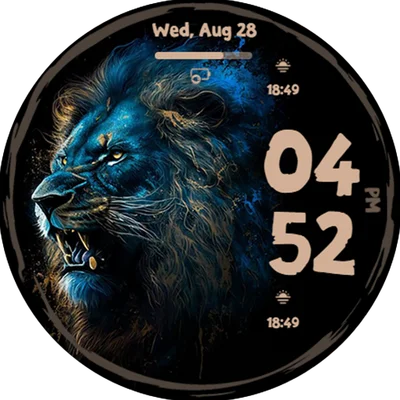
Dark Led Watch Face
RADU GHEORGHE TURCU- PEGI 3Classification d’âge
- PersonnalisationCatégorie
- 25/08/2024Mis à jour
- 1,09 €Prix
Renvoie vers la fiche Google Play officielle de com.turcuradu.darkledwatchface. Dernière vérification le 23/11/2026.
À propos de cette application
Traduction automatique par Google. Langue d’origine : Anglais (États-Unis).
Schéma d'image Cool Art Watchface Design 4
Essayez-le pour avoir du sens.
Appareils pris en charge : toutes les montres équipées de Wear OS
Widget compliqué et design sympa.
Caractéristiques :
Conception simple et cool
4 arrière-plans d'images différents
11 combinaisons de couleurs différentes
2 widgets compliqués
AOD
Grand temps numérique
Indicateur de batterie
Date complète
Vous pouvez me trouver sur Telegram :
https://t.me/TRWatchfaces
Notes d'installation du cadran sur la montre intelligente :
L'application téléphonique sert uniquement d'espace réservé pour faciliter l'installation et la recherche du cadran sur votre montre Wear OS. Vous devez sélectionner votre montre dans le menu déroulant d'installation.
Si vous téléchargez l'assistant directement avec le téléphone, vous devez ouvrir l'application et toucher l'écran ou le bouton de téléchargement. -> va commencer à s'installer sur la montre.
Une montre wear os doit être connectée.
Si cela ne fonctionne pas de cette manière, vous pouvez copier ce lien dans le navigateur Chrome de votre téléphone et cliquer sur la flèche vers le bas en partant de la droite, et vous choisissez le cadran à installer.
Si vous rencontrez des problèmes, veuillez me contacter à raduturcu03@gmail.com
Essayez de voir d'autres designs dans mon profil Google.
Afficher le texte d’origine
Try it to make sense.
Supported devices : All Watches which have Wear OS
Complicated Widget and cool design.
Features :
Simple and cool design
4 different image backround
11 different color schemes
2 Complicated Widgets
AoD
Big Digital Time
Battery Indicator
Full Date
You can find me at telegram :
https://t.me/TRWatchfaces
Watch face installation notes on smart watch:
Phone app serves only as a placeholder to make it easier to install & find the watch face on your Wear OS watch. You have to select your watch device from the install dropdown menu.
If you download the helper directly with the phone , you need to open application and touch on the display or the download button. -> will start to install on the watch.
A wear os watch need to be connected.
If not working in that way , you can copy that link into your phone chrome browser and click on arrow down from right , and you choose the watchface to install.
If you have problems , please contact me on raduturcu03@gmail.com
Try to see others designs in my google profile.
Sécurité des données
Ce que RADU GHEORGHE TURCU déclare sur Google Play au sujet des données que cette application collecte et partage.
- Aucune donnée partagée avec des tiersEn savoir plus sur la manière dont les développeurs déclarent le partage
- Aucune donnée collectéeEn savoir plus sur la manière dont les développeurs déclarent la collecte
Coordonnées du développeur
- E-mailraduturcu03@gmail.com
- Politique de confidentialitée-droid.net
- AdresseStr. Eduard Albert Bielz, Nr. 89d, Bl. b1, Sc. f, et.1, Ap. 60 550031 Sibiu Romania
Informations
- Proposée par
- RADU GHEORGHE TURCU
- Catégorie
- Personnalisation
- Mis à jour
- 25/08/2024
- Publié
- 25/08/2024
- Classification d’âge
- PEGI 3
- Prix
- 1,09 €
- Nom du package
- com.turcuradu.darkledwatchface