Edge Dial
ChronoHarvest- PEGI 3Classification d’âge
- PersonnalisationCatégorie
- 15/09/2026Mis à jour
- 1,09 €Prix
Renvoie vers la fiche Google Play officielle de com.watchface.xanleyn13. Dernière vérification le 21/11/2026.
À propos de cette application
Traduction automatique par Google. Langue d’origine : Anglais (États-Unis).
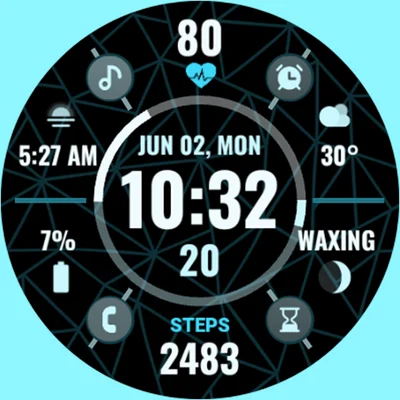
Cadran de montre numérique dynamique conçu pour WEAR OS
📍GUIDE D'INSTALLATION
⭐️Nos applications de cadrans sont rigoureusement testées sur un appareil réel et sont examinées et approuvées par l'équipe Google Play Store avant leur publication.
REMARQUE :
1️⃣ Les cadrans s'installent automatiquement sur la montre WEAR OS.
2️⃣ ASSUREZ-VOUS QUE LA MONTRE EST SYNCHRONISÉE AVEC VOTRE TÉLÉPHONE PAR LE MÊME WI-FI. CONNECTEZ-VOUS À VOTRE COMPTE GOOGLE SUR LA MONTRE POUR UNE INSTALLATION FACILE.
3️⃣ Après le téléchargement, ATTENDEZ quelques minutes que le cadran soit transféré sur la montre. (Une notification s'affichera sur votre montre si le cadran a été transféré avec succès.)
4️⃣ En l'absence de notification, accédez à Playstore sur votre montre et saisissez « Edge Dial » dans le champ de recherche.
5️⃣ Le cadran s'affichera. Appuyez ensuite sur le bouton d'installation.
⭐️ Les cadrans ne s'affichent pas automatiquement après une installation réussie. Revenez à l'écran d'accueil. Appuyez longuement sur l'écran, faites glisser votre doigt jusqu'au bout et appuyez sur + pour ajouter le cadran. Tournez le cadran ou faites défiler pour trouver le cadran.
📍Consultez les graphiques des fonctionnalités pour plus de détails sur l'installation.
📍Autorisez/activez toutes les autorisations depuis Paramètres -> Applications -> Autorisations.
⚠️⚠️⚠️ Le remboursement est possible uniquement sous 48 heures.
⭐️FONCTIONNALITÉS :
- Horloge et date numériques
- Raccourcis d'applications prédéfinis
- Raccourcis d'applications et complications personnalisables
- Différents styles et couleurs d'arrière-plan
📍Compatible avec les montres Wear OS, mais certaines fonctionnalités peuvent ne pas être disponibles sur certaines montres.
Contactez-nous à : dreamwatchfaces@gmail.com
Tutoriel d'installation YouTube : https://www.youtube.com/watch?v=vMM4Q2-rqoM
Afficher le texte d’origine
📍INSTALLATION GUIDE
⭐️Our watch face apps are thoroughly tested in a real device and are "reviewed and approved" by the Google Play Store Team before publishing them.
TAKE NOTE❗️❗️❗️
1️⃣ Watch faces automatically install on WEAR OS watch.
2️⃣ MAKE SURE THE WATCH IS SYNCED TO YOUR PHONE USING THE SAME WIFI. LOG IN TO YOUR GOOGLE ACCOUNT "ON WATCH" FOR SEAMLESS INSTALLATION.
3️⃣ After download, WAIT for a few minutes for the watch face to be transferred on watch. (There will be a notification on your watch if the watch face was successfully transferred.)
4️⃣ If incase there is no notification, Go to PLAYSTORE ON YOUR WATCH and type on the SEARCH BOX "Edge Dial"
5️⃣ The watch face will show up, then hit on install button.
⭐️ Watch faces don't automatically display/change after successful installation. Go back to home display. Tap and hold display, swipe until the end and tap + to add the watch face. Rotate Bezel or scroll to find the watch face.
📍Please see Feature Graphics for more details how to install.
📍ALLOW / ENABLE all permissions from settings -> applications -> permissions.
⚠️⚠️⚠️ Refund is ONLY allowed within 48 hours.
⭐️FEATURES:
-Digital Clock & Date
-Preset App Shortcuts
-Customizable App Shortcuts & Complications
-Different Background Styles & Colors
📍Supports Wear OS watches, but some features may not be available on some watches.
Contact us at: dreamwatchfaces@gmail.com
Youtube Installation Tutorial: https://www.youtube.com/watch?v=vMM4Q2-rqoM
Sécurité des données
Ce que ChronoHarvest déclare sur Google Play au sujet des données que cette application collecte et partage.
- Aucune donnée partagée avec des tiersEn savoir plus sur la manière dont les développeurs déclarent le partage
- Aucune donnée collectéeEn savoir plus sur la manière dont les développeurs déclarent la collecte
Coordonnées du développeur
- E-mailxanwatchfaces@gmail.com
- Politique de confidentialitésites.google.com
- AdresseB 5 L 15 BEVERLY HOMES HUGO PEREZ, TRECE MARTIRES CITY 4109 Philippines
Informations
- Proposée par
- ChronoHarvest
- Catégorie
- Personnalisation
- Mis à jour
- 15/09/2026
- Publié
- 02/06/2025
- Classification d’âge
- PEGI 3
- Prix
- 1,09 €
- Nom du package
- com.watchface.xanleyn13