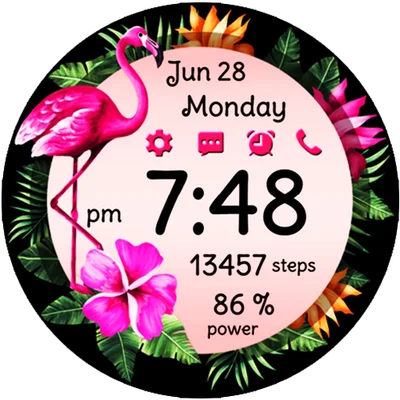
Flamingo Bloom
Bloomfield Watchfaces- PEGI 3Classification d’âge
- PersonnalisationCatégorie
- 22/06/2022Mis à jour
- 0,99 €Prix
Renvoie vers la fiche Google Play officielle de com.bloomfield.flamingobloom. Dernière vérification le 24/11/2026.
À propos de cette application
Traduction automatique par Google. Langue d’origine : Anglais (États-Unis).
Cadran élégant et amusant
Cadran de montre moderne et de fonds pour Wear OS (par Bloomfield Watchfaces)
IMPORTANT!
* Assurez-vous que la montre est correctement connectée au téléphone. Après quelques minutes, vérifiez les cadrans installés par l'application Wearable sur le téléphone.
* Si vous rencontrez des problèmes de synchronisation entre votre téléphone et Play Store, installez l'application directement depuis la montre : recherchez "Flamingo Bloom" depuis Play Store ON WATCH et appuyez sur le bouton d'installation.
* En cas d'incompatibilité d'appareil / "Cette application n'est pas disponible pour votre appareil", utilisez Play Store sur un navigateur WEB (CHROME) à partir d'un PC ou d'un ordinateur portable au lieu d'utiliser l'application Playstore sur le téléphone.
Copiez et collez le lien du cadran de la montre sur un navigateur WEB (CHROME) et installez.
* Activez toutes les autorisations à partir des paramètres -> applications -> autorisations.
* Ce cadran de montre a été développé avec l'outil "Watch Face Studio" de Samsung pour les appareils basés sur le nouveau système d'exploitation Wear OS Google / One UI Samsung comme Samsung Galaxy Watch 4.
Traits:
-Heure numérique 12/24h (synchronisation automatique, basée sur les paramètres du téléphone)
-Date (multilingue)
-Compteur de pas
-Montre la batterie
-Toujours activé
-Raccourcis d'application prédéfinis (paramètres, alarme, calendrier, messages et téléphone)
-Couleurs LCD modifiables (Flamant rose ou fleur à un seul robinet pour changer)
*certaines fonctionnalités peuvent ne pas être disponibles sur certaines montres.
Collection complète : https://play.google.com/store/apps/developer?id=Bloomfield+Watchfaces
Contactez-nous à : bloomfieldwatchfaces@gmail.com
Page Facebook : https://www.facebook.com/bloomfieldwatchfaces
Boutique Galaxy : https://galaxy.store/ALwatches
Afficher le texte d’origine
Modern and Fund Watch face for Wear OS (by Bloomfield Watchfaces)
IMPORTANT!
* Make sure the watch is properly connected to the phone. After a few minutes, check the watch faces installed by the Wearable app on the phone.
* If you are having synchronization problems between your phone and Play Store, install the app directly from watch: search "Flamingo Bloom" from Play Store ON WATCH and hit on install button.
* For device incompatibility / "This app is not available for your device", use Play Store on a WEB browser (CHROME) from PC or Laptop instead of using the playstore app on phone.
Copy and paste the watch face link on a WEB browser (CHROME) and install.
* Enable all permissions from settings -> applications -> permissions.
* This watch face was developed with Samsung's "Watch Face Studio" tool for devices based on the new Wear OS Google / One UI Samsung operating system like Samsung Galaxy Watch 4.
Features:
-12/24hr digital time (auto-sync, based on phone settings)
-Date (Multi-language)
-Step counter
-Watch battery
-Always-On
-Preset App Shortcuts (Settings, Alarm, Calendar, Messages & Phone)
-Changeable LCD colors ( Single Tap Flamingo or Flower to change)
*some features may not be available on some watches.
Full Collection: https://play.google.com/store/apps/developer?id=Bloomfield+Watchfaces
Contact us at: bloomfieldwatchfaces@gmail.com
Facebook Page: https://www.facebook.com/bloomfieldwatchfaces
Galaxy Store: https://galaxy.store/ALwatches
Sécurité des données
Ce que Bloomfield Watchfaces déclare sur Google Play au sujet des données que cette application collecte et partage.
- Aucune donnée partagée avec des tiersEn savoir plus sur la manière dont les développeurs déclarent le partage
- Aucune donnée collectéeEn savoir plus sur la manière dont les développeurs déclarent la collecte
Coordonnées du développeur
- Site webfacebook.com
- E-mailbloomfieldwatchfaces@gmail.com
- Politique de confidentialitésites.google.com
- Adresse0015 BLOCK 5 BLK Beverly Homes Hugo Perez, Trece Martirez City 4109 Philippines
Informations
- Proposée par
- Bloomfield Watchfaces
- Catégorie
- Personnalisation
- Mis à jour
- 22/06/2022
- Publié
- 22/06/2022
- Classification d’âge
- PEGI 3
- Prix
- 0,99 €
- Nom du package
- com.bloomfield.flamingobloom