GRBL Nova
Grubel- PEGI 3Classification d’âge
- PersonnalisationCatégorie
- 07/10/2026Mis à jour
- 0,99 €Prix
Renvoie vers la fiche Google Play officielle de com.grubel.nova. Dernière vérification le 13/11/2026.
À propos de cette application
Traduction automatique par Google. Langue d’origine : Anglais (États-Unis).
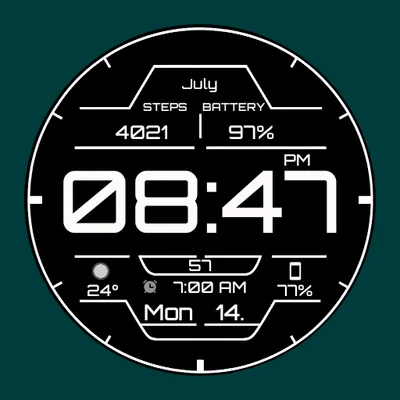
Cadran de montre numérique élégant et audacieux avec un design moderne et minimaliste
Pour Wear OS
Fonctionnalités :
1. Formats AM/PM et 12 h/24 h
2. Compteur de pas fixe et informations sur la batterie
3. Heure et secondes
4. Date
5. Affichage permanent
6. Trois complications personnalisées
7. 14 thèmes
VEUILLEZ NOTER QUE L'APPLICATION COMPAGNON N'INSTALLERA PAS LE CADRAN SUR LA MONTRE. VEUILLEZ LIRE LES INSTRUCTIONS CI-DESSOUS.
Il existe deux façons d'installer ce cadran sur Wear OS :
Depuis l'APPLICATION PLAY STORE :
1. Utilisez le menu déroulant et sélectionnez l'appareil cible sur l'APPLICATION PLAY STORE :
après quelques minutes, le cadran sera transféré sur la montre.
2. ACTIVER LE CADRAN :
Une fois installé, vous devez activer le cadran.
Appuyez longuement sur l'écran, balayez vers la gauche et appuyez sur « AJOUTER UN CADRAN » pour l'activer.
Depuis le site web du Play Store :
1 - Accédez au lien du cadran via un navigateur web sur PC/Mac (Chrome, Safari, etc.). Vous pouvez rechercher le nom du cadran sur le Play Store.
Cliquez sur « Installer sur d'autres appareils » et sélectionnez l'appareil cible :
après quelques minutes, le cadran sera transféré sur la montre.
2 - ACTIVER LE CADRAN :
Une fois installé, vous devez activer le cadran.
Appuyez longuement sur l'écran, balayez vers la gauche et appuyez sur « AJOUTER UN CADRAN » pour l'activer.
Avant de laisser un avis négatif (1 étoile) sur le Play Store,
pour ces raisons, veuillez lire attentivement le guide ou
contactez-moi :
grubel.watchfaces@gmail.com
Pour l'API 34 et les versions ultérieures, n'oubliez pas : si vous souhaitez que votre montre affiche l'état de la batterie de votre téléphone, vous devez installer l'application Phone Battery Complication.
Conçu pour WearOS, Wear OS
Afficher le texte d’origine
For Wear OS
Features:
1. Supports AM/PM and 12H/24H format
2. Fixed steps counter & battery info
3. Hour with seconds
4. Date
5. Always on display
6. Three custom complications
7. 14 themes
PLEASE KEEP IN MIND THAT THE COMPANION APP DOESN'T INSTALL WATCHFACE ON THE WATCH. PLEASE READ INSTRUCTIONS BELOW.
There are two ways to install this watchaface on Wear OS
From PLAY STORE APP:
1. Use the drop-down menu and select the target
device on the PLAY STORE APP:
after a few minutes the watch face will transferred on
watch.
2- ACTIVATE WATCH FACE:
Once installed, you need to activate the watch face.
Long press screen, swipe left and tap "ADD WATCH
FACE" to activate it.
From PLAY STORE WEBSITE:
1 - Go to the watch face link through a Web Browser on
PC / Mac such as Chrome, Safari (etc.). You can search
the watch face name on Play Store.
Click on "Install on more devices" and select the target
device:
after a few minutes the watch face will transferred on
watch.
2- ACTIVATE WATCH FACE:
Once installed, you need to activate the watch face.
Long press screen, swipe left and tap "ADD WATCH
FACE" to activate it.
Before drop a negative feedback (1 star) on Play Store
for these reasons, please read the guide carefully or
contact me:
grubel.watchfaces@gmail.com
for API 34+
Remember , if you want your watch to show phone's battery status, you should install Phone Battery Complication app
Designed for WearOS, Wear OS
Sécurité des données
Ce que Grubel déclare sur Google Play au sujet des données que cette application collecte et partage.
- Aucune donnée partagée avec des tiersEn savoir plus sur la manière dont les développeurs déclarent le partage
- Aucune donnée collectéeEn savoir plus sur la manière dont les développeurs déclarent la collecte
Coordonnées du développeur
- Site webgrubelwatchfaces.com
- E-mailgrubel.watchfaces@gmail.com
- Politique de confidentialitésites.google.com
- AdresseJuliana Tuwima 20/8a 90-002 Łódź Poland
Informations
- Proposée par
- Grubel
- Catégorie
- Personnalisation
- Mis à jour
- 07/10/2026
- Publié
- 14/07/2025
- Classification d’âge
- PEGI 3
- Prix
- 0,99 €
- Nom du package
- com.grubel.nova