HMKWatch Simple 015
HMKWatch- PEGI 3Classification d’âge
- PersonnalisationCatégorie
- 11/10/2026Mis à jour
- 1,29 €Prix
Renvoie vers la fiche Google Play officielle de com.watchfacestudio.hmk_simple_015. Dernière vérification le 13/11/2026.
À propos de cette application
Traduction automatique par Google. Langue d’origine : Anglais (États-Unis).
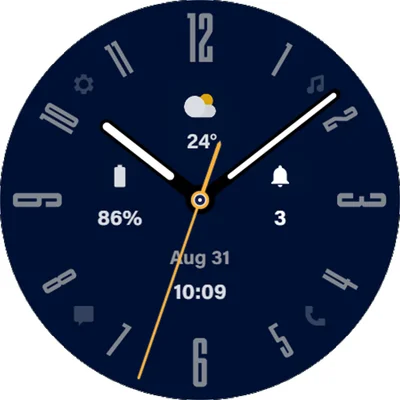
Cadran de montre analogique pratique et clair
* Ce cadran de montre analogique prend en charge les appareils Wear OS.
* Veuillez installer des applications supplémentaires en vous référant à "À propos de cette application".
================================================= =====
[Comment installer]
Assurez-vous que votre montre est sélectionnée avant d'appuyer sur le bouton de paiement.
Appuyez sur le petit triangle noir à côté du bouton Paiement pour sélectionner la montre.
Si vous ne suivez pas la méthode ci-dessus, vous pouvez utiliser le navigateur Chrome ou Samsung sur votre PC ou smartphone.
Après être entré dans la boutique avec un navigateur Web, cliquez sur Installer sur un autre appareil pour l'installer sur la montre.
Après la sortie de Watch 5, une nouvelle interface utilisateur a été appliquée à Watch 4.
Le cadran nouvellement installé peut être trouvé des manières suivantes.
1. Appuyez longuement sur l'écran de la montre pour accéder à la « Liste des visages fréquemment utilisés ».
2. Tournez-le vers la droite et appuyez sur "Ajouter un cadran".
3. Ensuite, entrez dans la "Liste des cadrans installés".
4. Recherchez et sélectionnez le cadran que vous avez acheté.
================================================= =====
[Application d'installation supplémentaire]
1. Application de batterie de téléphone intelligent (application gratuite)
Veuillez installer l'application supplémentaire du lien ci-dessous sur la montre et le smartphone, et configurer la complication.
Si le lien ne s'ouvre pas, veuillez rechercher l'application « Phone Battery Complication » et l'installer.
https://play.google.com/store/apps/details?id=com.weartools.phonebattcomp
2. Suite de complications - Wear OS (application gratuite)
https://play.google.com/store/apps/details?id=com.weartools.weekdayutccomp
3. Complication de la fréquence cardiaque (application payante)
https://play.google.com/store/apps/details?id=com.weartools.heartratecomp
4. Complications des services de santé (application payante)
https://play.google.com/store/apps/details?id=com.weartools.hscomplications
Tous les crédits reviennent au créateur de l'application d'origine :
amoledwatchfaces - https://play.google.com/store/apps/dev?id=5591589606735981545
================================================= =====
Recevez de nouvelles nouvelles de mon Instagram.
www.instagram.com/hmkwatch
https://hmkwatch.tistory.com/
S'il vous plaît envoyez-moi un e-mail si vous avez des erreurs ou des suggestions.
hmkwatch@gmail.com
Afficher le texte d’origine
*This analog watch face supports wear OS devices.
* Please install additional apps by referring to 'About this app'.
=======================================================
[How to install]
Make sure your watch is selected first before you press the payment button.
Press the small black triangle next to the Payment button to select the watch.
If you don't follow the above method, you can use Chrome or Samsung browser on your PC or smartphone.
After entering the store with a web browser, click Install on another device to install it on the watch.
After the release of Watch 5, a new UI was applied to Watch 4.
The newly installed watchface can be found in the following ways.
1. Press and hold the watch screen to enter the 'Frequently Used Watch Face List'.
2. Turn it to the rightmost and press 'Add watchface'.
3. Then, enter the 'Installed Watchface List'.
4. Find and select the watch face you purchased.
=======================================================
[Additional installation app]
1. Smart phone battery app (Free app)
Please install the additional app of the link below on the watch and smartphone, and set up the complication.
If the link does not open, please search for the 'Phone Battery Complication' app and install it.
https://play.google.com/store/apps/details?id=com.weartools.phonebattcomp
2. Complications Suite - Wear OS (Free app)
https://play.google.com/store/apps/details?id=com.weartools.weekdayutccomp
3. Heart Rate Complication (Paid app)
https://play.google.com/store/apps/details?id=com.weartools.heartratecomp
4. Health Services Complications (Paid app)
https://play.google.com/store/apps/details?id=com.weartools.hscomplications
All credits goes to original app creator:
amoledwatchfaces - https://play.google.com/store/apps/dev?id=5591589606735981545
=======================================================
Get new news from my Instagram.
www.instagram.com/hmkwatch
https://hmkwatch.tistory.com/
Please send me an email if you have any errors or suggestions.
hmkwatch@gmail.com
Sécurité des données
Ce que HMKWatch déclare sur Google Play au sujet des données que cette application collecte et partage.
- Aucune donnée partagée avec des tiersEn savoir plus sur la manière dont les développeurs déclarent le partage
- Aucune donnée collectéeEn savoir plus sur la manière dont les développeurs déclarent la collecte
Coordonnées du développeur
- Site webinstagram.com
- E-mailhmkwatch@gmail.com
- Politique de confidentialitéblog.naver.com
- Adresse중앙로6길 17 104동 804호 구로구, 서울특별시 08223 South Korea
Informations
- Proposée par
- HMKWatch
- Catégorie
- Personnalisation
- Mis à jour
- 11/10/2026
- Publié
- 31/08/2021
- Classification d’âge
- PEGI 3
- Prix
- 1,29 €
- Nom du package
- com.watchfacestudio.hmk_simple_015