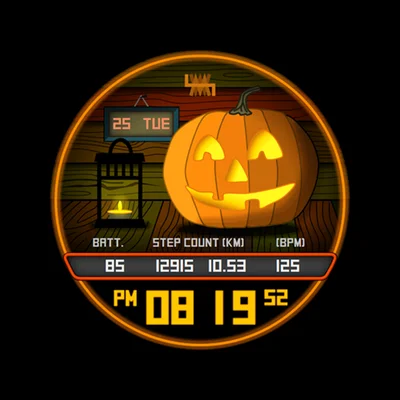
LMwatch pumpkin table
LMWATCH- PEGI 3Classification d’âge
- PersonnalisationCatégorie
- 25/10/2026Mis à jour
- 1,30 €Prix
Renvoie vers la fiche Google Play officielle de com.watchfacestudio.lmwatch_e013_pumpkin_table. Dernière vérification le 18/11/2026.
À propos de cette application
Traduction automatique par Google. Langue d’origine : Anglais (États-Unis).
Montre de style numérique avec le thème de la citrouille d'Helloween.
Cadran classique de LMwatch pour appareils Wear OS.
(Galaxy Watch séries 4, 5, 6, 7, 8)
1. 7 raccourcis d'applications prédéfinis et 2 raccourcis personnalisables.
- Veuillez consulter les images ci-jointes pour connaître l'emplacement des raccourcis.
2. 3 cadrans citrouilles pour 3 styles de décoration.
Notes d'installation
1. Si vous installez l'application depuis votre téléphone, assurez-vous que la montre est sélectionnée avant d'appuyer sur le bouton de paiement. Cliquez sur le petit triangle blanc à droite du bouton de paiement pour sélectionner la montre.
2. Si l'application semble incompatible avec le Play Store, installez-la depuis un navigateur web sur votre téléphone ou votre PC.
Une fois connecté au Play Store, cliquez sur le bouton « Installer sur un autre appareil » et sélectionnez la montre pour installer le cadran.
3. Vous pouvez également rechercher LMwatch dans l'application Play Store de la montre et l'installer directement.
Découvrez d'autres cadrans sur Instagram : www.instagram.com/lmwatch_watchface/
En cas de problème avec le cadran ou pour toute suggestion, n'hésitez pas à nous contacter : bitterwine1996@gmail.com
Afficher le texte d’origine
LMwatch's classic watchface for wear OS devices.
(Galaxy watch 4, 5, 6, 7, 8 series)
1. 7 preset app shortcuts and 2 customizable app shortcuts.
- Please refer to attached pictures for the shortcut location.
2. 3 pumpkin faces x 3 decoration styles.
Installation notes
1. If you install it from your phone, make sure the watch is selected before pressing the payment button. Click on the small white triangle symbol next to the right of the payment button to select the watch.
2. If the app appears to be incompatible in the Playstore, install it
using a web browser on your phone or PC.
After entering the store, click the Install to another device button, and select watch to install watchface on your watch.
3. You can also search for LMwatch in the watch's Playstore app and install it directly on your watch.
There are more watchfaces on instagram
: www.instagram.com/lmwatch_watchface/
If there is a problem with the watch face or have any suggestions,
please contact us.
: bitterwine1996@gmail.com
Sécurité des données
Ce que LMWATCH déclare sur Google Play au sujet des données que cette application collecte et partage.
- Aucune donnée partagée avec des tiersEn savoir plus sur la manière dont les développeurs déclarent le partage
- Aucune donnée collectéeEn savoir plus sur la manière dont les développeurs déclarent la collecte
Nouveautés
25/10/2026
LMwatch pumpkin table
Coordonnées du développeur
- Site webinstagram.com
- E-mailbitterwine1996@gmail.com
- Politique de confidentialitésites.google.com
- Adresse동수원로145번길 73 301동 802호 (권선동, 수원아이파크시티아파트) 권선구, 수원시, 경기도 16664 South Korea
Informations
- Proposée par
- LMWATCH
- Catégorie
- Personnalisation
- Mis à jour
- 25/10/2026
- Publié
- 10/10/2022
- Classification d’âge
- PEGI 3
- Prix
- 1,30 €
- Nom du package
- com.watchfacestudio.lmwatch_e013_pumpkin_table