Oogly Classy Lux
Oogly Watch Face- PEGI 3Classification d’âge
- PersonnalisationCatégorie
- 08/10/2026Mis à jour
- 1,69 €Prix
Renvoie vers la fiche Google Play officielle de com.watchfacestudio.ooglyclassylux. Dernière vérification le 16/11/2026.
À propos de cette application
Traduction automatique par Google. Langue d’origine : Anglais (États-Unis).
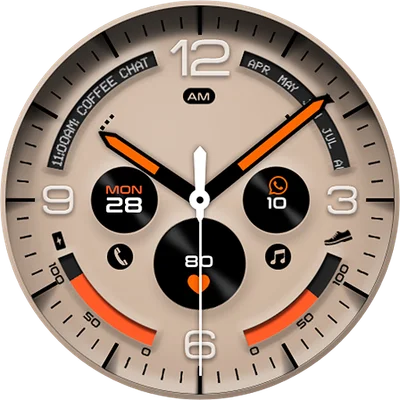
Cadran élégant, avec commutateur analogique et hybride
Faites ressortir votre montre intelligente avec un cadran qui respire la classe, la sophistication et un design avant-gardiste. Améliorez votre montre intelligente avec un cadran de montre haut de gamme qui allie élégance intemporelle et innovation moderne. Basculez sans effort entre les modes analogique et hybride en fonction de votre style et de vos besoins. Avec des options personnalisables dans des couleurs sombres, claires et vibrantes, vous pouvez créer le look parfait pour toute occasion.
Conçu pour WEAR OS API 34+, compatible avec Galaxy Watch 5 ou version ultérieure, Pixel Watch, Fossil et autres Wear OS avec API 34 minimum.
Caractéristiques :
- 12/24 heures
-Commutateur hybride analogique
- Informations personnalisables
-Multicolore et style
- Raccourci d'application
- Toujours affiché
Après quelques minutes, trouvez le cadran de la montre. Il n'est pas automatiquement affiché sur la liste principale. Ouvrez la liste des cadrans de montre (appuyez longuement sur le cadran de montre actif actuel), puis faites défiler vers l'extrême droite. Appuyez sur Ajouter un cadran de montre et trouvez-le ici.
Si vous rencontrez toujours un problème, contactez-nous à :
e-mail : ooglywatchface@gmail.com
télégramme : https://t.me/ooglywatchface
Afficher le texte d’origine
Make your smartwatch stand out with a watch face that exudes class, sophistication, and cutting-edge design. Upgrade your smartwatch with a premium watch face that combines timeless elegance with modern innovation. Effortlessly switch between analog and hybrid modes to suit your style and needs. With customizable options in dark, light, and vibrant colors, you can create the perfect look for any occasion.
Designed for WEAR OS API 34+, compatible with Galaxy Watch 5 or newer, Pixel Watch, Fossil, and other Wear OS with minimum API 34.
Features :
- 12/24 Hour
- Analog Hybrid Switch
- Customizable info
- Multi color & style
- App Shortcut
- Always On Display
After few minutes, find the watch face on the watch. It is not automatically shown on the main list. Open the watch face list (tap and hold current active watch face) then scroll to the far right. Tap add watch face and find it there.
If you still have problem, contact us at :
email: ooglywatchface@gmail.com
telegram: https://t.me/ooglywatchface
Sécurité des données
Ce que Oogly Watch Face déclare sur Google Play au sujet des données que cette application collecte et partage.
- Aucune donnée partagée avec des tiersEn savoir plus sur la manière dont les développeurs déclarent le partage
- Aucune donnée collectéeEn savoir plus sur la manière dont les développeurs déclarent la collecte
Nouveautés
08/10/2026
- Companion app to help you install the watch face on your Wear OS device
- Simple and easy installation process
- Once installation on your smartwatch is complete, the companion app can be safely removed
Coordonnées du développeur
- E-mailooglywatchface@gmail.com
- Politique de confidentialitésites.google.com
- AdresseKAMPUNG MALANG UTARA 4/2B 002/004 TEGALSARI TEGALSARI SURABAYA Jawa Timur Indonesia
Informations
- Proposée par
- Oogly Watch Face
- Catégorie
- Personnalisation
- Mis à jour
- 08/10/2026
- Publié
- 26/02/2025
- Classification d’âge
- PEGI 3
- Prix
- 1,69 €
- Nom du package
- com.watchfacestudio.ooglyclassylux