Oogly WeatherMax
Oogly Watch Face- PEGI 3Classification d’âge
- PersonnalisationCatégorie
- 06/10/2026Mis à jour
- 1,49 €Prix
Renvoie vers la fiche Google Play officielle de com.watchfacestudio.ooglyweathermax. Dernière vérification le 24/11/2026.
À propos de cette application
Traduction automatique par Google. Langue d’origine : Anglais (États-Unis).
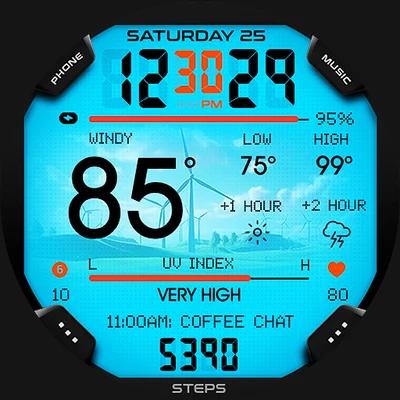
Cadran météo avec prévisions et possibilité de basculer entre un affichage épuré et un affichage visuel.
Découvrez Oogly WeatherMax : intelligent, épuré et axé sur la météo. Le cadran conçu pour ceux qui recherchent une clarté instantanée, des données complètes et un design moderne et élégant, en un coup d'œil. Idéal au quotidien, pour vos séances de sport, vos activités de plein air ou pour tous ceux qui souhaitent une montre connectée vraiment performante.
Fonctionnalités clés
– Format horaire 12/24 h
– Conditions météo en direct et prévisions horaires
– Activation/désactivation des illustrations météo : choisissez un style épuré ou plus visuel.
– Thèmes de couleurs variés
– Affichage des informations personnalisable
– Accès rapide aux applications
– Compatible avec l'affichage permanent
Conçu avec précision pour une lisibilité optimale, WeatherMax transforme votre montre connectée en un véritable centre de données : élégant, intelligent et toujours prêt à l'emploi. Améliorez votre expérience quotidienne. Compatible avec Wear OS API 34 et versions ultérieures.
Après quelques minutes, retrouvez le cadran sur votre montre. Il n'apparaît pas automatiquement dans la liste principale. Ouvrez la liste des cadrans (appuyez longuement sur le cadran actif) puis faites défiler vers la droite. Appuyez sur « Ajouter un cadran » et vous le trouverez.
Si le problème persiste, contactez-nous à l’adresse :
ooglywatchface@gmail.com
ou sur notre groupe Telegram officiel : @OoglyWatchfaceCommunity
Afficher le texte d’origine
Meet Oogly WeatherMax, Smart, Clean, and Weather-Driven. The watchface built for those who want instant clarity, powerful data, and a premium modern look—all in one glance. Perfect for daily use, workouts, outdoor plans, or anyone who wants their smartwatch to feel truly smart.
Key Features
– 12/24H Time Format
– Live Weather Conditions & Hourly Forecasts
– Weather Illustration ON/OFF – Choose a cleaner look or a more visual one.
– Multi-Style Color Themes
– Customizable Info Display
– App Shortcuts
– Always-On Display Support
Crafted with precision and designed for maximum readability, WeatherMax turns your smartwatch into a data powerhouse—stylish, smart, and always ready.Upgrade your daily experience.Designed for WEAR OS API 34+
After few minutes, find the watch face on the watch. It is not automatically shown on the main list. Open the watch face list (tap and hold current active watch face) then scroll to the far right. Tap add watch face and find it there.
If you still have problem, contact us at :
ooglywatchface@gmail.com
or on our official telegram @OoglyWatchfaceCommunity
Sécurité des données
Ce que Oogly Watch Face déclare sur Google Play au sujet des données que cette application collecte et partage.
- Aucune donnée partagée avec des tiersEn savoir plus sur la manière dont les développeurs déclarent le partage
- Aucune donnée collectéeEn savoir plus sur la manière dont les développeurs déclarent la collecte
Nouveautés
06/10/2026
- Companion app to help you install the watch face on your Wear OS device
- Simple and easy installation process
- Once installation on your smartwatch is complete, the companion app can be safely removed
Coordonnées du développeur
- E-mailooglywatchface@gmail.com
- Politique de confidentialitésites.google.com
- AdresseKAMPUNG MALANG UTARA 4/2B 002/004 TEGALSARI TEGALSARI SURABAYA Jawa Timur Indonesia
Informations
- Proposée par
- Oogly Watch Face
- Catégorie
- Personnalisation
- Mis à jour
- 06/10/2026
- Publié
- 14/11/2025
- Classification d’âge
- PEGI 3
- Prix
- 1,49 €
- Nom du package
- com.watchfacestudio.ooglyweathermax