Oogly Xtra
Oogly Watch Face- PEGI 3Classification d’âge
- PersonnalisationCatégorie
- 01/10/2026Mis à jour
- 1,59 €Prix
Renvoie vers la fiche Google Play officielle de com.watchfacestudio.ooglyxtra. Dernière vérification le 13/11/2026.
À propos de cette application
Traduction automatique par Google. Langue d’origine : Anglais (États-Unis).
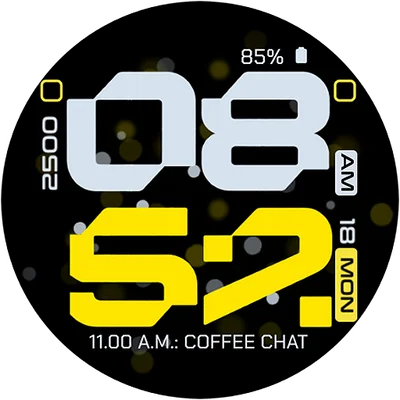
Horloge numérique extra-large et audacieuse avec polices, couleurs et animations personnalisables.
Typographie audacieuse. Animation dynamique. Affirmez votre style en toutes circonstances.
Conçue pour celles et ceux qui aiment se faire remarquer, Oogly Xtra combine une typographie numérique extra-large et audacieuse, des contours élégants et des animations visuelles fluides pour un cadran de montre stylé et percutant.
JPG
Son horloge numérique surdimensionnée emblématique offre une lisibilité optimale en un coup d'œil, vous permettant de choisir parmi de nombreux styles de police et des combinaisons de couleurs éclatantes. Grâce à ses effets d'arrière-plan animés optionnels, activables et désactivables en toute simplicité, Oogly Xtra vous permet d'adapter votre cadran à votre style personnel sans effort.
Caractéristiques principales
• Horloge numérique extra-large et audacieuse pour une lisibilité optimale
• Plusieurs styles de police pour l'horloge numérique, adaptés à vos goûts
• Animation d'arrière-plan fluide – Activation/Désactivation optionnelle
• Plusieurs thèmes de couleurs et options d'accentuation
• Modes d'arrière-plan clair et sombre
• Format horaire 12/24 heures
• Raccourcis d'applications personnalisés
• Complications personnalisées
• Compatible avec l'affichage permanent (AOD) pour une consommation d'énergie réduite
JPG
Un design audacieux. Statistiques essentielles. Impact maximal.
Oogly Xtra — Affirmez votre style à chaque poignet.
Conçu pour Wear OS API 35+
Après quelques minutes, trouvez le cadran sur votre montre. Il n'apparaît pas automatiquement dans la liste principale. Ouvrez la liste des cadrans (appuyez longuement sur le cadran actif), puis faites défiler vers la droite. Appuyez sur « Ajouter un cadran » et trouvez-le.
Si vous rencontrez toujours des problèmes, contactez-nous à :
ooglywatchface@gmail.com
ou sur notre groupe Telegram officiel : @OoglyWatchfaceCommunity
Afficher le texte d’origine
Bold Typography. Dynamic Animation. Stand Out Everywhere.
Designed for those who make a statement, Oogly Xtra combines extra-large bold digital typography, slick edge metrics, and smooth visual animations into a stylish, high-impact watch face.
JPG
Its signature Oversized Digital Clock maximizes readability at a glance, allowing you to choose from multiple digital font styles and vibrant color combinations. Enhanced with optional animated background effects that you can easily turn on or off, Oogly Xtra lets you match your watch face to your personal style effortlessly.
Key Features
• Extra-Large Bold Digital Clock for effortless readability at a glance
• Multiple Digital Clock Font Styles to match your aesthetic
• Smooth Background Animation — Optional On/Off
• Multiple Color Themes & Accent Options
• Light & Dark Background Modes
• 12/24-Hour Time Format
• Custom App Shortcuts
• Custom Complications
• Battery-Friendly Always-On Display (AOD) Support
JPG
Bold design. Essential stats. Extra impact.
Oogly Xtra — Stand Out on Every Wrist.
Designed for WEAR OS API 35+
After a few minutes, find the watch face on the watch. It is not automatically shown on the main list. Open the watch face list (tap and hold current active watch face) then scroll to the far right. Tap add watch face and find it there.
If you still have problem, contact us at :
ooglywatchface@gmail.com
or on our official telegram @OoglyWatchfaceCommunity
Sécurité des données
Ce que Oogly Watch Face déclare sur Google Play au sujet des données que cette application collecte et partage.
- Aucune donnée partagée avec des tiersEn savoir plus sur la manière dont les développeurs déclarent le partage
- Aucune donnée collectéeEn savoir plus sur la manière dont les développeurs déclarent la collecte
Nouveautés
01/10/2026
- Companion app to help you install the watch face on your Wear OS device
- Simple and easy installation process
- Once installation on your smartwatch is complete, the companion app can be safely removed
Coordonnées du développeur
- E-mailooglywatchface@gmail.com
- Politique de confidentialitésites.google.com
- AdresseKAMPUNG MALANG UTARA 4/2B 002/004 TEGALSARI TEGALSARI SURABAYA Jawa Timur Indonesia
Informations
- Proposée par
- Oogly Watch Face
- Catégorie
- Personnalisation
- Mis à jour
- 01/10/2026
- Publié
- 01/10/2026
- Classification d’âge
- PEGI 3
- Prix
- 1,59 €
- Nom du package
- com.watchfacestudio.ooglyxtra