Passenger Watch Face
themaContient des annonces
- PEGI 3Classification d’âge
- PersonnalisationCatégorie
- 05/09/2026Mis à jour
- 1,19 €Prix
Renvoie vers la fiche Google Play officielle de fr.thema.wear.watch.passenger. Dernière vérification le 13/11/2026.
À propos de cette application
Traduction automatique par Google. Langue d’origine : Anglais (États-Unis).
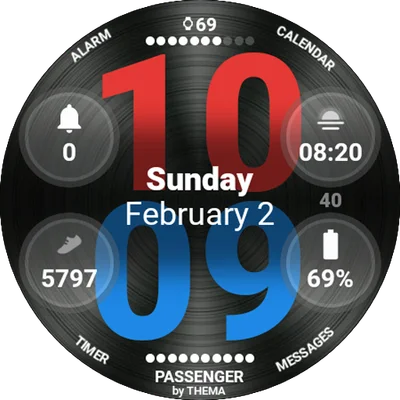
Passenger Watch Face est un cadran de montre avec 4 widgets et 4 raccourcis
Cadran Passenger pour Wear OS !
Ce cadran est compatible avec WatchFaceFormat. Il est compatible avec toutes les montres récentes.
Les réglages du cadran se trouvent :
- sur votre mobile, dans l'application « Wear » associée à votre montre
- sur votre montre, en appuyant longuement sur l'écran et en sélectionnant « Personnaliser »
★ Fonctionnalités du cadran Passenger ★
- Plusieurs couleurs de design
- Jour et mois
- Pile
- Choisissez le format de date
- Afficher un zéro initial pour les heures ou non
- Afficher le nom du cadran ou non
- Afficher le nom de la marque ou non
- Afficher les points des secondes ou non
- Afficher les secondes ou non
- Afficher la pile ou non
- Choisissez un fond d'écran parmi différents styles
- Mélangez le fond d'écran et les couleurs
- Données :
+ Changez l'indicateur pour un affichage sur les 4 positions
+ Accédez à des possibilités de données illimitées avec des complications étendues.
- Interactivité
+ Définissez le raccourci à exécuter sur les 4 positions
+ Choisissez votre raccourci parmi toutes les applications installées sur votre montre !
+ Afficher ou non les raccourcis
★ Fonctionnalités supplémentaires sur votre téléphone ★
- Notifications pour les nouveaux designs
- Accès à l'assistance
- ... et plus encore
★ Installation ★
🔸Wear OS 2.X / 3.X / 4.X
Une notification s'affichera sur votre montre juste après l'installation de votre téléphone. Il vous suffit de cliquer dessus pour lancer l'installation du cadran.
Si la notification ne s'affiche pas, vous pouvez toujours installer le cadran via le Google Play Store disponible sur votre montre : recherchez simplement le cadran par son nom.
🔸Wear OS 6.X
Installez le cadran directement depuis le Play Store de votre montre ou de votre téléphone. Une fois installé, retrouvez votre cadran dans la catégorie « Téléchargements » de votre liste de cadrans.
★ Plus de cadrans ★
Découvrez ma collection de cadrans pour Wear OS sur le Play Store : https://goo.gl/CRzXbS
** En cas de problème ou de question, n'hésitez pas à me contacter par e-mail (en anglais ou en français) avant de me donner une mauvaise note. Merci !
Site web : https://www.themaapps.com/
Youtube : https://youtube.com/ThomasHemetri
Twitter : https://x.com/ThomasHemetri
Instagram : https://www.instagram.com/thema_watchfaces
Afficher le texte d’origine
Passenger Watch Face for Wear OS!
This watchface is built with WatchFaceFormat. It supports all recent watch devices.
The settings of the watch face are located :
- on your mobile, in your associated watch "Wear" app
- on your watch, by long pressing the screen and hitting customize
★ Features of Passenger Watch Face ★
- Multiple design colors
- Day & Month
- Watch battery
- Choose your date format
- Display a leading zero on hours or not
- Display watchface name or not
- Display brand name or not
- Display the seconds dots or not
- Display the seconds or not
- Display the battery or not
- Choose background among different styles
- Blend background with colors
- Data:
+ Change the indicator to display on the 4 positions
+ Access unlimited data possibilities with extended complications.
- Interactivity
+ Define the shortcut to execute on the 4 positions
+ Choose your shortcut among all applications installed on your watch!
+ Display the schortcuts or not
★ Additional features on phone ★
- Notifications for new designs
- Access to support
- ... and more
★ Installation ★
🔸Wear OS 2.X / 3.X / 4.X
A notification will be displayed on your watch, right after your mobile installation. You just have to hit it to start the installation process of the watch face.
If the notification did not display for some reason, you can still install the watch face by using the Google Play Store available on your watch: just search the watch face by its name.
🔸Wear OS 6.X
Install the watch face directly from your watch or phone play store. Once installed, find your watch face in the "downloaded" category of your watch faces list.
★ More watch faces ★
Visit my watch faces collection for Wear OS on the Play Store at https://goo.gl/CRzXbS
** If you have any issues or questions, feel free to contact me by email (English or French language) before giving a bad rating. Thanks!
Website: https://www.themaapps.com/
Youtube: https://youtube.com/ThomasHemetri
Twitter: https://x.com/ThomasHemetri
Instagram: https://www.instagram.com/thema_watchfaces
Sécurité des données
Ce que thema déclare sur Google Play au sujet des données que cette application collecte et partage.
- Aucune donnée partagée avec des tiersEn savoir plus sur la manière dont les développeurs déclarent le partage
- Cette appli peut recueillir ces types de donnéesActivité dans l'application et Infos et performance des applis
- Les données sont chiffrées lors de leur transfert
- Impossible de supprimer les données
Nouveautés
05/09/2026
2.26.09.0522
- Fix startup crash
- Bump wear compatibility target to 35
- Bump mobile compatibility target to 36
- Fix wear app install status
- Bump library versions
Requires app update on both Watch & Mobile.
If you have any issue, please let me know by email at thema.apps@gmail.com
Coordonnées du développeur
- Site webthemaapps.com
- E-mailthema.apps@gmail.com
- Politique de confidentialitéthemaapps.com
- Adresse7 Rue Alfred Sisley 78370 Plaisir France
Informations
- Proposée par
- thema
- Catégorie
- Personnalisation
- Mis à jour
- 05/09/2026
- Publié
- 04/02/2025
- Classification d’âge
- PEGI 3
- Prix
- 1,19 €
- Nom du package
- fr.thema.wear.watch.passenger