RoXi
Mohamed Nabil Elewa- PEGI 3Classification d’âge
- PersonnalisationCatégorie
- 04/11/2026Mis à jour
- 2,09 €Prix
Renvoie vers la fiche Google Play officielle de com.watchfacestudio.RoXi. Dernière vérification le 20/11/2026.
À propos de cette application
Traduction automatique par Google. Langue d’origine : Anglais (États-Unis).
Cadran de montre hybride multicolore personnalisable.
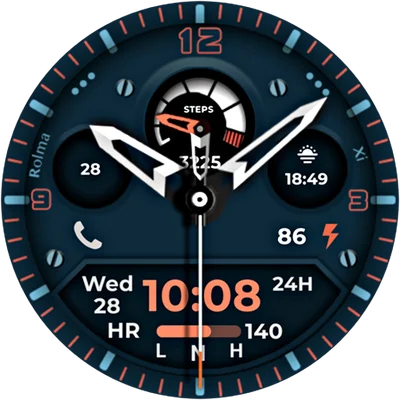
« RoXi » est un cadran hybride coloré unique pour les appareils Wear OS.
Ce cadran a été conçu avec l'outil Watch Face Studio.
Remarque : les cadrans pour montres rondes ne sont pas compatibles avec les montres rectangulaires ou carrées.
INSTALLATION :
1. Connectez votre montre à votre téléphone.
2. Installez le cadran sur votre montre. Une fois l'installation terminée, consultez la liste des cadrans en appuyant longuement sur l'écran, puis en faisant glisser votre doigt vers la droite et en sélectionnant « Ajouter un cadran ». Vous y trouverez le nouveau cadran installé ; il vous suffit de l'activer.
3. Après l'installation, vous pouvez également vérifier les points suivants :
I. Pour les montres Samsung, consultez l'application Galaxy Wearable sur votre téléphone (installez-la si ce n'est pas déjà fait). Dans la section « Cadrans » > « Téléchargés », vous trouverez le nouveau cadran installé. Appliquez-le ensuite à votre montre connectée.
II. Pour les autres marques de montres connectées et les autres appareils Wear OS, consultez l'application fournie avec votre montre sur votre téléphone et recherchez le nouveau cadran dans la galerie ou la liste des cadrans.
PERSONNALISATION :
1. Appuyez longuement sur l’écran, puis appuyez sur « Personnaliser ».
2. Faites glisser votre doigt vers la gauche ou la droite pour choisir les éléments à personnaliser.
3. Faites glisser votre doigt vers le haut ou le bas pour parcourir les options disponibles.
4. Appuyez sur « OK ».
Fonctionnalités :
- Cadran hybride multicolore.
- Affichage de l’heure au format 12/24 h avec la date.
- 2 complications personnalisées.
- Indicateur analogique de fréquence cardiaque avec compteur numérique.
- Indicateur numérique de batterie à droite.
- Pourcentage de pas par rapport à l’objectif (de 0 à 20 000).
- Compteur de pas numérique.
- Accès direct aux applications du téléphone (touche à gauche).
- 2 raccourcis d’applications personnalisés.
- Affichage permanent du même design.
Pour toute assistance ou demande, n’hésitez pas à me contacter par e-mail à l’adresse mhmdnabil2050@gmail.com.
Afficher le texte d’origine
The "RoXi" is a unique colorful Hybrid watch face for Wear OS devices.
This watch face was designed using Watch Face Studio tool.
Note: watch faces for the a round watches are not suitable for rectangular or square watches.
INSTALLATION:
1. Keep your watch connected to your phone.
2. Install in the watch. After installation, check your watch face list in your watch by pressing and hold display then swipe to the right end and click Add watch face. There you can see the newly installed watch face and just activate it.
3. After installation, you can also check the following:
I. For Samsung watches, check your Galaxy Wearable app in your phone (install it if not yet installed). Under Watch faces > Downloaded, there you can see the newly installed watch face and then just apply it to connected watch.
II. For other smartwatch brands, for other Wear OS devices, please check the watch app installed in your phone that comes with your smartwatch brand and find the newly installed watch face in the watch face gallery or list.
CUSTOMIZATION:
1. Press and hold display then hit "Customize".
2. Swipe left and right to choose what to customize.
3. Swipe up and down to choose options available.
4. Hit "OK".
Features:
- Multi Color Hybrid watch face.
- 12/24H Digital Time with full date.
- 2X Custom Complication.
- Analog Heart rate indicator with digital counter.
- Digital Battery indicator on the right.
- Analog steps percentage of the goal, the target steps value is (0-20000).
- Digital steps counter.
- Phone app action tap on the left.
- 2X Custom App Shortcuts.
- Same design always on display.
For support and request, Do not hesitate emailing me at mhmdnabil2050@gmail.com
Sécurité des données
Ce que Mohamed Nabil Elewa déclare sur Google Play au sujet des données que cette application collecte et partage.
- Aucune donnée partagée avec des tiersEn savoir plus sur la manière dont les développeurs déclarent le partage
- Aucune donnée collectéeEn savoir plus sur la manière dont les développeurs déclarent la collecte
Coordonnées du développeur
- E-mailmhmdnabil2050@gmail.com
- Politique de confidentialitétermsfeed.com
- Adresse6 Fathalla Refaat Street, Nasr City 3 Cairo القاهرة 11371 Egypt
Informations
- Proposée par
- Mohamed Nabil Elewa
- Catégorie
- Personnalisation
- Mis à jour
- 04/11/2026
- Publié
- 04/11/2026
- Classification d’âge
- PEGI 3
- Prix
- 2,09 €
- Nom du package
- com.watchfacestudio.RoXi