SamWatch Color E
Samtree- PEGI 3Classification d’âge
- PersonnalisationCatégorie
- 13/08/2026Mis à jour
- 1,39 €Prix
Renvoie vers la fiche Google Play officielle de com.watchfacestudio.samwatch_color_e. Dernière vérification le 24/11/2026.
À propos de cette application
Traduction automatique par Google. Langue d’origine : Anglais (États-Unis).
Cadran de montre numérique SamWatch pour Wear OS et Galaxy Watch.
Cadran numérique SamWatch | Design premium pour Wear OS
AVIS IMPORTANT
Ce cadran est compatible uniquement avec One UI 6.0 ou version ultérieure.
Cette application est conçue exclusivement pour les montres connectées. Les utilisateurs ne possédant pas de montre connectée compatible ne pourront pas l'utiliser après l'achat.
FONCTIONNALITÉS DU CADRAN
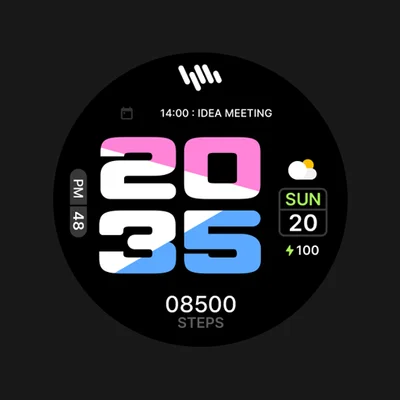
• Design numérique premium : interface élégante alliant éléments traditionnels et modernes
• Compteur de pas : surveillez votre niveau d'activité quotidien
• État de la batterie : suivez le niveau de batterie de votre montre
• Couleurs personnalisables : personnalisez votre cadran avec différentes options de couleurs
GUIDE D'INSTALLATION SAMWATCH
Les applications « Guide d'installation SamWatch » sont des applications complémentaires qui facilitent le téléchargement de cadrans sur les appareils Wear OS. Veuillez noter que les captures d'écran de l'application peuvent différer du cadran téléchargé. La plupart des produits SamWatch incluent des applications compagnons pour smartphone, et le « Guide d'installation SamWatch » aide uniquement à télécharger les applications Wear OS.
INFORMATIONS SUPPLÉMENTAIRES
Cet article comprend des applications supplémentaires pour votre smartphone. Ces applications offrent :
• Accès au site web officiel de Samtree
• Instructions détaillées pour l'installation des cadrans
• Solutions de dépannage en cas d'échec de l'installation du cadran
REMARQUES D'UTILISATION
• Selon votre appareil, un bouton OK peut apparaître en mode Personnalisation
• Les informations sur la fréquence cardiaque correspondent aux données mesurées par l'application de fréquence cardiaque de votre montre
• La marque SamWatch identifie les langues prises en charge
• Ce cadran fait partie de la collection SamWatch Digital Color
COMMUNAUTÉ ET ASSISTANCE
Rejoignez-nous via nos canaux officiels :
• Site web officiel : https://isamtree.com
• X : https://x.com/samtree_watch
• Communauté Galaxy Watch : http://cafe.naver.com/facebot
• Facebook : www.facebook.com/SamtreePage
• Telegram : https://t.me/SamWatch_SamTheme
• YouTube : https://www.youtube.com/channel/UCobv0SerfG6C5flEngr_Jow
• Blog : https://samtreehome.blogspot.com/
• Blog coréen : https://samtree.tistory.com/SamWatch Cadran numérique Pixel pour Wear OS et Galaxy Watch.
Afficher le texte d’origine
SamWatch Digital Watch Face | Premium Design for Wear OS
IMPORTANT NOTICE
This watch face is supported only on One UI 6.0 or above.
This app is designed exclusively for smartwatches. Users without a compatible smartwatch will not be able to use the watch face after purchase.
WATCH FACE FEATURES
• Premium Digital Design - Elegant interface combining traditional and modern elements
• Step Counter - Monitor your daily activity levels
• Battery Status - Keep track of your watch's battery level
• Customizable Colors - Personalize your watch face with various color options
SAMWATCH INSTALL GUIDE
The 'SamWatch Install Guide' apps are companion applications that facilitate downloading watch faces on Wear OS devices. Please note that the preview screenshots in the guide app may differ from the actual downloaded watch face. Most SamWatch products include smartphone companion apps, and the 'SamWatch Install Guide' only assists in downloading Wear OS applications.
ADDITIONAL INFORMATION
This item includes additional applications for your smartphone that provide:
• Access to Samtree's official website
• Detailed instructions for installing watch faces
• Troubleshooting solutions if the watch face fails to install on your watch
USAGE NOTES
• Depending on your device, an OK button may appear in customize mode
• Heart rate information represents data measured by the heart rate app on your watch
• You can identify supported languages by the SamWatch brand name
• This watch face belongs to the SamWatch Digital Color collection
COMMUNITY & SUPPORT
Connect with us through our official channels:
• Official Website: https://isamtree.com
• X: https://x.com/samtree_watch
• Galaxy Watch Community: http://cafe.naver.com/facebot
• Facebook: www.facebook.com/SamtreePage
• Telegram: https://t.me/SamWatch_SamTheme
• YouTube: https://www.youtube.com/channel/UCobv0SerfG6C5flEngr_Jow
• Blog: https://samtreehome.blogspot.com/
• Korean Blog: https://samtree.tistory.com/SamWatch Pixel Digital watch face for Wear OS & Galaxy Watch.
Sécurité des données
Ce que Samtree déclare sur Google Play au sujet des données que cette application collecte et partage.
- Aucune donnée partagée avec des tiersEn savoir plus sur la manière dont les développeurs déclarent le partage
- Aucune donnée collectéeEn savoir plus sur la manière dont les développeurs déclarent la collecte
Coordonnées du développeur
- Site webisamtree.com
- E-mailhelp@isamtree.com
- Politique de confidentialitéisamtree.com
- AdresseRm 1310 201 Daegudae-ro, Jillyang-eup 경산시, 경상북도 38453 South Korea
Informations
- Proposée par
- Samtree
- Catégorie
- Personnalisation
- Mis à jour
- 13/08/2026
- Publié
- 18/06/2024
- Classification d’âge
- PEGI 3
- Prix
- 1,39 €
- Nom du package
- com.watchfacestudio.samwatch_color_e