Santa Clock
StarWatchfaces- PEGI 3Classification d’âge
- PersonnalisationCatégorie
- 20/08/2026Mis à jour
- 2,09 €Prix
Renvoie vers la fiche Google Play officielle de com.starwatchfaces.santaclock. Dernière vérification le 21/11/2026.
À propos de cette application
Traduction automatique par Google. Langue d’origine : Anglais (États-Unis).
Joli Père Noël animé à votre poignet ! Vous fera sourire à chaque fois!
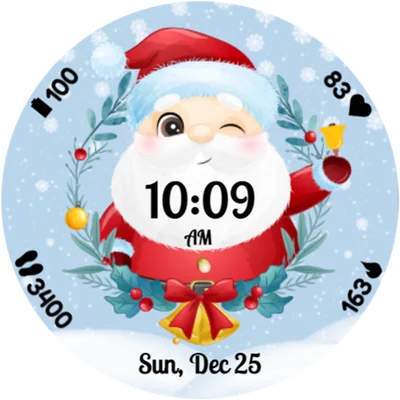
Notre adorable cadran de Noël pour Wear OS apportera une touche de fantaisie et de gaieté à votre quotidien. Avec son Père Noël animé qui fait un clin d'œil et sonne une clochette, ce cadran vous fera sourire à chaque fois que vous regarderez l'heure. Son design lumineux et coloré, ainsi que son animation ludique, en font un incontournable pour tous ceux qui souhaitent partager la magie des fêtes.
Avec plus de 20 thèmes de couleurs au choix, 2 raccourcis d'applications personnalisables, une horloge numérique au format 12 ou 24 heures, la date dans la langue de votre appareil et un affichage permanent (AOD) personnalisé, « Horloge du Père Noël » est le cadran le plus mignon à porter cette saison sur votre Galaxy Watch ou toute autre montre Wear OS.
🎅 Découvrez toute la collection de Noël dans notre nouvelle application « Boutique de cadrans » et profitez d'une offre exceptionnelle avec un pack regroupant tous les cadrans de saison. Trouvez votre style de Noël idéal : https://play.google.com/store/apps/details?id=com.starwatchfaces.watchfaces 🎅
Vous rencontrez des difficultés pour installer le cadran sur votre montre ? Consultez l'application mobile associée pour obtenir des instructions détaillées !
Pour personnaliser le cadran :
1. Appuyez longuement sur l'écran.
2. Appuyez sur le bouton « Personnaliser » pour choisir le thème de couleurs et les applications à lancer avec le raccourci personnalisé.
N'oubliez pas : utilisez l'application mobile associée pour découvrir d'autres superbes cadrans créés par nos soins !
Pour les raccourcis personnalisables, voici les options disponibles* :
- Raccourci d'application : Alarme, Bixby, Contrôleur Buds, Calculatrice, Calendrier, Boussole, Contacts, Localiser mon iPhone, Galerie, Google Pay, Maps, Contrôleur multimédia, Messages, Musique, Outlook, Téléphone, Play Store, Applications récentes, Rappel, Samsung Health, Paramètres, Chronomètre, Minuteur, Enregistreur vocal, Météo, Horloge mondiale
- Applications récentes
- Oxygène sanguin
- Composition corporelle
- Respiration
- Consommation
- Activité quotidienne
- Fréquence cardiaque
- Sommeil
- Stress
- Ensemble
- Hydratation
- Santé féminine
- Contacts
- Google Pay
- Exercices : Circuit training, Cyclisme, Vélo d'appartement, Randonnée, Course à pied, Natation, Marche, etc.
Pour afficher le raccourci souhaité, appuyez longuement sur l'écran, puis appuyez sur le bouton Personnaliser et choisissez le raccourci pour la complication du bas.
* Ces fonctions dépendent de l'appareil et peuvent ne pas être disponibles sur toutes les montres.
Pour découvrir d'autres cadrans, rendez-vous sur notre site web.
Profitez-en !
Afficher le texte d’origine
Our cute and irresistible Christmas watchface for Wear OS will add a touch of whimsy and cheer to your daily routine. Featuring an animated Santa who winks and rings a hand bell, this watchface is sure to bring a smile to your face every time you check the time. The bright, colorful design and playful animation make it a must-have for anyone looking to spread some holiday cheer.
With over 20 color themes to choose from, 2 customizable app shortcuts, digital clock in 12 or 24H format, date in device language and custom designed AOD, Santa Clock is the cutest watchface to wear this season for your Galaxy Watch or any other WearOS based watch.
🎅 Explore the entire Christmas Collection in our new Watchface Shop app and grab the best value with a bundle that includes all seasonal watchfaces. Discover your perfect Christmas style - https://play.google.com/store/apps/details?id=com.starwatchfaces.watchfaces 🎅
Issues installing the watchface on your watch? Check the companion phone app for step by step instructions!
To customize the watchface:
1. Press and hold on the display
2. Tap the Customize button to select color theme and the apps to launch with the custom shortcut.
Don't forget: use the companion app on your phone to discover other amazing watchfaces made by us!
For the customizable shortcuts you have these options*:
- App shortcut: Alarm, Bixby, Buds controller, Calculator, Calendar, Compass, Contacts, Find my phone, Gallery, Google Pay, Maps, Media Controller, Messages, Music, Outlook, Phone, Play Store, Recent apps, Reminder, Samsung Health, Settings, Stopwatch, Timer, Voice
Recorder, Weather, World Clock
- Recent apps
- Blood Oxygen
- Body Composition
- Breathe
- Consumed
- Daily Activity
- Heart rate
- Sleep
- Stress
- Together
- Water
- Woman’s health
- Contacts
- Google Pay
- Exercises: Circuit training, Cycling, Exercise bike, Hiking, Running, Swimming, Walking etc
To display the shortcut you want, tap and hold on the display, then press the Customize button and choose the shortcut you want for the bottom complication.
* these functions are device dependent and might not be available on all watches
For more watchfaces, visit our website.
Enjoy!
Sécurité des données
Ce que StarWatchfaces déclare sur Google Play au sujet des données que cette application collecte et partage.
- Aucune donnée partagée avec des tiersEn savoir plus sur la manière dont les développeurs déclarent le partage
- Aucune donnée collectéeEn savoir plus sur la manière dont les développeurs déclarent la collecte
Coordonnées du développeur
- Site webstarwatchfaces.com
- E-mailwearos@starwatchfaces.com
- Politique de confidentialitéstarwatchfaces.com
- AdresseStrada Carol Davila 8 bloc 118A sc A et 1 ap 5 100462 Ploiești Romania
Informations
- Proposée par
- StarWatchfaces
- Catégorie
- Personnalisation
- Version
- 1.0.0
- Mis à jour
- 20/08/2026
- Publié
- 06/12/2022
- Classification d’âge
- PEGI 3
- Prix
- 2,09 €
- Nom du package
- com.starwatchfaces.santaclock