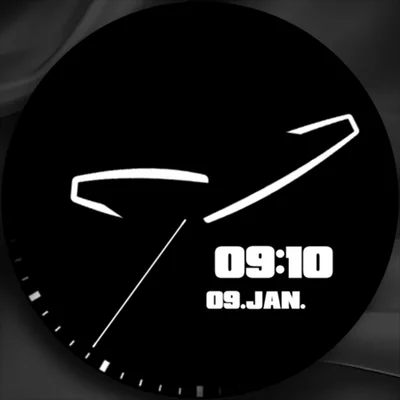
Silver XV12
Freiberg watches- PEGI 3Classification d’âge
- PersonnalisationCatégorie
- 09/08/2026Mis à jour
- 1,19 €Prix
Renvoie vers la fiche Google Play officielle de com.watchfacestudio.watchfacexv. Dernière vérification le 25/11/2026.
À propos de cette application
Traduction automatique par Google. Langue d’origine : Anglais (Inde).
Porter le cadran de l'horloge du système d'exploitation
Cadran d'horloge Wear OS.
Application compagnon d'écran d'horloge Wear OS pour téléphone :
Immédiatement après l'installation de l'application mobile, un message apparaît à l'ouverture de l'application.
Appuyez sur l'image du cadran pour lancer l'installation du cadran sur votre montre (pour accélérer la connexion et le chargement, ouvrez l'application GALAXY WEARABLE ou un autre programme de gestion d'horloge. Le téléchargement sur votre montre commencera immédiatement.).
Une fois l'installation terminée, l'application compagnon peut être supprimée.
Après l'installation, parcourez la bibliothèque de cadrans pour trouver le cadran.
IMPORTANT APRÈS L'INSTALLATION : Après l'installation, le téléphone ouvrira un lien de remboursement visible sur la montre. Pour trouver un cadran, n'appuyez pas sur « rembourser » et parcourez la bibliothèque de cadrans.
Caractéristiques principales :
- Plusieurs options de couleurs (appuyez longuement pour personnaliser et modifier les couleurs).
- Cadran numérique commutable en 12/24 heures via les paramètres du téléphone.
- Marqueur AM/PM (pour le format 12 heures).
- Date. - Index personnalisable (maintenez le doigt appuyé pour modifier ou masquer l'index).
- Accès rapide à l'alarme.
- Accès rapide au calendrier.
- Accès rapide à un raccourci masqué personnalisable (maintenez le doigt appuyé pour personnaliser et modifier le raccourci masqué selon l'action choisie).
- Accès rapide à un raccourci personnalisé (maintenez le doigt appuyé pour personnaliser et modifier le raccourci selon l'action choisie).
- Affichage permanent.
Remarque :
Pour vos commentaires et suggestions, envoyez un e-mail à freibergclockfaces@gmail.com
Afficher le texte d’origine
Wear OS clock face.
Wear OS clock screen companion app for Phone:
Immediately after installing the mobile application, a message will appear when you open the application.
You need to tap on the watch face image to start the process of installing the watch face on your watch (To speed up connection and loading, open the GALAXY WEARABLE app or other clock management program. Downloading to your watch will begin immediately.).
Once the installation process is complete, the companion app can be deleted.
After installation, browse the watch face library to find the screen face.
IMPORTANT AFTER INSTALLATION - after installation, the phone will open a refund link that will be visible on the watch. To find a watch face don't press refund and browse the watch face library to find a watch face.
Main Features:
- Multiple color options (tap & hold to customize & change colors).
- Digital watch face switchable to 12/24 hour via Phone Settings.
- AM/PM marker (For 12-hour time format).
- Date.
- Customizable index (tap and hold to change or hide the index).
- Quick access to Alarm.
- Quick access to the calendar.
- Quick access to 1 hidden customizable shortcut (Tap and hold to customize and change Hidden shortcut to your chosen action).
- Quick access to 1 custom shortcut (Tap and hold to customize and change shortcut to your chosen action).
- Always on display.
Note:
Email for feedback and suggestions ===> freibergclockfaces@gmail.com
Sécurité des données
Ce que Freiberg watches déclare sur Google Play au sujet des données que cette application collecte et partage.
- Aucune donnée partagée avec des tiersEn savoir plus sur la manière dont les développeurs déclarent le partage
- Aucune donnée collectéeEn savoir plus sur la manière dont les développeurs déclarent la collecte
- S'engage à respecter les règles pour les contenus familiaux de Play
Coordonnées du développeur
- E-maildfreibergs84@gmail.com
- Politique de confidentialitésites.google.com
- AdresseKokneses pagasts, Burtnieki Aizkraukles novads, Latvija, LV-5113 Latvia
Informations
- Proposée par
- Freiberg watches
- Catégorie
- Personnalisation
- Mis à jour
- 09/08/2026
- Publié
- 16/01/2022
- Classification d’âge
- PEGI 3
- Prix
- 1,19 €
- Nom du package
- com.watchfacestudio.watchfacexv