SMZ Kingmaker3
SMZ™- PEGI 3Classification d’âge
- PersonnalisationCatégorie
- 09/11/2025Mis à jour
- 1,09 €Prix
Renvoie vers la fiche Google Play officielle de com.smzjdh.kingmaker3. Dernière vérification le 23/11/2026.
À propos de cette application
Traduction automatique par Google. Langue d’origine : Anglais (États-Unis).
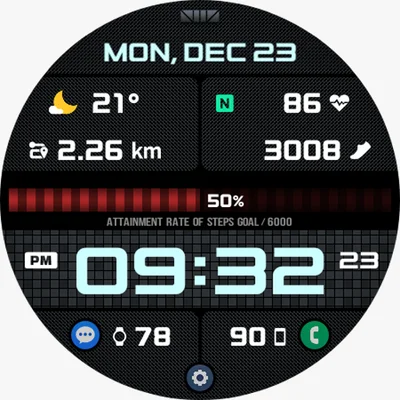
Cadran numérique SMZ pour Wear OS
Veuillez regarder la vidéo pour décorer votre montre comme les photos.
Veuillez regarder la vidéo pour l'utilisation.
[Niveau de la batterie du téléphone]
Application Phone Battery Complications d'amoledwatchfaces™
Lien du développeur - https://play.google.com/store/apps/dev?id=5591589606735981545
Pour utiliser cette fonction, l'application 'Phone Battery Complication' doit être installée sur votre téléphone et votre montre.
Chemin de téléchargement :
https://play.google.com/store/apps/details?id=com.weartools.phonebattcomp
*Comment régler. - https://cafe.naver.com/smzwatch/22
[Comment utiliser le format 24 heures]
Si vous souhaitez modifier le format de l'heure, vous pouvez le définir dans le chemin ci-dessous sur le téléphone connecté à la montre.
*Le téléphone connecté - Paramètres - Gestion générale - Date et heure - Utiliser le format 24h.
Si coché, la montre sera également au format 24 heures, et si décoché, la montre sera au format 12 heures.
[L'obscurité de l'écran AOD]
Dans la section Personnaliser, 'AOD Dim1' ajuste l'obscurité de tout l'écran AOD. Et 'AOD Dim2' ajuste uniquement l'obscurité de l'arrière-plan de l'écran AOD.
[PERSONNALISER]
Pour personnaliser le cadran, touchez et maintenez l'écran et touchez le bouton [Personnaliser].
*Veuillez modifier ces sélections dans le champ de personnalisation.
[Instagram SMZ]
http://www.instagram.com/smz.watch.tech
[Facebook SMZ]
https://www.facebook.com/smz.watchface
[Page d'accueil SMZ]
https://www.smzwatch.com
[Le courrier électronique est toujours le bienvenu]
smz.watch.tech@gmail.com
Afficher le texte d’origine
Please Watch the video to decorate your watch like the photos.
Please Watch the VIDEO for usage.
[Phone Battery Level]
Phone Battery Complications app from amoledwatchfaces™
Dev's link - https://play.google.com/store/apps/dev?id=5591589606735981545
To use this function, the 'Phone Battery Complication' app must be installed on your phone and watch.
Download path :
https://play.google.com/store/apps/details?id=com.weartools.phonebattcomp
*How to set. - https://cafe.naver.com/smzwatch/22
[How to use 24-hour format]
If you want to change the time format, you can set it in the path below on the phone connected to the watch.
*The connected phone - Settings - General management - Date and time - Use 24-hour format.
If checked, the watch will also be in 24-hour format, and if unchecked, the watch will be in 12-hour format.
[The DARKNESS of the AOD screen]
In the Customize section, 'AOD Dim1' adjusts the darkness of all the AOD screen. And 'AOD Dim2' only adjusts the darkness of the background of AOD screen.
[CUSTOMIZE]
For customization of watchface, touch and hold the screen and touch on [Coustomize] button.
*Please edit these selections in coustomize field.
[SMZ Instagram]
http://www.instagram.com/smz.watch.tech
[SMZ Facebook]
https://www.facebook.com/smz.watchface
[SMZ Homepage]
https://www.smzwatch.com
[E-mail is always welcome]
smz.watch.tech@gmail.com
Sécurité des données
Ce que SMZ™ déclare sur Google Play au sujet des données que cette application collecte et partage.
- Aucune donnée partagée avec des tiersEn savoir plus sur la manière dont les développeurs déclarent le partage
- Aucune donnée collectéeEn savoir plus sur la manière dont les développeurs déclarent la collecte
Coordonnées du développeur
- Site webinstagram.com
- E-mailsmz.watch.tech@gmail.com
- Politique de confidentialitéblog.naver.com
- Adresse거제대로 275 거제미소지움더퍼스트, 102동 1101호 연제구, 부산광역시 47512 South Korea
Informations
- Proposée par
- SMZ™
- Catégorie
- Personnalisation
- Mis à jour
- 09/11/2025
- Publié
- 23/06/2023
- Classification d’âge
- PEGI 3
- Prix
- 1,09 €
- Nom du package
- com.smzjdh.kingmaker3