TKS 08 Split Watch Face
Tiny Kitchen Studios- PEGI 3Classification d’âge
- PersonnalisationCatégorie
- 06/09/2026Mis à jour
- 1,59 €Prix
Renvoie vers la fiche Google Play officielle de com.tks.split. Dernière vérification le 21/11/2026.
À propos de cette application
Traduction automatique par Google. Langue d’origine : Anglais (États-Unis).
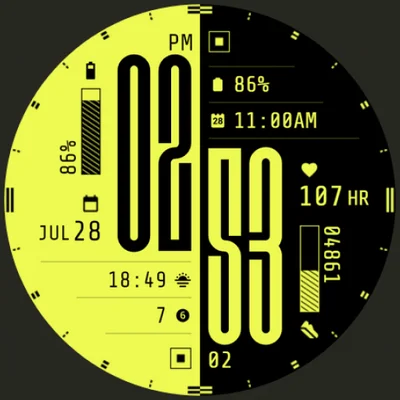
Un cadran de montre numérique informatif et personnalisable pour les appareils Wear OS
Un cadran numérique informatif et personnalisable pour les montres connectées Wear OS de Google.
CARACTÉRISTIQUES :
- 30 couleurs disponibles, dont 8 avec un fond noir.
- Compatible avec les formats 12 h et 24 h.
- Possibilité de masquer le cadre.
- Podomètre et compteur de fréquence cardiaque.
- 2 modes d'affichage permanent : informatif et simple.
- 4 complications personnalisables.
- 2 raccourcis d'applications personnalisables.
Achat et installation du cadran :
Lors de l'achat et de l'installation du cadran, assurez-vous que votre montre est bien sélectionnée. L'installation de l'application mobile n'est pas nécessaire ; le cadran fonctionnera correctement sans application.
Utilisation du cadran :
1- Appuyez longuement sur l'écran de votre montre.
2- Faites glisser votre doigt vers la droite pour afficher tous les cadrans.
3- Appuyez sur « + » et sélectionnez le cadran installé dans la liste.
*Note importante pour les utilisateurs de Pixel Watch :
Un problème d'affichage sur la Pixel Watch peut parfois entraîner le blocage des compteurs de pas, de fréquence cardiaque et de batterie, notamment après la personnalisation du cadran. Pour résoudre ce problème, essayez de changer de cadran, puis de revenir au cadran initial.
Vous rencontrez des difficultés ou avez besoin d'aide ? Nous sommes là pour vous ! Envoyez-nous un e-mail à l'adresse dev.tinykitchenstudios@gmail.com
Afficher le texte d’origine
An informative, customizable digital watch face for Google's Wear OS Smart Watches.
FEATURES:
- 30 color options, 8 of which has true black background.
- Compatible with 12 hours and 24 hours modes.
- Ability to hide the frame
- Steps and heart rate counters
- 2 AOD modes: informative and simple
- 4 customizable complications.
- 2 customizable app shortcuts.
Purchasing and Installing the watch face:
During watch face purchase and installation, keep your watch selected. You can skip installing the phone app - the watch face should work just fine on its own.
Using the watch face:
1- Tap and hold on your watch display.
2- Swipe all watch faces to the right
3- Tap "+" and find the installed watch face in this list.
*Important note for pixel watch users:
There's a pixel watch rendering issue that sometimes causes the steps, heart rate, and battery counters to freeze specifically after you customize the watch face on your pixel watch. this can be fixed by switching to a different watch face and then back to this one.
Run into any issues or need a hand? We're happy to help! Just send us an email at dev.tinykitchenstudios@gmail.com
Sécurité des données
Ce que Tiny Kitchen Studios déclare sur Google Play au sujet des données que cette application collecte et partage.
- Aucune donnée partagée avec des tiersEn savoir plus sur la manière dont les développeurs déclarent le partage
- Aucune donnée collectéeEn savoir plus sur la manière dont les développeurs déclarent la collecte
Nouveautés
06/09/2026
Target SDK Update
Coordonnées du développeur
- Site webinstagram.com
- E-maildev.tinykitchenstudios@gmail.com
- Politique de confidentialitésites.google.com
- AdresseAl Jandaweel, An Nubough street, 4, 5 Amman 11817 Jordan
Informations
- Proposée par
- Tiny Kitchen Studios
- Catégorie
- Personnalisation
- Mis à jour
- 06/09/2026
- Publié
- 30/07/2024
- Classification d’âge
- PEGI 3
- Prix
- 1,59 €
- Nom du package
- com.tks.split