Vectora Axis Watch Face
Pars Watch Faces- PEGI 3Classification d’âge
- PersonnalisationCatégorie
- 05/10/2026Mis à jour
- 0,99 €Prix
Renvoie vers la fiche Google Play officielle de com.watchfacestudio.vectoraaxis. Dernière vérification le 13/11/2026.
À propos de cette application
Traduction automatique par Google. Langue d’origine : Anglais (États-Unis).
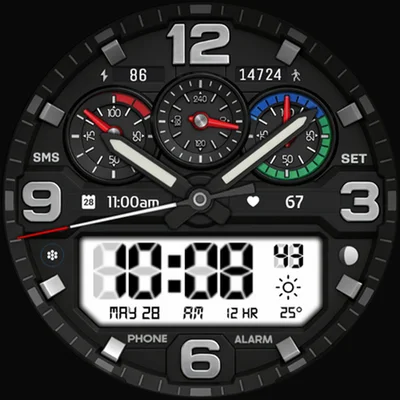
Cadran hybride lumineux, météo, fréquence cardiaque, podomètre et niveau de batterie
Conçu pour Wear OS, ce cadran hybride allie l'élégance analogique classique aux données numériques essentielles, vous offrant un accès instantané à l'essentiel.
🔥 Fonctionnalités clés :
🎨 25 couleurs de fond éclatantes
⚙️ 2 complications personnalisées
⌚ Design hybride
🌤 Informations météo
🔋 Pourcentage de batterie
👣 Podomètre
❤️ Moniteur de fréquence cardiaque
Le cadran Vectora Axis est compatible avec toutes les montres utilisant Wear OS SDK 34 et API 34+.
REMARQUE IMPORTANTE : L'application associée installée sur votre téléphone est uniquement informative. Le cadran sera automatiquement installé sur votre montre. Il vous suffit d'activer l'option « Toujours définir le cadran » dans les paramètres de l'application Play Store sur votre montre. Le cadran apparaîtra alors automatiquement sur votre écran d'accueil. Pour plus d'informations, veuillez consulter le lien ci-dessous.
https://www.parswatchfaces.com/set/
REMARQUE IMPORTANTE : Sur certains modèles et marques de montres, certaines fonctions spécifiques aux montres Samsung Galaxy peuvent ne pas être disponibles.
* Veuillez consulter les images du cadran pour plus d'informations.
REMARQUES :
- Assurez-vous d'avoir autorisé l'accès aux capteurs.
- Objectif de pas : 10 000.
- L'activation du podomètre en cliquant dessus peut ne pas fonctionner sur certains modèles de montres autres que les montres Samsung.
- Ce cadran est compatible avec les Samsung Galaxy Watch 4, 5, 6, 7, Pixel Watch, etc. Il prend en charge tous les appareils Wear OS avec un niveau d'API supérieur à 30.
INSTRUCTIONS D'INSTALLATION :
1 - Assurez-vous que la montre est correctement connectée à votre téléphone.
L'application Téléphone sert uniquement d'interface pour faciliter la configuration et la recherche du cadran sur votre montre Wear OS.
PS : Si vous rencontrez un problème lors du paiement, ne vous inquiétez pas, un seul paiement sera effectué même si une seconde demande vous est faite. Patientez 5 minutes ou redémarrez votre montre et réessayez.
Il peut y avoir un problème de synchronisation entre votre appareil et les serveurs Google.
ou
2 - Vous pouvez également essayer d'installer le cadran depuis le navigateur web de votre ordinateur.
PS : Le développeur n'a aucun contrôle sur l'installation du cadran.
Avant de laisser un commentaire négatif ou d'attribuer une note d'une étoile, veuillez lire attentivement le guide d'installation (lien ci-dessous) et nous contacter par e-mail en cas de problème.
https://www.parswatchfaces.com/installation-guide/
REMARQUE : Si le message « Vos appareils ne sont pas compatibles » s'affiche au lieu de l'application sur votre téléphone, veuillez utiliser le Play Store dans un navigateur web sur votre ordinateur.
AVIS IMPORTANT :
Après l'installation, le cadran peut afficher le dernier résultat de votre mesure de fréquence cardiaque, mais ce n'est pas obligatoire.
Le cadran ne mesure pas et n'affiche pas automatiquement votre fréquence cardiaque.
Pour consulter votre fréquence cardiaque actuelle, vous devez effectuer une mesure manuelle.
Pour ce faire, restez immobile, patientez quelques minutes, puis appuyez sur la zone d'affichage de la fréquence cardiaque.
Attendez quelques secondes. Le cadran effectuera la mesure et affichera le résultat.
Répétez cette opération chaque fois que vous souhaitez consulter votre fréquence cardiaque.
CATALOGUE DE CADRANS DE MONTRE
https://play.google.com/store/apps/dev?id=7655501335678734997
SUIVEZ-NOUS :
FACEBOOK
https://www.facebook.com/profile.php?id=100078915463662
INSTAGRAM
https://www.instagram.com/parswf/
TELEGRAM
https://t.me/parswatchfaces
Pour toute question, veuillez me contacter à l'adresse suivante : info@parswatchfaces.com
Je vous serais très reconnaissant de bien vouloir noter et commenter l'application sur la boutique.
Merci.
Afficher le texte d’origine
Built for Wear OS, this hybrid design blends classic analog elegance with essential digital performance metrics — giving you instant access to what truly matters.
🔥 Key Features:
🎨 25 Vivid Background Colors
⚙️ 2 Custom Complication
⌚ Hybrid Design
🌤 Weather Information
🔋 Battery Percentage
👣 Step Counter
❤️ Heart Rate Monitor
Vectora Axis Watch Face is compatible with all watches using Wear OS SDK 34 and Api 34+.
IMPORTANT NOTE: The companion application installed on your phone is for informational purposes only. The watch face will be automatically installed on your watch. All you need to do is activate the Always Set Watch Face section from the settings menu in the Play Store application on your watch. This will automatically bring the watch face to your home screen. For more information, please check the link below.
https://www.parswatchfaces.com/set/
PLEASE NOTE: In some watch brands and models, functions specific to Samsung Galaxy series watches may not work.
* Please check the pictures of the watch face for more information.
NOTES:
- Make sure you have allowed the access sensors.
- Step target set to 10k.
- Turning on the pedometer by clicking on the Pedometer text may not work on some watch models other than Samsung watch models.
- This watch face is compatible with Samsung Galaxy Watch 4,Watch 5, Watch 6, Watch 7, Pixel Watch etc.It supports all Wear OS devices with API Level 30+.
ISTALLING NOTES:
1 - Make sure the watch is properly connected to the phone.
The Phone app just acts as a placeholder to make it easy to set up and find the watch face on your Wear OS watch
PS: If you get stuck in the payment cycle, don't worry, only one payment will be made even if you are asked to pay a second time. Wait 5 minutes or restart your watch and try again.
There may be a synchronization issue between your device and Google servers.
or
2 - Alternatively, try to install the watch face from the web browser on your PC.
PS: While installing the watch face, the developer has no any control about the installation.
Before writing a negative comment or giving 1 star rating please read the Installation Guide carefully in the link below and please contact us via e-mail if you get any other problem.
https://www.parswatchfaces.com/installation-guide/
NOTE :If you get the message "Your devices are not compatible" instead of app on phone, please use Play Store in WEB browser from PC or Laptop.
IMPORTANT NOTICE :
After installation, the watch face can load the last heart rate measurement result, but it doesn't have to.
The watch face does not automatically measure and does not automatically display the heart rate result.
To view your current heart rate score, you'll need to take a manual measurement.
To do this, sit still, wait a few minutes and click on the heart rate display area.
Wait a few seconds. The watch face will take a measurement and display the current result.
Do this whenever you want to see your current heart rate.
MY WATCH FACES CATALOG
https://play.google.com/store/apps/dev?id=7655501335678734997
FOLLOW US :
FACEBOOK
https://www.facebook.com/profile.php?id=100078915463662
INSTAGRAM
https://www.instagram.com/parswf/
TELEGRAM
https://t.me/parswatchfaces
if you have any question, please contact with me: info@parswatchfaces.com
I would be very grateful for the rate and review in the Store.
Thanks.
Sécurité des données
Ce que Pars Watch Faces déclare sur Google Play au sujet des données que cette application collecte et partage.
- Aucune donnée partagée avec des tiersEn savoir plus sur la manière dont les développeurs déclarent le partage
- Aucune donnée collectéeEn savoir plus sur la manière dont les développeurs déclarent la collecte
Nouveautés
05/10/2026
First Release
Coordonnées du développeur
- Site webparswatchfaces.com
- E-mailparswatchfaces@gmail.com
- Politique de confidentialitéparswatchfaces.com
- AdresseEsentepe Mah.Tuna Caddesi̇.Di̇nlendi̇ Sok. İçsezgi̇ Apt.K:3 D:8, 16120 Nilüfer/Bursa Türkiye
Informations
- Proposée par
- Pars Watch Faces
- Catégorie
- Personnalisation
- Mis à jour
- 05/10/2026
- Publié
- 16/07/2026
- Classification d’âge
- PEGI 3
- Prix
- 0,99 €
- Nom du package
- com.watchfacestudio.vectoraaxis