Watchface for Juggluco
Jaap Korthals Altes- PEGI 3Classification d’âge
- OutilsCatégorie
- 28/03/2026Mis à jour
- GratuitPrix
Renvoie vers la fiche Google Play officielle de tk.glucodata.watchfacepush.watchface2. Dernière vérification le 24/11/2026.
À propos de cette application
Traduction automatique par Google. Langue d’origine : Anglais (États-Unis).
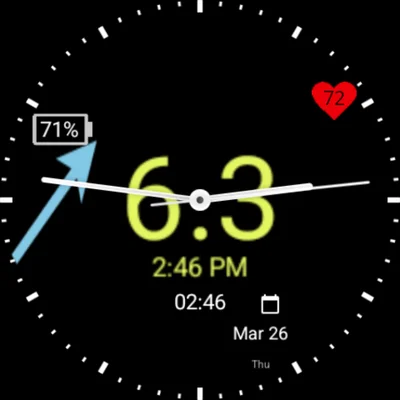
Cadran de montre analogique avec affichage de la fréquence cardiaque, du niveau de batterie et 8 emplacements pour complications.
Le cadran affiche toujours les aiguilles d'une montre analogique, ainsi qu'un affichage numérique plus petit indiquant l'heure, la fréquence cardiaque et le niveau de batterie.
Les emplacements de complications présentent les caractéristiques suivantes :
• Ils permettent d'afficher tous types de complications.
• Un emplacement de complication en arrière-plan occupe tout l'écran.
• Un autre emplacement de complication est situé au centre de l'écran.
Ce cadran a été initialement développé comme alternative à celui de l'application Juggluco : https://play.google.com/store/apps/details?id=tk.glucodata. Sur les montres Wear OS récentes, les cadrans qui ne sont pas au format « Watch Face » ne fonctionnent plus et ne peuvent plus être téléchargés ni mis à jour sur Google Play. De plus, les cadrans doivent être installés dans des applications distinctes.
Désormais, les données spécifiques à une application ne peuvent être affichées sur un cadran que via les complications.
Ce cadran visait à recréer les possibilités offertes par le cadran original. Le cadran de montre numérique suivant remplit parfaitement cette fonction : https://play.google.com/store/apps/details?id=tk.glucodata.watchfacepush.watchface3
Afficher le texte d’origine
The watch face always contains the hands of the analog watch face and also a smaller digital display of the time and the heart rate and battery level.
The complication slots have the following special features:
• They allow all kind of complications
• One background complication slot takes in the whole display
• Another complication slot is in the middle of the display
Originally it was developed as an alternative to the watch face contained in the Juggluco app: https://play.google.com/store/apps/details?id=tk.glucodata
On newer Wear OS watches, watch faces that are not in Watch Face Format do no longer work, and now they can also no longer be uploaded or updated on Google Play. Also watch faces should be in separate apps.
The only way app specific data can be displayed in a watch face is now in complications.
This watch face was an attempt to approach what was possible in the original watch face. The following digital watch face has fully achieved this: https://play.google.com/store/apps/details?id=tk.glucodata.watchfacepush.watchface3
Sécurité des données
Ce que Jaap Korthals Altes déclare sur Google Play au sujet des données que cette application collecte et partage.
- Aucune donnée partagée avec des tiersEn savoir plus sur la manière dont les développeurs déclarent le partage
- Aucune donnée collectéeEn savoir plus sur la manière dont les développeurs déclarent la collecte
Nouveautés
Version 0.0.1 · 28/03/2026
First release
Coordonnées du développeur
- Site webgithub.com
- E-mailjaapkorthalsaltes@gmail.com
- Politique de confidentialitéjuggluco.nl
- AdresseNetherlands
Informations
- Proposée par
- Jaap Korthals Altes
- Catégorie
- Outils
- Version
- 0.0.1
- Mis à jour
- 28/03/2026
- Publié
- 28/03/2026
- Classification d’âge
- PEGI 3
- Prix
- Gratuit
- Nom du package
- tk.glucodata.watchfacepush.watchface2