Billable Timer: Time Tracker
Easily Capture Your Time
Conçue pour iPhone, iPad
5,99 €
- Classification d’âge4+
- CatégorieÉconomie et entreprise
- DéveloppeurLMWA HOLDINGS LLC
- LanguesAnglais
- Taille74,4 Mo
Renvoie vers la page App Store officielle
Download.org n’héberge aucun fichier de Billable Timer: Time Tracker. Le bouton ouvre la page de l’application sur App Store, où LMWA HOLDINGS LLC la publie. Fiche vérifiée pour la dernière fois le 12/11/2026.
Captures d’écran
À propos
Le développeur n’a pas fourni ce texte dans votre langue.
Designed for professionals who bill by the hour, this app helps lawyers, accountants, consultants, engineers, architects, and other professionals easily capture their time. Clear elapsed-time displays and billable decimals help you keep an accurate record while the details are still fresh.
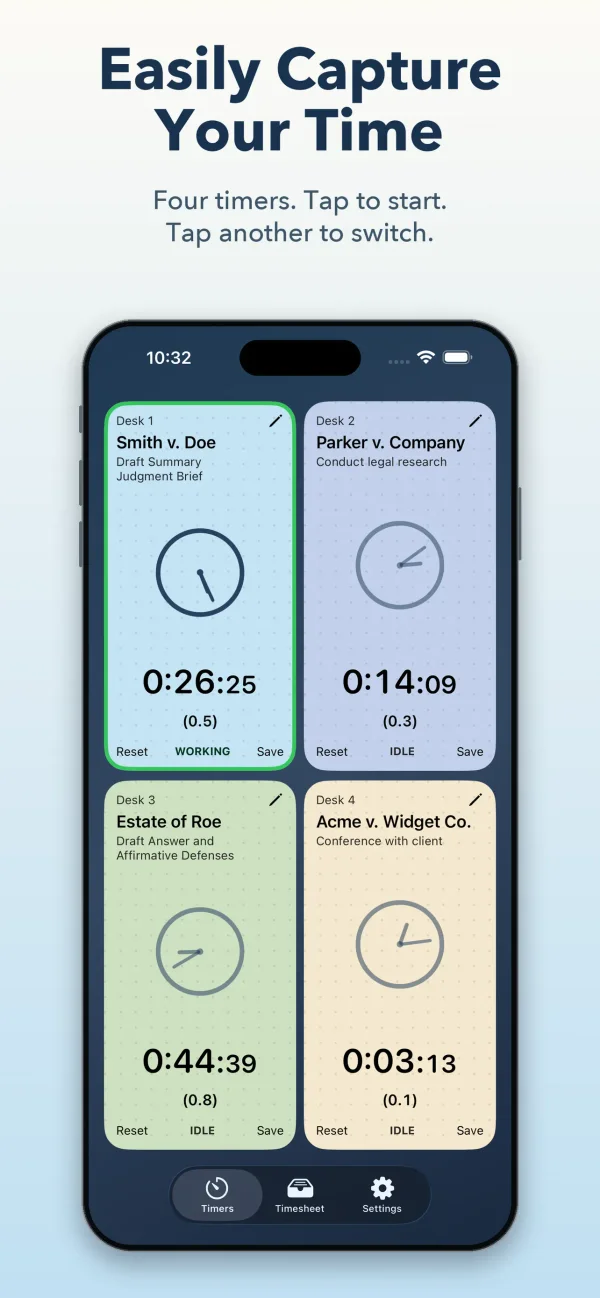
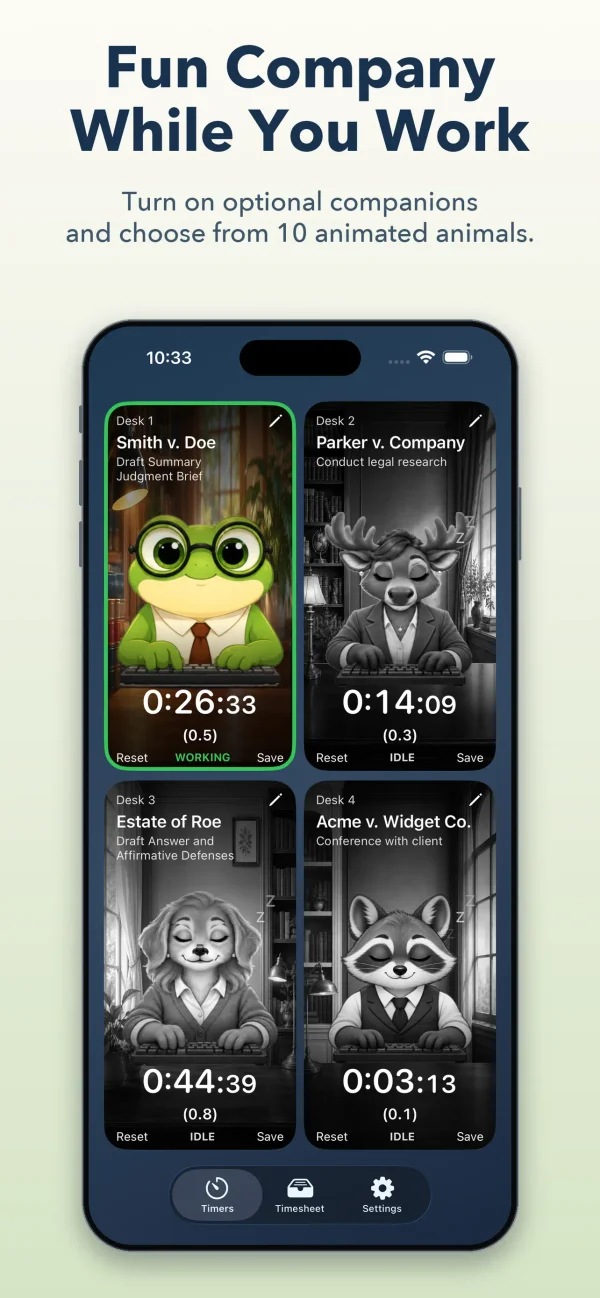
Billable Timer keeps four timers in view so you can capture your work as it happens. Start, pause, or switch assignments with one tap, then save your time to a daily Timesheet for export to your actual billing system.
Case Study: Imagine that you are drafting a lengthy work product when a client calls. Forty minutes later, you are interrupted by an urgent assignment. Five minutes later, you are interrupted by a phone call. You started timing the original assignment, but now you're left reconstructing which minutes belong to which project. With Billable Timer, all you would have to do is tap another timer when the interrupting assignments begin. Your previous timer pauses automatically, and the new timer begins. Return to the first assignment when you're ready with one tap. Each assignment keeps its own time, so switching tasks is incredibly easy.
FOUR TIMERS, ONE CLEAR VIEW
• Keep up to four assignments visible simultaneously, each with its own work name, task, and elapsed time. Only one timer runs at a time, so you will never forget to pause an existing timer when switching assignments. Move time to and from your timesheet very easily.
BILLABLE TIME WITHOUT THE MENTAL MATH
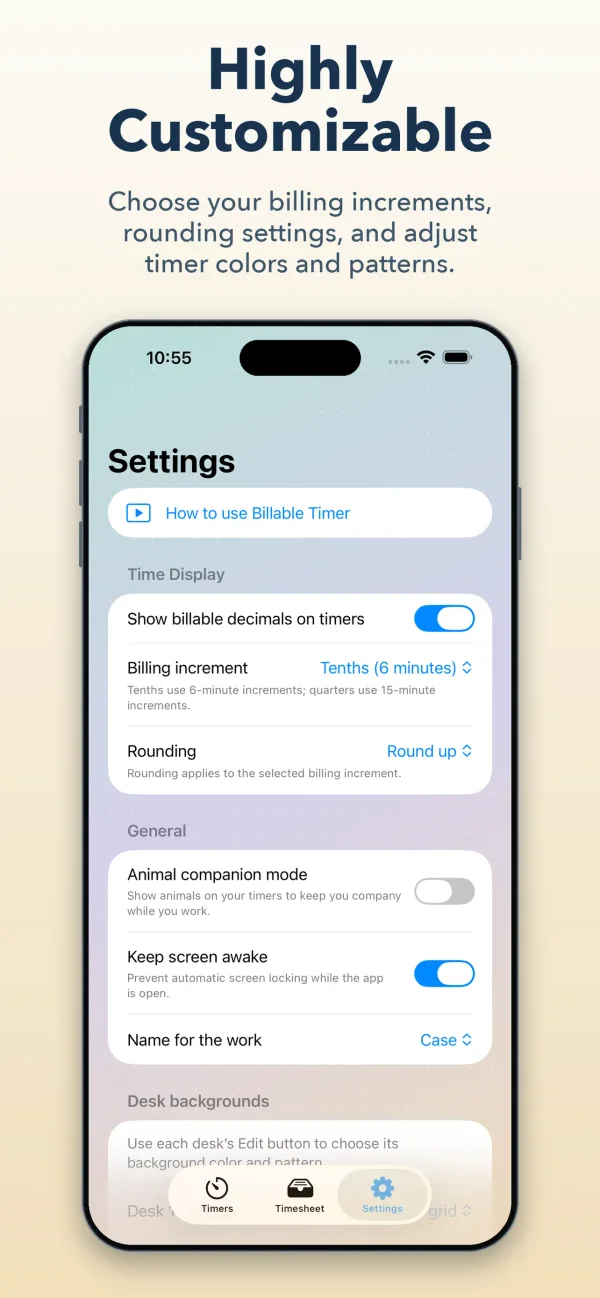
• View hours, minutes, and seconds alongside their billable equivalent. Choose tenths of an hour or quarter-hour increments, then round up, down, or to the nearest increment to match your billing practice. You can also hide the decimals if you want.
SAVE YOUR TIME AND PICK UP LATER
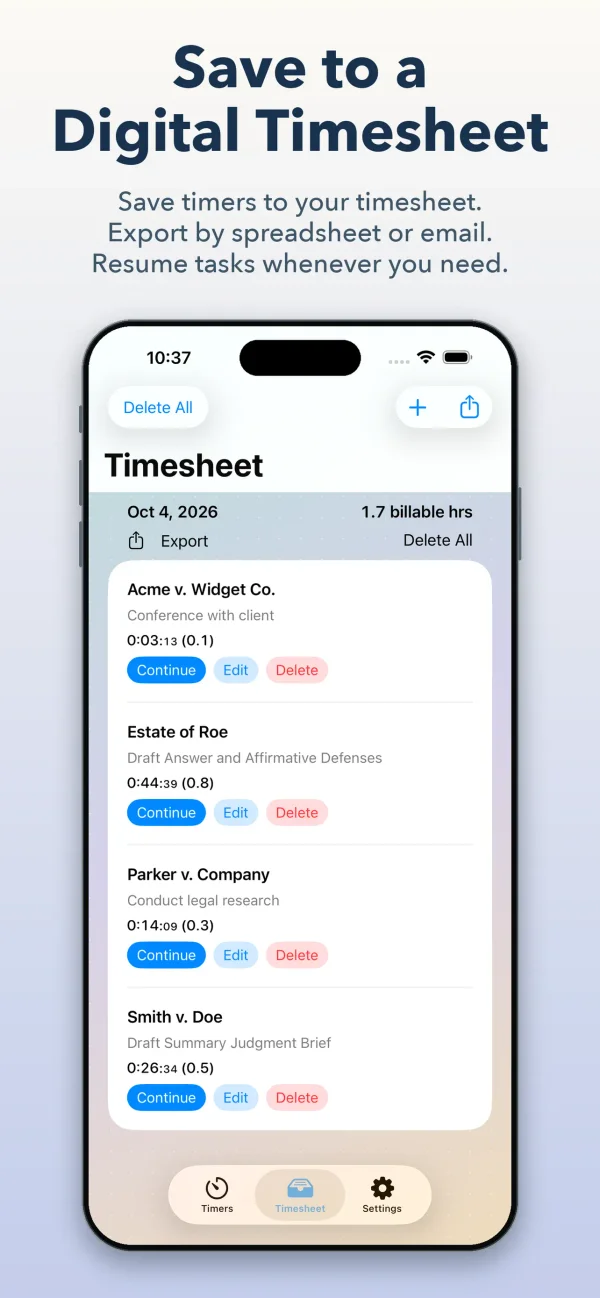
• Save a timer to your Timesheet to free it for another assignment. Entries are grouped by date, with daily billable-hour totals that make reviewing your work easier. Restore a saved entry to an empty timer if you need to continue an existing timesheet entry.
FILL IN THE GAPS
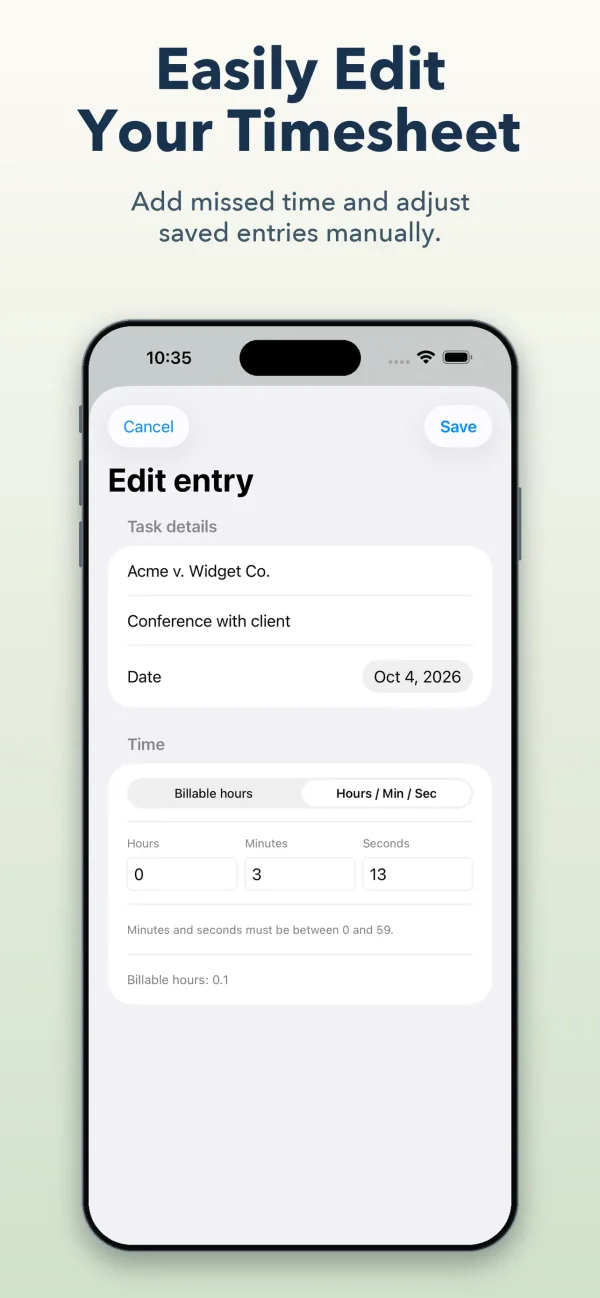
• Forgot to start a timer? Add a manual entry using billable hours or elapsed time. Correct the date, work name, task, or duration of an existing entry before exporting. Separate hours, minutes, and seconds fields make adjustments straightforward. Remove individual entries, a day's entries, or the full Timesheet when you need to clear it.
BRING YOUR RECORDS INTO YOUR BILLING WORKFLOW
• Export a single day or your full Timesheet as a spreadsheet-friendly CSV. You can also share them as plain text through email, Messages, and other compatible apps, making it easy to send your records to your work computer. Exports include the date, work name, task, elapsed time when recorded, and billable time. This makes it easy to enter your captured time into your official billing system.
MAKE YOUR TIMERS EASY TO RECOGNIZE
• Choose Case, Matter, File, Project, Client, or Job to match the language of your work. Give each timer its own background color and choose from five patterns or a solid background. Distinct appearances help you find the right assignment at a glance.
ADD A LITTLE FUN COMPANY
• Work can get lonely, so turn on the optional "Animal Companion" mode to bring illustrated offices and fun animated animals to your timers. They type while you work, sleep when paused, and occasionally do something unexpected. Choose from ten animals with two styles each to give your workday a little personality. Animals include: frog, raccoon, owl, fox, bunny, moose, dog, cat, bear, and lizard.
KEEP YOUR PLACE BETWEEN SESSIONS
• Saved entries and timer state stay on your device between launches. A running timer accounts for elapsed time while the app is closed or when you take a phone call, so reopening it preserves your place. You can keep the screen awake to leave your timers visible while you work or allow automatic locking in Settings.
***NO IN-APP PURCHASES REQUIRED! ALL FEATURES ARE INCLUDED IN THE PRICE OF THE APP!***
Nouveautés
Version 1.1 · 07/10/2026
Minor cosmetic improvements to app layout for iPads in horizontal mode.
Confidentialité de l’application
Ce que LMWA HOLDINGS LLC déclare sur l’App Store au sujet du traitement des données par cette application.
-
Données non collectées
Le développeur ne collecte aucune donnée à partir de cette application.
Les pratiques en matière de confidentialité peuvent varier, notamment en fonction des fonctionnalités que vous utilisez ou de votre âge.
Informations
- Vendeur
- LMWA HOLDINGS LLC
- Catégorie
- Économie et entreprise
- Version
- 1.1
- Mis à jour
- 07/10/2026
- Publié
- 24/09/2026
- Taille
- 74,4 Mo
- Nécessite
- iOS 26.5 ou version ultérieure
- Classification d’âge
- 4+
- Prix
- 5,99 €
- Langues
- Anglais
- Copyright
- © 2026 LMWA HOLDINGS LLC
Vous aimerez peut-être aussi
-
 HexishqFinance
-
 onTrack: Billable HoursProductivité
-
 LocalScribe: Audio to TextProductivité
-
 VirtualDrive : Stockage CloudSauvegarde photo · 20 Go
-
 Billable Time TrackerÉconomie et entreprise
-
 UniClip - Clipboard SyncProductivité
-
 42 PDF Editor: Sign & AnnotateProductivité
-
 SaveIt - Liens, notes, favorisSignets à lire plus tard
-
 Squirrel - Expense TrackerFinance
-
 HueTodo - Minimalist ChecklistProductivité